Book a Free Strategy Call
Skip the read: talk to Walid in 30 min.
Free strategy call. We map your AI engineering team, you keep the notes.
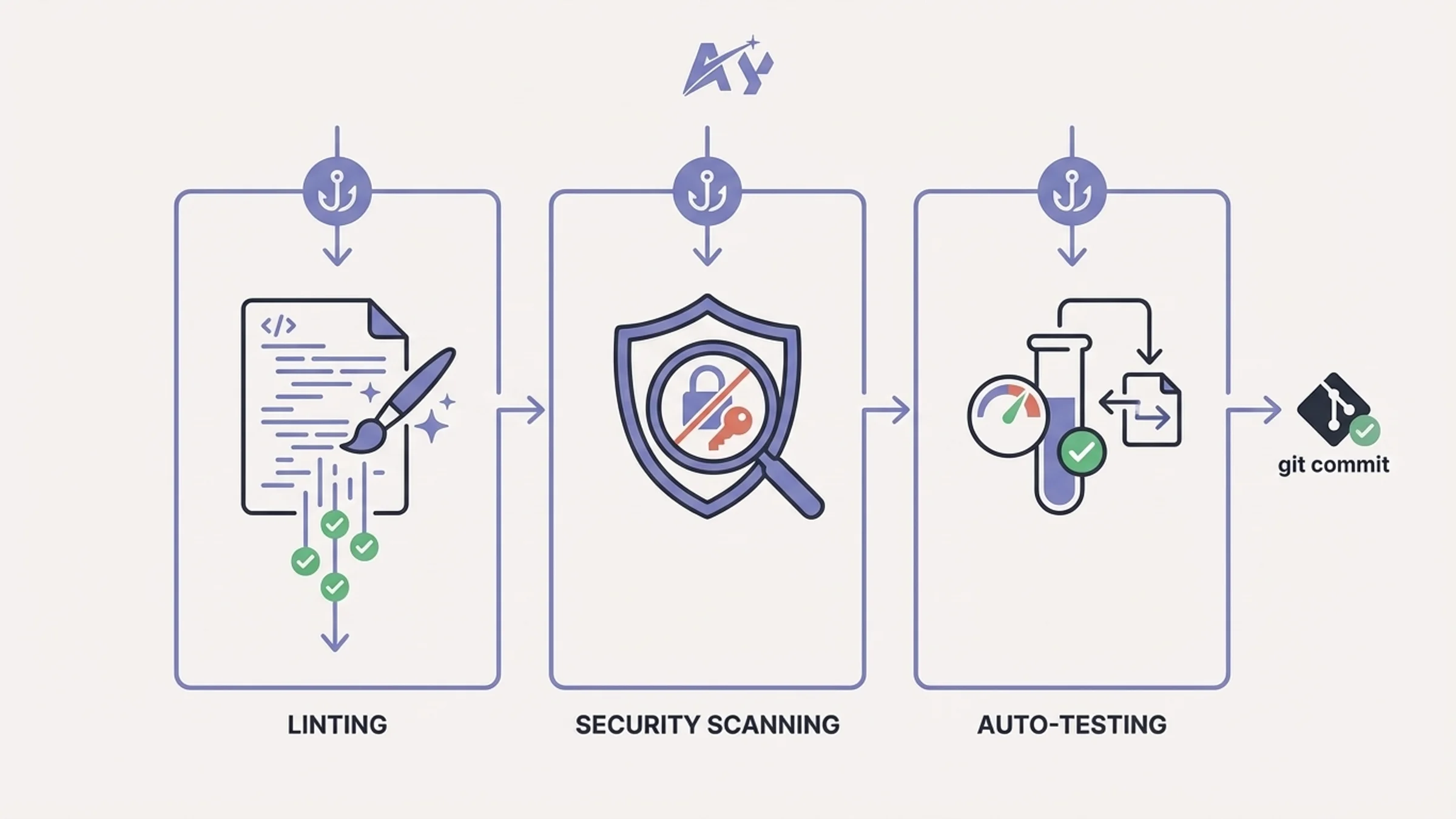
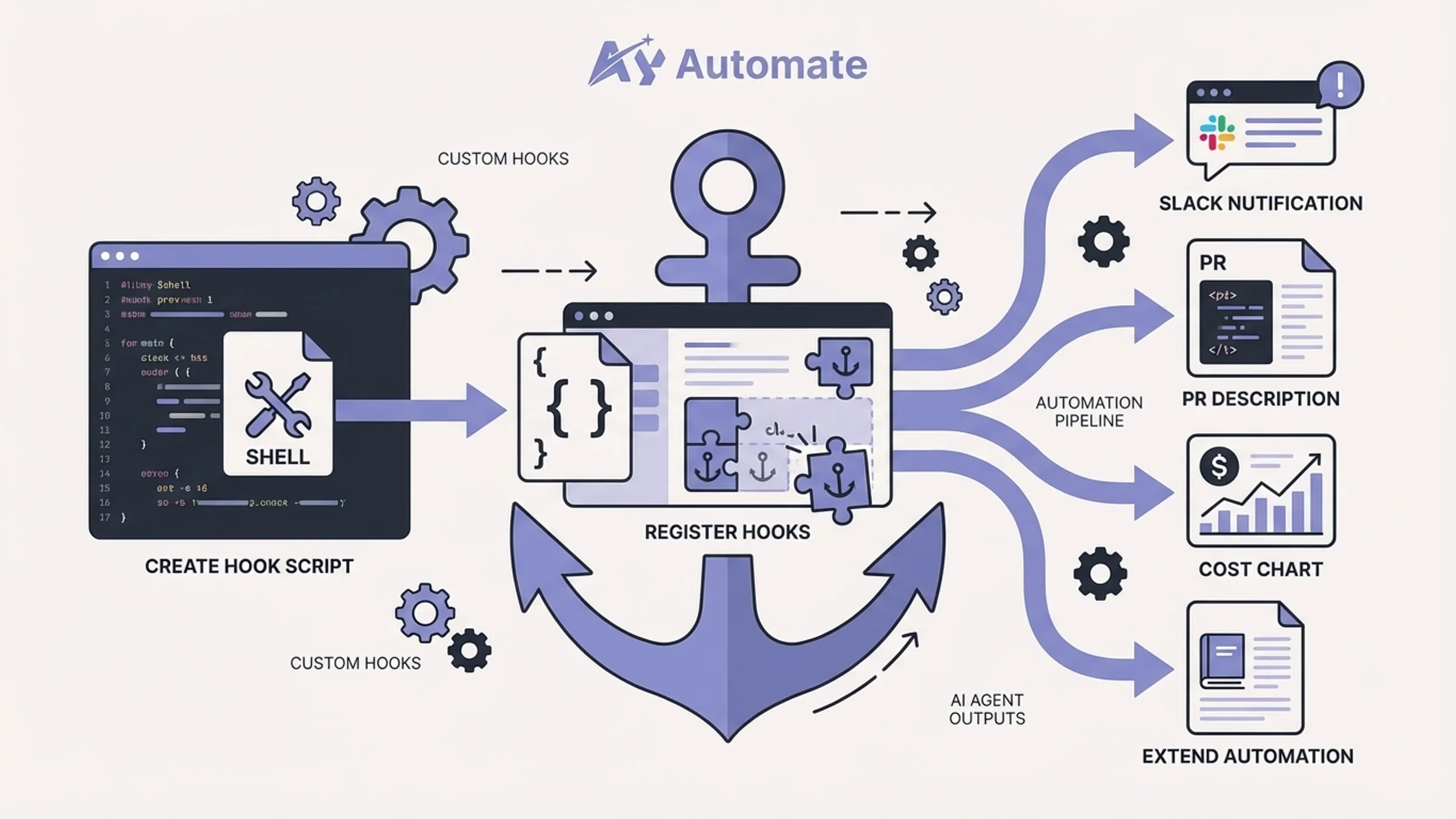
The 12 most useful Claude Code hooks: pre-commit linting to catch format errors before every commit, auto-test runner to verify changes instantly, security scanner to block secrets from reaching your repo, notification hook to alert on task completion, a Stop gate that keeps Claude working while tests fail, and 7 more with exact settings.json configs.
Claude Code hooks are shell commands that fire automatically at specific points in Claude Code's lifecycle. They sit between you and the AI agent, intercepting tool calls, validating outputs, and enforcing rules without relying on prompt instructions that the model might ignore. Unlike skills or custom commands, hooks are deterministic. They run every single time, regardless of how you phrase your prompt or what the model decides to do.
This guide covers the 12 most useful Claude Code hooks you can add to your workflow today. Each one includes the exact settings.json configuration, a practical example, and guidance on when it makes sense to use it. It is a ranked shortlist with the reasoning behind each pick. If you want more copy-paste variants instead, our 15 Claude Code hook examples post goes wider.
Best Claude Code hooks: quick recommendations
If you want code quality guardrails:
- Start with the pre-commit linting hook to catch formatting issues before every commit
- Add the auto-test runner to verify nothing breaks after code changes
- Layer on the security scanner hook to block secrets from reaching your repository
If you want workflow automation:
- Use the PR description generator to auto-create pull request summaries on push
- Add the documentation updater to keep docs in sync with code changes
- Set up the notification hook to alert your team on key events
If you want visibility and control:
- Deploy the cost tracker hook to monitor token usage across sessions
- Add the dependency checker to catch outdated or vulnerable packages
- Use the code review enforcer to protect critical files from unreviewed changes
If you run long, hands-off sessions:
- Add the Stop test gate so Claude cannot end its turn while tests fail
- Use the compaction context re-injector to restore branch and task state after the context gets summarized
| Hook | Trigger | What it does | Difficulty |
|---|---|---|---|
| Pre-commit linting | PreToolUse (Bash) | Runs ESLint/Prettier before commits | Easy |
| Auto-test runner | PostToolUse (Edit/Write) | Runs tests after code changes | Easy |
| Security scanner | PreToolUse (Bash) | Blocks secrets and vulnerabilities | Medium |
| PR description generator | PostToolUse (Bash) | Generates PR descriptions on push | Medium |
| Code review enforcer | PreToolUse (Edit/Write) | Blocks changes to critical files | Easy |
| Dependency checker | SessionStart | Alerts on outdated dependencies | Easy |
| Documentation updater | PostToolUse (Edit/Write) | Triggers doc regeneration on changes | Medium |
| Notification hook | Notification | Sends alerts to Slack or Discord | Medium |
| Cost tracker | Stop | Logs and alerts on token usage | Advanced |
| Stop test gate | Stop | Keeps Claude working while tests fail | Medium |
| Compaction context re-injector | SessionStart (compact) | Restores branch and task state after compaction | Easy |
| Custom validation | PreToolUse | Your own validation logic | Advanced |
How Claude Code hooks work
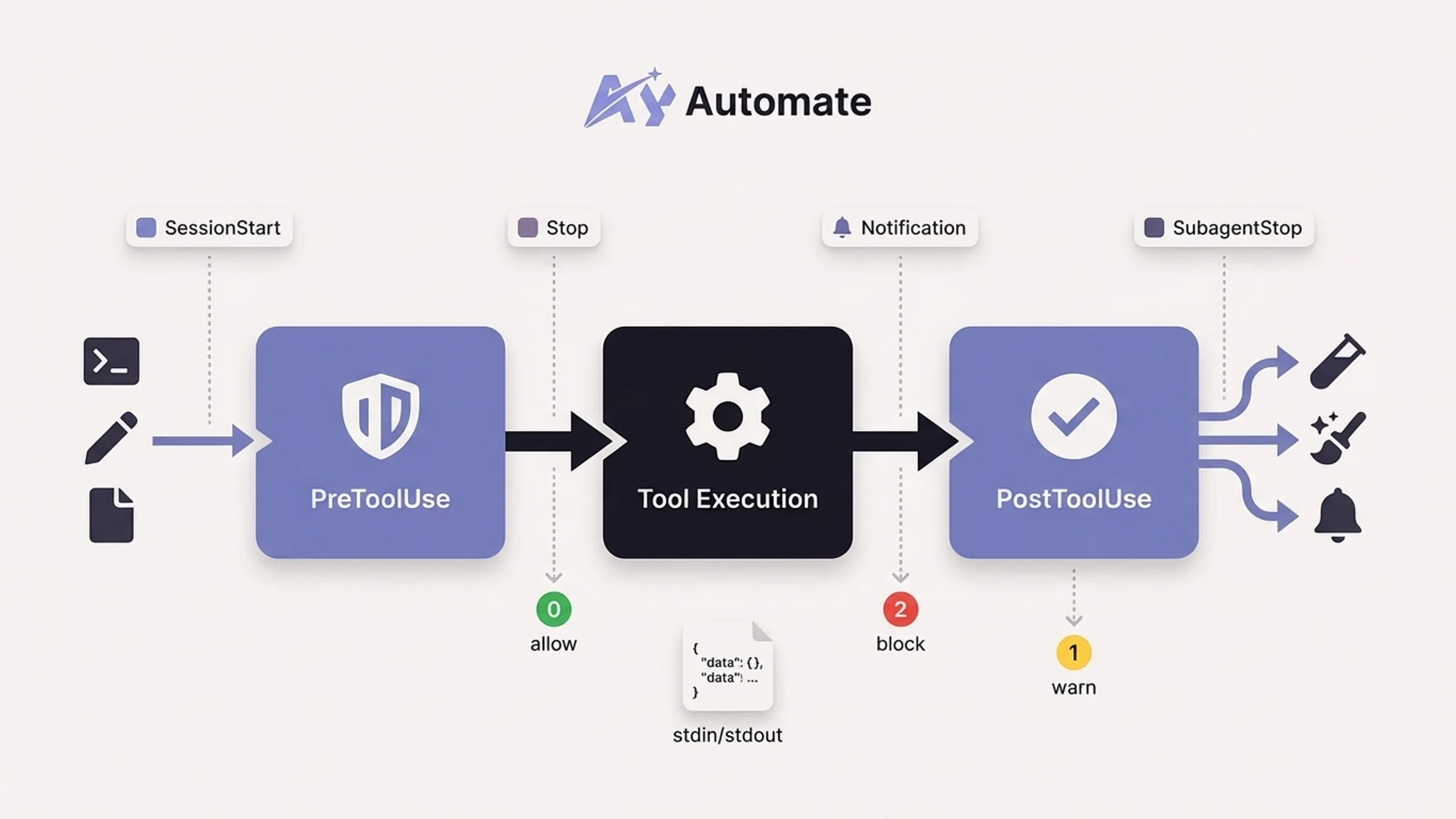
Claude Code hooks operate through lifecycle events. When Claude Code performs an action, such as running a shell command, editing a file, or finishing a response, it fires an event. Your hook listens for that event and runs a shell command in response.
The core event types you will work with most often:
- PreToolUse: Fires before Claude executes a tool (Bash, Edit, Write, etc.). Your hook can allow, block, or modify the action.
- PostToolUse: Fires after a tool completes successfully. Useful for running formatters, tests, or validators on the result.
- SessionStart: Fires when Claude Code starts or resumes a session. Good for loading context, checking environment state, or setting variables.
- Stop: Fires when Claude finishes responding. Useful for logging, cleanup, or telling Claude to keep working.
- Notification: Fires when Claude generates a notification. Route alerts to Slack, Discord, or any webhook.
- SubagentStop: Fires when a subagent spawned via the Agent tool completes its task.
Every hook receives JSON data via stdin with session context and event-specific fields like tool_name, tool_input, and tool_response. Your hook communicates back through exit codes: 0 means allow/success, 2 means block on events that can block (PreToolUse, UserPromptSubmit and Stop among them), and any other non-zero code signals a non-blocking error.
Hooks are configured in two places:
~/.claude/settings.jsonfor global hooks that apply to every project.claude/settings.jsonfor project-specific hooks you can version-control and share with your team
If you do not yet have a .claude/ directory in your repo, the complete Claude Code setup guide covers creating both config files along with permissions, CLAUDE.md, and MCP servers from scratch.
The basic structure looks like this:
{
  "hooks": {
    "EventName": [
      {
        "matcher": "ToolNameRegex",
        "hooks": [
          {
            "type": "command",
            "command": "your-shell-command-here"
          }
        ]
      }
    ]
  }
}
The matcher field is a regex that filters which tools trigger the hook. For PreToolUse and PostToolUse events, it matches against the tool name (Bash, Edit, Write, etc.). Stop and UserPromptSubmit take no matcher. SessionStart matches on how the session started (startup, resume, clear, compact or fork), which entry 11 uses.
1. Pre-commit linting hook
What it does: Intercepts every git commit command Claude runs and executes ESLint and Prettier on staged files first. If linting fails, the commit is blocked and Claude receives the error output so it can fix the issues before retrying.
When to use it: On any project where you want consistent code formatting and style enforcement. This is the single most impactful hook for code quality because it catches issues at the exact moment they would enter your git history.
The hook configuration:
{
  "hooks": {
    "PreToolUse": [
      {
        "matcher": "Bash",
        "hooks": [
          {
            "type": "command",
            "command": "python3 -c \"import json, sys; d=json.load(sys.stdin); cmd=d.get('tool_input',{}).get('command',''); sys.exit(0) if 'git commit' not in cmd else None; import subprocess; r=subprocess.run(['npx', 'lint-staged'], capture_output=True, text=True, cwd=d['cwd']); sys.stderr.write(r.stdout + r.stderr) if r.returncode != 0 else None; sys.exit(2 if r.returncode != 0 else 0)\""
          }
        ]
      }
    ]
  }
}
Practical example:
For a simpler approach, create a script at .claude/hooks/pre-commit-lint.sh:
#!/bin/bash # .claude/hooks/pre-commit-lint.sh # Reads JSON from stdin to check if the command is a git commitINPUT=$(cat) COMMAND=$(echo "$INPUT" | python3 -c "import json,sys; print(json.load(sys.stdin).get('tool_input',{}).get('command',''))")
if echo "$COMMAND" | grep -q "git commit"; then CWD=$(echo "$INPUT" | python3 -c "import json,sys; print(json.load(sys.stdin).get('cwd','.'))") cd "$CWD"
Run ESLint on staged files
STAGED=$(git diff --cached --name-only --diff-filter=ACM | grep -E '.(js|ts|jsx|tsx)$') if [ -n "$STAGED" ]; then npx eslint $STAGED 2>&1 if [ $? -ne 0 ]; then echo "ESLint failed on staged files. Fix errors before committing." >&2 exit 2 fi
npx prettier --check $STAGED 2>&1 if [ $? -ne 0 ]; then echo "Prettier check failed. Run prettier --write on staged files." >&2 exit 2 fifi fi
exit 0
Then reference it in your settings:
{
  "hooks": {
    "PreToolUse": [
      {
        "matcher": "Bash",
        "hooks": [
          {
            "type": "command",
            "command": "bash .claude/hooks/pre-commit-lint.sh"
          }
        ]
      }
    ]
  }
}
This approach keeps your settings.json clean and makes the hook logic easy to test independently.
2. Auto-test runner hook
What it does: Runs your test suite automatically every time Claude edits or creates a file. If tests fail, Claude receives the failure output immediately and can fix the issue in the same turn rather than discovering it later.
When to use it: On projects with a solid test suite where you want TDD-style feedback loops. Pair this with the pre-commit linting hook for a workflow where Claude never commits code that fails tests or linting.
The hook configuration:
{
  "hooks": {
    "PostToolUse": [
      {
        "matcher": "Edit|Write",
        "hooks": [
          {
            "type": "command",
            "command": "bash .claude/hooks/auto-test.sh"
          }
        ]
      }
    ]
  }
}
Practical example:
Create .claude/hooks/auto-test.sh:
#!/bin/bash # .claude/hooks/auto-test.sh # Runs relevant tests after file changesINPUT=$(cat) FILE_PATH=$(echo "$INPUT" | python3 -c " import json, sys d = json.load(sys.stdin) tool_input = d.get('tool_input', {}) print(tool_input.get('file_path', tool_input.get('filePath', ''))) ")
Skip non-source files
if ! echo "$FILE_PATH" | grep -qE '.(ts|tsx|js|jsx|py)$'; then exit 0 fi
Skip test files themselves to avoid infinite loops
if echo "$FILE_PATH" | grep -qE '.(test|spec).(ts|tsx|js|jsx)$'; then exit 0 fi
CWD=$(echo "$INPUT" | python3 -c "import json,sys; print(json.load(sys.stdin).get('cwd','.'))") cd "$CWD"
Try to find a related test file
BASE_NAME=$(basename "$FILE_PATH" | sed 's/.[^.]$//') TEST_FILE=$(find . -name "${BASE_NAME}.test." -o -name "${BASE_NAME}.spec.*" 2>/dev/null | head -1)
if [ -n "$TEST_FILE" ]; then RESULT=$(npx jest "$TEST_FILE" --no-coverage 2>&1) else
Run the full suite if no specific test file found
RESULT=$(npx jest --no-coverage 2>&1) fi
Exit 2 on PostToolUse shows stderr to Claude (the edit already happened)
if [ $? -ne 0 ]; then echo "$RESULT" | tail -40 >&2 exit 2 fi
exit 0
For Python projects, swap npx jest for python -m pytest. For larger codebases, you may want to limit this to only run tests related to the changed file rather than the entire suite. The find logic above handles that by looking for a matching test file first. The script exits 2 on failure on purpose: for PostToolUse, Claude Code shows stderr to Claude only on exit 2, while output from a hook that exits 0 goes to the debug log.
3. Security scanner hook
What it does: Scans staged files for secrets, API keys, tokens, and common vulnerability patterns before Claude can commit them. If it finds anything suspicious, the commit is blocked and Claude is told exactly what was detected.
When to use it: On every project, no exceptions. Accidentally committing a .env file or an API key to a public repo is one of the most common and damaging mistakes in software development. This hook makes it structurally impossible.
The hook configuration:
{
  "hooks": {
    "PreToolUse": [
      {
        "matcher": "Bash",
        "hooks": [
          {
            "type": "command",
            "command": "bash .claude/hooks/security-scan.sh"
          }
        ]
      }
    ]
  }
}
Practical example:
Create .claude/hooks/security-scan.sh:
#!/bin/bash # .claude/hooks/security-scan.sh # Blocks commits containing secrets or sensitive filesINPUT=$(cat) COMMAND=$(echo "$INPUT" | python3 -c "import json,sys; print(json.load(sys.stdin).get('tool_input',{}).get('command',''))")
if ! echo "$COMMAND" | grep -q "git commit"; then exit 0 fi
CWD=$(echo "$INPUT" | python3 -c "import json,sys; print(json.load(sys.stdin).get('cwd','.'))") cd "$CWD"
STAGED=$(git diff --cached --name-only)
Block sensitive file patterns
BLOCKED_FILES=$(echo "$STAGED" | grep -E '.env$|.env.|credentials.json|.pem$|.key$|id_rsa') if [ -n "$BLOCKED_FILES" ]; then echo "BLOCKED: Attempting to commit sensitive files:" >&2 echo "$BLOCKED_FILES" >&2 exit 2 fi
Scan staged content for secret patterns
SECRETS=$(git diff --cached -U0 | grep -E '(AKIA[0-9A-Z]{16}|sk-[a-zA-Z0-9]{20,}|ghp_[a-zA-Z0-9]{36}|password\s*=\s*["\x27][^"\x27]{8,}|API_KEY\s*=\s*["\x27][^"\x27]+)') if [ -n "$SECRETS" ]; then echo "BLOCKED: Possible secrets detected in staged changes:" >&2 echo "$SECRETS" >&2 exit 2 fi
exit 0
For more thorough scanning, you can integrate tools like gitleaks or trufflehog into this hook instead of using grep patterns. The grep approach above catches the most common patterns (AWS keys, OpenAI keys, GitHub tokens, hardcoded passwords) without requiring additional dependencies. For teams running hooks like this in production, pairing them with an automation maintenance and support plan ensures your security scanning stays current as new secret patterns and vulnerability types emerge.
If you want defense in depth, add a second hook that blocks Claude from writing secrets into files in the first place:
{
  "hooks": {
    "PreToolUse": [
      {
        "matcher": "Edit|Write",
        "hooks": [
          {
            "type": "command",
            "command": "python3 -c \"import json,sys; d=json.load(sys.stdin); p=d.get('tool_input',{}).get('file_path',''); sys.exit(2 if any(x in p for x in ['.env','.pem','.key','credentials','id_rsa']) else 0)\""
          }
        ]
      }
    ]
  }
}
4. PR description generator hook
What it does: Detects when Claude pushes a branch and automatically generates a structured pull request description based on the diff and commit history. The description is written to a file that you can copy into your PR, or the hook can create the PR directly using the GitHub CLI.
When to use it: When you want consistent, well-structured PR descriptions without writing them manually. Especially useful on teams where PR descriptions tend to be either empty or a copy of the last commit message.
The hook configuration:
{
  "hooks": {
    "PostToolUse": [
      {
        "matcher": "Bash",
        "hooks": [
          {
            "type": "command",
            "command": "bash .claude/hooks/pr-description.sh"
          }
        ]
      }
    ]
  }
}
Practical example:
Create .claude/hooks/pr-description.sh:
#!/bin/bash
# .claude/hooks/pr-description.sh
# Generates a PR description after git push
INPUT=$(cat)
COMMAND=$(echo "$INPUT" | python3 -c "import json,sys; print(json.load(sys.stdin).get('tool_input',{}).get('command',''))")
if ! echo "$COMMAND" | grep -q "git push"; then
exit 0
fi
CWD=$(echo "$INPUT" | python3 -c "import json,sys; print(json.load(sys.stdin).get('cwd','.'))")
cd "$CWD"
BRANCH=$(git branch --show-current)
BASE="main"
Skip if we are on main
if [ "$BRANCH" = "$BASE" ] || [ "$BRANCH" = "master" ]; then
exit 0
fi
Gather context
COMMITS=$(git log "$BASE".."$BRANCH" --oneline 2>/dev/null)
DIFF_STAT=$(git diff "$BASE"..."$BRANCH" --stat 2>/dev/null)
FILES_CHANGED=$(git diff "$BASE"..."$BRANCH" --name-only 2>/dev/null)
Write PR description template
PR_FILE="$CWD/.claude/pr-description.md"
cat > "$PR_FILE" << PRDESC
Summary
Branch: $BRANCH
Commits: $(echo "$COMMITS" | wc -l | tr -d ' ')
Changes
$DIFF_STAT
Commits
$COMMITS
Files changed
$FILES_CHANGED
Related Reads
Test plan
- Verify all tests pass
- Manual smoke test of affected features PRDESC
echo "PR description generated at .claude/pr-description.md" >&2 exit 0
For teams using the GitHub CLI, you can replace the file-writing step with a direct gh pr create call. Just be careful with automation here: most teams prefer to review the description before creating the PR rather than having it created automatically.
5. Code review enforcer hook
What it does: Blocks Claude from modifying files in protected directories or matching protected patterns without explicit confirmation. Critical files like authentication logic, database migrations, CI/CD configs, and infrastructure code get an extra layer of protection.
When to use it: On any project where certain files carry outsized risk. A bug in your auth middleware or a bad database migration can take down production. This hook forces a pause before those files are touched.
The hook configuration:
{
  "hooks": {
    "PreToolUse": [
      {
        "matcher": "Edit|Write",
        "hooks": [
          {
            "type": "command",
            "command": "bash .claude/hooks/review-enforcer.sh"
          }
        ]
      }
    ]
  }
}
Practical example:
Create .claude/hooks/review-enforcer.sh:
#!/bin/bash # .claude/hooks/review-enforcer.sh # Blocks edits to critical files, sending the reason to ClaudeINPUT=$(cat) FILE_PATH=$(echo "$INPUT" | python3 -c " import json, sys d = json.load(sys.stdin) tool_input = d.get('tool_input', {}) print(tool_input.get('file_path', tool_input.get('filePath', ''))) ")
Define protected patterns
PROTECTED_PATTERNS=( "middleware.ts" "middleware.js" "prisma/migrations/" ".github/workflows/" "lib/auth" "lib/supabase" "Dockerfile" "docker-compose" ".env" )
for pattern in "${PROTECTED_PATTERNS[@]}"; do if echo "$FILE_PATH" | grep -q "$pattern"; then echo "BLOCKED: $FILE_PATH matches protected pattern '$pattern'. This file requires manual review before modification." >&2 exit 2 fi done
exit 0
When this hook blocks an edit, Claude receives the stderr message and can explain what it was trying to do. You can then decide whether to temporarily disable the hook, whitelist the specific change, or make the edit yourself. The key value is that Claude cannot silently modify critical infrastructure.
You can adapt the PROTECTED_PATTERNS array to match your project. For a Next.js app like the ones we build at AY Automate, protecting middleware.ts, auth libraries, and database migrations covers the highest-risk files. For a different stack, you might protect terraform/, k8s/, or nginx.conf.
6. Dependency checker hook
What it does: Runs an audit of your project dependencies when Claude starts a session. It checks for outdated packages, known vulnerabilities, and license issues, then surfaces the results as context that Claude can act on.
When to use it: On projects with many dependencies where you want early warning about security issues. The SessionStart trigger means you get this information at the beginning of every session without having to ask for it.
The hook configuration:
{
  "hooks": {
    "SessionStart": [
      {
        "hooks": [
          {
            "type": "command",
            "command": "bash .claude/hooks/dep-check.sh"
          }
        ]
      }
    ]
  }
}
Practical example:
Create .claude/hooks/dep-check.sh:
#!/bin/bash # .claude/hooks/dep-check.sh # Checks for vulnerable or outdated dependencies at session startINPUT=$(cat) CWD=$(echo "$INPUT" | python3 -c "import json,sys; print(json.load(sys.stdin).get('cwd','.'))") cd "$CWD"
OUTPUT=""
Node.js projects
if [ -f "package.json" ]; then AUDIT=$(npm audit --json 2>/dev/null) VULN_COUNT=$(echo "$AUDIT" | python3 -c " import json, sys try: d = json.load(sys.stdin) v = d.get('metadata', {}).get('vulnerabilities', {}) total = sum(v.values()) if isinstance(v, dict) else 0 print(total) except: print(0) ")
if [ "$VULN_COUNT" -gt 0 ]; then OUTPUT="$OUTPUT\nWARNING: $VULN_COUNT npm vulnerabilities found. Run 'npm audit' for details." fi
OUTDATED=$(npm outdated --json 2>/dev/null) OUTDATED_COUNT=$(echo "$OUTDATED" | python3 -c " import json, sys try: d = json.load(sys.stdin) print(len(d)) except: print(0) ")
if [ "$OUTDATED_COUNT" -gt 5 ]; then OUTPUT="$OUTPUT\nINFO: $OUTDATED_COUNT outdated npm packages. Consider updating." fi fi
Python projects
if [ -f "requirements.txt" ] || [ -f "pyproject.toml" ]; then if command -v pip-audit &>/dev/null; then PIP_AUDIT=$(pip-audit --format json 2>/dev/null) PIP_VULN=$(echo "$PIP_AUDIT" | python3 -c " import json, sys try: d = json.load(sys.stdin) print(len(d.get('dependencies', []))) except: print(0) ")
if [ "$PIP_VULN" -gt 0 ]; then OUTPUT="$OUTPUT\nWARNING: $PIP_VULN Python dependency vulnerabilities found." fifi fi
if [ -n "$OUTPUT" ]; then
SessionStart adds plain stdout to Claude's context
echo -e "$OUTPUT" fi
exit 0
This hook prints its warnings to stdout and exits 0. For SessionStart, Claude Code adds plain-text stdout to Claude's context, so Claude sees the warnings and the session still starts. Stderr from a hook that exits 0 only reaches the debug log. You want awareness, not a hard gate, since you would not want a session to fail just because a transitive dependency has a low-severity CVE.
7. Documentation updater hook
What it does: Watches for changes to source files and triggers documentation regeneration when relevant files are modified. It can update JSDoc comments, regenerate API docs, or flag that README sections are out of date.
When to use it: On projects where documentation drift is a recurring problem. If you maintain API documentation, changelogs, or inline docs, this hook keeps them synchronized with actual code changes.
The hook configuration:
{
  "hooks": {
    "PostToolUse": [
      {
        "matcher": "Edit|Write",
        "hooks": [
          {
            "type": "command",
            "command": "bash .claude/hooks/doc-updater.sh"
          }
        ]
      }
    ]
  }
}
Practical example:
Create .claude/hooks/doc-updater.sh:
#!/bin/bash # .claude/hooks/doc-updater.sh # Flags documentation that may need updating after code changesINPUT=$(cat) FILE_PATH=$(echo "$INPUT" | python3 -c " import json, sys d = json.load(sys.stdin) tool_input = d.get('tool_input', {}) print(tool_input.get('file_path', tool_input.get('filePath', ''))) ")
CWD=$(echo "$INPUT" | python3 -c "import json,sys; print(json.load(sys.stdin).get('cwd','.'))") cd "$CWD"
Map source directories to their documentation
declare -A DOC_MAP DOC_MAP["app/api/"]="docs/api/" DOC_MAP["lib/"]="docs/architecture/" DOC_MAP["prisma/schema.prisma"]="docs/database/"
for src_pattern in "${!DOC_MAP[@]}"; do if echo "$FILE_PATH" | grep -q "$src_pattern"; then DOC_DIR="${DOC_MAP[$src_pattern]}" if [ -d "$DOC_DIR" ]; then NOTES="$NOTES\nNOTE: $FILE_PATH was modified. Documentation in $DOC_DIR may need updating." fi fi done
Check if API route files changed and typedoc is available
if echo "$FILE_PATH" | grep -q "app/api/" && command -v npx &>/dev/null; then if [ -f "typedoc.json" ]; then npx typedoc 2>&1 >/dev/null NOTES="$NOTES\nAPI documentation regenerated via TypeDoc." fi fi
Exit 2 on PostToolUse shows stderr to Claude; exit 0 output only reaches the debug log
if [ -n "$NOTES" ]; then echo -e "$NOTES" >&2 exit 2 fi
exit 0
The hook takes a lightweight approach: it flags documentation that may need attention rather than rewriting docs automatically. Automated documentation generation works well for API references (TypeDoc, Swagger), but higher-level architectural docs are better updated intentionally. The stderr messages give Claude the context to suggest or make documentation updates as part of the same session.
8. Notification hook
What it does: Routes Claude Code notifications to external services like Slack, Discord, or Microsoft Teams. When Claude finishes a long task, encounters an error, or needs your attention, the notification goes where you actually see it.
When to use it: When you run Claude Code on long-running tasks and step away from the terminal. Instead of checking back periodically, you get a ping in Slack or Discord when something needs your attention.
The hook configuration:
{
  "hooks": {
    "Notification": [
      {
        "hooks": [
          {
            "type": "command",
            "command": "bash .claude/hooks/notify.sh"
          }
        ]
      }
    ]
  }
}
Practical example:
Create .claude/hooks/notify.sh:
#!/bin/bash # .claude/hooks/notify.sh # Sends Claude Code notifications to Slack or DiscordINPUT=$(cat) MESSAGE=$(echo "$INPUT" | python3 -c " import json, sys d = json.load(sys.stdin) print(d.get('message', d.get('notification', 'Claude Code notification'))) ")
SESSION_ID=$(echo "$INPUT" | python3 -c " import json, sys d = json.load(sys.stdin) print(d.get('session_id', 'unknown')) ")
Slack webhook
SLACK_WEBHOOK="${CLAUDE_SLACK_WEBHOOK:-}" if [ -n "$SLACK_WEBHOOK" ]; then curl -s -X POST "$SLACK_WEBHOOK"
-H "Content-Type: application/json"
-d "{ "text": "Claude Code Notification", "blocks": [ { "type": "section", "text": { "type": "mrkdwn", "text": "Claude Code\n${MESSAGE}\n\nSession: `${SESSION_ID}`" } } ] }" 2>/dev/null fiDiscord webhook (alternative)
DISCORD_WEBHOOK="${CLAUDE_DISCORD_WEBHOOK:-}" if [ -n "$DISCORD_WEBHOOK" ]; then curl -s -X POST "$DISCORD_WEBHOOK"
-H "Content-Type: application/json"
-d "{ "content": "Claude Code - ${MESSAGE}\nSession: `${SESSION_ID}`" }" 2>/dev/null fimacOS native notification (always fires as fallback)
if command -v osascript &>/dev/null; then osascript -e "display notification "$MESSAGE" with title "Claude Code"" fi
exit 0
Set your webhook URLs as environment variables in your shell profile:
export CLAUDE_SLACK_WEBHOOK="https://hooks.slack.com/services/T00/B00/xxx"
export CLAUDE_DISCORD_WEBHOOK="https://discord.com/api/webhooks/xxx/xxx"
The hook includes a macOS native notification as a fallback so you always get alerted even if you have not configured a webhook. On Linux, you can replace osascript with notify-send.
9. Cost tracker hook
What it does: Logs a usage record every time Claude finishes responding, which is when the Stop event fires. It can track cumulative spending across sessions, alert when you approach a budget threshold, and generate usage reports.
When to use it: When you are paying for Claude API usage and want visibility into costs. Especially important on teams where multiple developers use Claude Code and costs need to be tracked per project or per person.
The hook configuration:
{
  "hooks": {
    "Stop": [
      {
        "hooks": [
          {
            "type": "command",
            "command": "bash .claude/hooks/cost-tracker.sh"
          }
        ]
      }
    ]
  }
}
Practical example:
Create .claude/hooks/cost-tracker.sh:
#!/bin/bash # .claude/hooks/cost-tracker.sh # Tracks token usage and estimated costs per sessionINPUT=$(cat) SESSION_ID=$(echo "$INPUT" | python3 -c " import json, sys d = json.load(sys.stdin) print(d.get('session_id', 'unknown')) ")
TRANSCRIPT_PATH=$(echo "$INPUT" | python3 -c " import json, sys d = json.load(sys.stdin) print(d.get('transcript_path', '')) ")
CWD=$(echo "$INPUT" | python3 -c "import json,sys; print(json.load(sys.stdin).get('cwd','.'))")
Cost tracking log
LOG_DIR="$HOME/.claude/cost-logs" mkdir -p "$LOG_DIR" LOG_FILE="$LOG_DIR/usage-$(date +%Y-%m).csv"
Initialize CSV header if new file
if [ ! -f "$LOG_FILE" ]; then echo "date,session_id,project,transcript_path" > "$LOG_FILE" fi
Log this session
PROJECT_NAME=$(basename "$CWD") echo "$(date -Iseconds),$SESSION_ID,$PROJECT_NAME,$TRANSCRIPT_PATH" >> "$LOG_FILE"
Check monthly session count and warn if high
SESSION_COUNT=$(wc -l < "$LOG_FILE" | tr -d ' ') THRESHOLD="${CLAUDE_SESSION_THRESHOLD:-100}"
if [ "$SESSION_COUNT" -gt "$THRESHOLD" ]; then
systemMessage is shown to the user; stderr at exit 0 would only reach the debug log
echo "{"systemMessage": "$SESSION_COUNT Stop events logged this month (threshold $THRESHOLD)."}" fi
exit 0
This is a basic counter. Stop fires once per response, so a single session adds several rows. For actual token-level cost tracking, you would parse the transcript file referenced in transcript_path to extract input/output token counts and multiply by your rate. The Anthropic API returns usage data in each response, and the transcript file preserves it.
Set a custom threshold via environment variable:
export CLAUDE_SESSION_THRESHOLD=50
For teams that need detailed cost attribution, consider building a more sophisticated tracker that posts usage data to a shared dashboard or database. The Stop hook fires each time Claude finishes responding, so it suits per-turn accounting. For one row per session, the docs list a separate SessionEnd event.
10. Stop test gate hook
What it does: Runs your test suite when Claude tries to end its turn. If the suite fails, the hook prints {"decision": "block", "reason": ...} with the last 30 lines of test output. Claude Code does not let Claude stop, and Claude reads the reason as its next instruction.
When to use it: When you hand Claude a multi-step task and leave. The auto-test runner (#2) reacts to every edit. This gate checks the finished state once per turn, which costs less on a slow suite and catches the case where Claude says "done" with a red build.
The hook configuration:
{
  "hooks": {
    "Stop": [
      {
        "hooks": [
          {
            "type": "command",
            "command": "bash .claude/hooks/stop-test-gate.sh",
            "timeout": 300
          }
        ]
      }
    ]
  }
}
Practical example:
Create .claude/hooks/stop-test-gate.sh (it needs jq):
#!/bin/bash # .claude/hooks/stop-test-gate.sh # Keeps Claude working while the test suite failsINPUT=$(cat)
Claude is already continuing because of a Stop hook: let it stop
if [ "$(echo "$INPUT" | jq -r '.stop_hook_active')" = "true" ]; then exit 0 fi
CWD=$(echo "$INPUT" | jq -r '.cwd') cd "$CWD" || exit 0
Nothing changed this turn (for example, you only asked a question): skip the suite
if [ -z "$(git status --porcelain 2>/dev/null)" ]; then exit 0 fi
if ! RESULT=$(npm test 2>&1); then jq -n --arg out "$(echo "$RESULT" | tail -30)"
'{decision: "block", reason: ("Tests are failing. Fix them before finishing.\n" + $out)}' fi
exit 0
The stop_hook_active check matters. The Claude Code docs say the field is true when Claude is already continuing because of a Stop hook, and they tell you to check it so the hook does not block on a condition that never resolves. As written, Claude gets one extra pass to fix the tests. Drop the check and Claude Code still ends the loop after 8 consecutive continuations, a cap you can raise with CLAUDE_CODE_STOP_HOOK_BLOCK_CAP. If you would rather not maintain a script, the docs describe the built-in /goal command as a shortcut for a session-scoped Stop hook.
Drawback: it runs the full suite at the end of every turn that left uncommitted changes. A four-minute suite adds four minutes to each of those turns, and a flaky test sends Claude off to "fix" code that was fine.
Skip it if your suite takes minutes to run, your tests are flaky, or you mostly use Claude Code for questions and small edits you review yourself.
Source: Claude Code hooks reference, Stop input and Stop decision control sections, checked 2026-09-26.
11. Compaction context re-injector hook
What it does: Fires right after Claude Code compacts the conversation and prints the working state Claude is most likely to lose: current branch, uncommitted files, the last five commits, and your task notes. SessionStart supports a compact matcher, and for this event Claude Code adds plain stdout to Claude's context.
When to use it: On long sessions that hit compaction. Compaction summarizes the conversation to free space, and the official hooks guide warns that this can lose important details. CLAUDE.md files are reloaded after compaction (the docs list compact as a load reason), so this hook is for state that changes during the session, not for static rules.
The hook configuration:
{
  "hooks": {
    "SessionStart": [
      {
        "matcher": "compact",
        "hooks": [
          {
            "type": "command",
            "command": "bash .claude/hooks/post-compact-context.sh"
          }
        ]
      }
    ]
  }
}
Practical example:
Create .claude/hooks/post-compact-context.sh:
#!/bin/bash # .claude/hooks/post-compact-context.sh # Runs after compaction. SessionStart adds plain stdout to Claude's context.INPUT=$(cat) cd "$(echo "$INPUT" | jq -r '.cwd')" || exit 0
echo "Current branch: $(git branch --show-current 2>/dev/null)" echo "Uncommitted files:" git status --porcelain 2>/dev/null | head -20 echo "Last 5 commits:" git log --oneline -5 2>/dev/null if [ -f .claude/current-task.md ]; then echo "Current task notes:" head -40 .claude/current-task.md fi
exit 0
Write the output as plain facts ("Current branch: feat/auth"), not commands. The docs note that text framed as out-of-band system instructions can trip Claude's prompt-injection defenses, so Claude shows it to you instead of using it. Keep it short too: output over 10,000 characters is saved to a file, and Claude only gets the path and a 2,000-character preview.
Drawback: it adds a second place to maintain alongside CLAUDE.md, and whatever you print lands in context after every compaction, eating part of the space compaction just freed.
Skip it if your sessions are short enough that they rarely compact, or everything Claude needs is static and already lives in CLAUDE.md.
Source: Claude Code hooks guide, "Re-inject context after compaction", and the SessionStart and InstructionsLoaded sections of the hooks reference, checked 2026-09-26.
12. Custom validation hook (tutorial)
What it does: This is a template for building your own validation logic. We will walk through creating a hook from scratch that validates Claude's file edits against custom rules specific to your project.
When to use it: When none of the standard hooks cover your specific requirement. Maybe you need to enforce naming conventions, validate that certain imports are used, or ensure that every new component follows a specific pattern.
Step 1: Define your validation rules
Decide what you want to enforce. For this example, we will build a hook that ensures every new TypeScript file includes a copyright header and follows the project's naming conventions.
Step 2: Create the hook script
Create .claude/hooks/custom-validate.sh:
#!/bin/bash # .claude/hooks/custom-validate.sh # Custom validation: copyright headers and naming conventionsINPUT=$(cat) FILE_PATH=$(echo "$INPUT" | python3 -c " import json, sys d = json.load(sys.stdin) tool_input = d.get('tool_input', {}) print(tool_input.get('file_path', tool_input.get('filePath', ''))) ")
CONTENT=$(echo "$INPUT" | python3 -c " import json, sys d = json.load(sys.stdin) tool_input = d.get('tool_input', {}) print(tool_input.get('content', tool_input.get('new_string', ''))) ")
Only validate TypeScript files
if ! echo "$FILE_PATH" | grep -qE '.tsx?$'; then exit 0 fi
ERRORS=""
Rule 1: New files must have a copyright header
if echo "$INPUT" | python3 -c " import json, sys d = json.load(sys.stdin) sys.exit(0 if d.get('tool_input',{}).get('content') else 1) " 2>/dev/null; then
This is a Write (new file), not an Edit
if ! echo "$CONTENT" | head -3 | grep -q "Copyright"; then ERRORS="$ERRORS\n- Missing copyright header in new file: $FILE_PATH" fi fi
Rule 2: Component files must use PascalCase
if echo "$FILE_PATH" | grep -q "components/"; then BASENAME=$(basename "$FILE_PATH" | sed 's/..//') if ! echo "$BASENAME" | grep -qE '^[A-Z][a-zA-Z0-9]$'; then ERRORS="$ERRORS\n- Component file '$BASENAME' must use PascalCase naming" fi fi
Rule 3: No console.log in production code
if echo "$FILE_PATH" | grep -qv "tests|.test.|.spec."; then if echo "$CONTENT" | grep -q "console.log"; then ERRORS="$ERRORS\n- console.log found in production file: $FILE_PATH (use a proper logger)" fi fi
if [ -n "$ERRORS" ]; then echo -e "Custom validation failed:$ERRORS" >&2 exit 2 fi
exit 0
Step 3: Register the hook
Add it to your .claude/settings.json:
{
  "hooks": {
    "PreToolUse": [
      {
        "matcher": "Write|Edit",
        "hooks": [
          {
            "type": "command",
            "command": "bash .claude/hooks/custom-validate.sh"
          }
        ]
      }
    ]
  }
}
Step 4: Test the hook
Run Claude Code and ask it to create a new component without a copyright header. The hook should block the action and tell Claude what is wrong. Claude will then retry with the correct header.
Extending the pattern:
The key insight is that your hook receives the full tool_input as JSON via stdin. For Write operations, this includes file_path and content. For Edit operations, you get file_path, old_string, and new_string. For Bash operations, you get command. This gives you full visibility into what Claude is about to do, letting you enforce any rule you can express in a shell script.
For complex validation logic, consider writing your hook in Python or Node.js instead of bash. The interface is the same: read JSON from stdin, write errors to stderr, exit with code 2 to block or 0 to allow.
How to build custom hooks: complete settings.json reference
Here is a complete settings.json that combines multiple hooks into a production-ready configuration. You can use this as a starting point and remove the hooks you do not need.
{
  "hooks": {
    "SessionStart": [
      {
        "hooks": [
          {
            "type": "command",
            "command": "bash .claude/hooks/dep-check.sh"
          }
        ]
      },
      {
        "matcher": "compact",
        "hooks": [
          {
            "type": "command",
            "command": "bash .claude/hooks/post-compact-context.sh"
          }
        ]
      }
    ],
    "PreToolUse": [
      {
        "matcher": "Bash",
        "hooks": [
          {
            "type": "command",
            "command": "bash .claude/hooks/pre-commit-lint.sh"
          },
          {
            "type": "command",
            "command": "bash .claude/hooks/security-scan.sh"
          }
        ]
      },
      {
        "matcher": "Edit|Write",
        "hooks": [
          {
            "type": "command",
            "command": "bash .claude/hooks/review-enforcer.sh"
          },
          {
            "type": "command",
            "command": "bash .claude/hooks/custom-validate.sh"
          }
        ]
      }
    ],
    "PostToolUse": [
      {
        "matcher": "Edit|Write",
        "hooks": [
          {
            "type": "command",
            "command": "bash .claude/hooks/auto-test.sh"
          },
          {
            "type": "command",
            "command": "bash .claude/hooks/doc-updater.sh"
          }
        ]
      },
      {
        "matcher": "Bash",
        "hooks": [
          {
            "type": "command",
            "command": "bash .claude/hooks/pr-description.sh"
          }
        ]
      }
    ],
    "Notification": [
      {
        "hooks": [
          {
            "type": "command",
            "command": "bash .claude/hooks/notify.sh"
          }
        ]
      }
    ],
    "Stop": [
      {
        "hooks": [
          {
            "type": "command",
            "command": "bash .claude/hooks/cost-tracker.sh"
          },
          {
            "type": "command",
            "command": "bash .claude/hooks/stop-test-gate.sh",
            "timeout": 300
          }
        ]
      }
    ]
  }
}
A few things to keep in mind when combining hooks:
- Order matters. Hooks within the same matcher run sequentially. If the pre-commit linting hook blocks execution (exit 2), the security scanner never runs. Put the fastest checks first.
- Keep hooks fast. Every PreToolUse hook adds latency to every tool call. If a hook takes more than a second, consider whether it belongs on PostToolUse instead.
- Use project-level settings for team hooks. Put shared hooks in
.claude/settings.json(project root) so they are version-controlled. Use~/.claude/settings.jsononly for personal preferences. - Test hooks independently. You can pipe test JSON into your hook scripts directly:
echo '{"tool_input":{"command":"git commit -m test"},"cwd":"/tmp"}' | bash .claude/hooks/security-scan.sh
Getting started with Claude Code hooks
If you have never used hooks before, start with two: the pre-commit linting hook and the security scanner. These two alone will prevent the most common issues with AI-generated code reaching your repository in a bad state.
Once those are working, add the auto-test runner. The combination of linting, security scanning, and automated testing creates a tight feedback loop where Claude catches and fixes its own mistakes before you ever see them. If you run long sessions and step away, the Stop test gate is the next one to add, since it stops Claude from reporting "done" on a failing build. Before rolling a shared hook set out to a whole team, a Claude Code security audit reviews what your settings files let the agent run.
For teams building custom workflow automation or AI agent development pipelines, hooks become the control layer that makes AI-assisted development predictable and auditable. Instead of hoping the model follows your instructions, you enforce the rules programmatically.
Getting the whole team onto the same shared hooks from .claude/settings.json takes more than documentation; our Claude Code training workshops cover hook setup alongside CLAUDE.md conventions and MCP configuration in a single day on your actual codebase.
If you need help designing a hook system for your team or integrating Claude Code into your development workflow, reach out to us. We build AI automation systems for development teams and can help you get the most out of Claude Code hooks for your specific stack and requirements.
Frequently asked questions
What are Claude Code hooks?
Claude Code hooks are shell commands that execute automatically at specific points in Claude Code's lifecycle. They intercept tool calls (like file edits, bash commands, and commits), validate outputs, and enforce rules deterministically. Unlike prompt instructions, hooks run every time regardless of how you phrase your request.
Where do I configure Claude Code hooks?
Hooks are configured in JSON settings files. Use ~/.claude/settings.json for global hooks that apply to all projects, or .claude/settings.json in your project root for project-specific hooks that can be shared with your team via version control.
What is the difference between PreToolUse and PostToolUse hooks?
PreToolUse hooks fire before a tool executes and can block the action (exit code 2), allow it (exit code 0), or prompt for confirmation. PostToolUse hooks fire after a tool succeeds and cannot undo the action. Use PreToolUse for validation and gatekeeping, PostToolUse for formatting, testing, and notifications.
Can hooks slow down Claude Code?
Yes. Every PreToolUse hook adds latency before each matching tool call. Keep hooks fast (under one second) and use specific matchers to avoid running hooks on irrelevant tools. If a hook involves network calls or heavy computation, consider moving it to PostToolUse or the Stop event instead.
How do I debug a hook that is not working?
Test your hook script independently by piping sample JSON into it: echo '{"tool_input":{"command":"git commit -m test"},"cwd":"/tmp"}' | bash your-hook.sh. Check the exit code with echo $?. Exit code 0 means allow, 2 means block. Any stderr output is sent back to Claude as context.
Can I use hooks with Claude Code subagents?
Yes. PreToolUse and PostToolUse hooks fire for subagent tool calls as well. Additionally, the SubagentStop event fires when a subagent completes, letting you run cleanup or validation logic after subagent work. A Stop hook defined in a subagent's own frontmatter is converted to SubagentStop, per the hooks reference. To act when any subagent finishes, add a SubagentStop entry in settings.json. See the 10 best Claude Code sub-agents for picks that pair well with these hooks.
Do hooks work in CI/CD environments?
Hooks work anywhere Claude Code runs, including CI/CD pipelines via claude-code-action or the Claude Code SDK. The same .claude/settings.json configuration applies. Just make sure your hook scripts and their dependencies are available in the CI environment.
How many hooks can I run at once?
There is no hard limit on the number of hooks. However, each hook adds execution time, so be practical. A typical production setup runs three to five hooks. If you find yourself adding more than eight or ten, consider consolidating related checks into a single script to reduce overhead.
Can a hook stop Claude from finishing before tests pass?
Yes. A Stop hook runs when Claude finishes responding. If it exits with code 2 or prints JSON with decision set to block and a reason, Claude keeps working and reads the reason as feedback. Check the stop_hook_active input field to avoid loops. Claude Code also ends the loop after 8 consecutive continuations.
Why does Claude not see my hook output?
Because of the exit code. When a hook exits 0, its stderr goes only to the debug log, and stdout reaches Claude only for UserPromptSubmit, UserPromptExpansion, SessionStart and PostModelSwitch. For PostToolUse, exit 2 to show stderr to Claude, or print JSON with an additionalContext field inside hookSpecificOutput.
Does exit code 1 block a Claude Code hook?
No. For most events, exit 1 is a non-blocking error: the action goes ahead and the transcript shows a hook error notice. Only exit 2 blocks, or valid JSON with a blocking decision. A mistyped script path fails the same way, so a policy hook with a wrong path silently stops enforcing anything.
How do I keep context after Claude Code compacts the conversation?
Add a SessionStart hook with the matcher set to compact. It fires after automatic or manual compaction, and Claude Code adds its plain stdout to Claude's context. Print changing state such as the branch, recent commits and task notes. CLAUDE.md is reloaded after compaction already, so static rules do not need the hook.
How do I train my team on building Claude Code hooks?
Start with the pre-commit linting and security scanner hooks from this guide, then have each developer build one custom hook for their workflow. Our guide to writing Claude Code hooks covers the JSON contract and 7 production examples to build from. If you need structured onboarding, custom AI training programs can walk your team through hook architecture, debugging techniques, and best practices for production hook systems.
Once your hooks are in place, see the best Claude Code project templates guide for starters that ship production-ready settings.json configurations and agent definitions out of the box.
Teams that would rather have hooks and full automation systems built and maintained for them work with an AI automation agency instead of running it in-house.
Continue Reading
7 Real n8n Workflow Examples You Can Actually Build (2026)
Most n8n tutorials show you buttons. This one shows you the actual node sequence behind 7 workflows teams run every day, lead capture, invoice reminders, RSS-to-social, database sync, order alerts, reporting, and error monitoring, so you can rebuild any of them in an afternoon.
CLAUDE.md vs AGENTS.md: What Changed When Claude Code Added AGENTS.md Support (2026)
Claude Code 2.1.277 reads AGENTS.md when a folder has no CLAUDE.md. Here is the exact precedence, the /config setting, what to do with old symlink and import workarounds, and how to verify it works.
AGENTS.md Explained: The Open Spec for AI Coding Agent Instructions
AGENTS.md is an open, cross-tool markdown file for giving AI coding agents project context: build commands, tests, and conventions. Codex, Cursor, and opencode read it natively, and since version 2.1.277 (September 18, 2026) Claude Code falls back to it when a folder has no CLAUDE.md.
Book a Free Strategy Call
Building this in production?
Walid runs a 30-min call to map your AI engineering team. Free, no slides.
Free weekly brief
Steal our production automations
The exact n8n flows, Claude Code setups, and prompts we ship for clients, broken down step by step. No spam, unsubscribe anytime.

Taha builds and ships custom AI agents and workflow automations for AY Automate clients across SaaS, finance, and professional services.