Book a Free Strategy Call
Skip the read: talk to Walid in 30 min.
Free strategy call. We map your AI engineering team, you keep the notes.
The best Claude Code skills to install in 2026 are Superpowers for TDD-enforced development methodology, ui-ux-pro-max for AI-powered design system generation, and claude-seo for full-stack SEO audits with live data. Instead of writing custom prompts or stitching together scripts, you drop a SKILL.md file into .claude/skills/ and Claude Code gains an entirely new capability: SEO audits, browser automation, video generation, diagram creation, and more. Skills live inside the .claude/ directory alongside your settings and sub-agents. If you are starting fresh, the Claude Code setup guide covers how to create that directory and wire up the full configuration. If you are comparing Claude Code to other editors before committing, see our Windsurf vs Cursor vs Claude Code comparison.
The skills ecosystem has exploded in 2026. Thousands of skills are floating around GitHub, the Anthropic marketplace, and community repositories. The problem is separating production-grade skills from weekend experiments. We ranked the 10 original picks from their repos and documentation. All 10 are also bundled in AY Automate's public Ay-Skills repo, so treat those picks as ours. In September 2026 we added two more, Vercel Agent Skills and Trail of Bits Skills, from their GitHub repos and READMEs (checked 2026-09-26), which brings the list to 12.
Best Claude Code skills: a brief overview
If you want to level up your development workflow:
- Install superpowers for strict TDD enforcement and a structured 7-phase dev methodology
- Add skill-creator so you can build and package your own skills following best practices
If you do frontend or design work:
- Start with ui-ux-pro-max for AI-powered design system generation with 161 palettes and 57 font pairings
- Use artifacts-builder for rapid prototyping with React, Tailwind, and shadcn/ui
If you need SEO, research, or content capabilities:
- Install claude-seo for full-stack SEO audits with live data from DataForSEO
- Add notebooklm for source-grounded research answers with citation tracking
If you work with automation and external tools:
- Use agent-browser for headless browser automation directly from Claude Code
- Add mcp-client to connect Claude Code to any MCP server without custom configuration
If you ship React apps or care about security review:
- Install Vercel Agent Skills for 40+ React and Next.js performance rules from Vercel Engineering
- Add Trail of Bits Skills for CodeQL and Semgrep static analysis, differential review, and supply-chain audits
| Skill | Key strength | Source | Category |
|---|---|---|---|
| superpowers | TDD-enforced 7-phase agentic dev workflow | obra/superpowers | Development methodology |
| ui-ux-pro-max | AI design system with 50+ styles, 161 palettes | nextlevelbuilder/ui-ux-pro-max-skill | Frontend/UI |
| claude-seo | 13 sub-skills, 7 subagents, DataForSEO MCP | AgriciDaniel/claude-seo | SEO |
| agent-browser | Headless browser automation via Rust CLI | vercel-labs/agent-browser | Browser automation |
| skill-creator | Interactive skill authoring with Q&A workflow | anthropics/skills | Skill development |
| excalidraw-diagram | Brand-styled diagrams with visual verification | coleam00/excalidraw-diagram-skill | Documentation |
| remotion | Best-practice rules for video compositions | remotion-dev/skills | Video generation |
| artifacts-builder | Complex HTML artifacts with React and Tailwind | anthropics/skills (now web-artifacts-builder) | Prototyping |
| mcp-client | Universal connector to any MCP server | coleam00/second-brain-skills | MCP integration |
| notebooklm | Source-grounded answers from Google NotebookLM | PleasePrompto/notebooklm-mcp | Research |
| Vercel Agent Skills | 40+ React and Next.js performance rules, UI audit | vercel-labs/agent-skills | Frontend performance |
| Trail of Bits Skills | Security audit plugins: CodeQL, Semgrep, supply chain | trailofbits/skills | Security |
1. Superpowers: best overall for development methodology
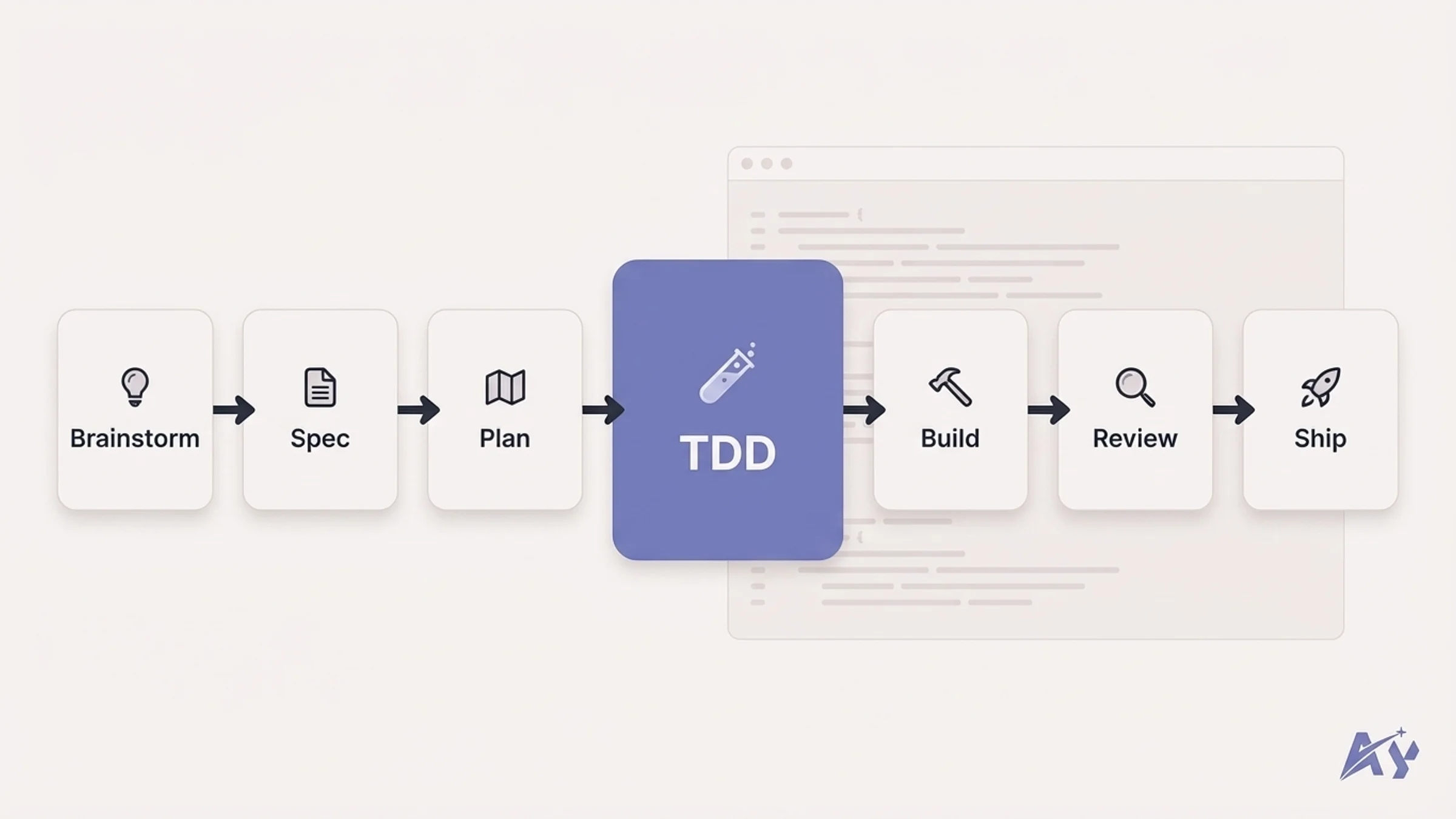
Superpowers is a development methodology encoded as a skills framework. It transforms Claude Code from a reactive code generator into something that behaves like a senior developer who follows test-driven development, breaks work into atomic tasks, and thinks before writing code.
With over 94,000 GitHub stars and acceptance into the official Anthropic marketplace, it is the most popular Claude Code skill by a wide margin. The framework enforces a strict 7-phase workflow: Brainstorm, Spec, Plan, TDD, Subagent Development, Review, Finalize. The key differentiator is that Superpowers literally deletes code written before tests exist. TDD is not optional here.
Key features
- 7-phase agentic workflow with mandatory TDD enforcement at every stage
- 20+ battle-tested skills including debugging, collaboration, and project planning
- Slash commands like /brainstorm, /write-plan, /execute-plan, and /skills-search
- YAGNI and DRY principles baked into every skill decision
- Socratic brainstorming phase that forces requirement clarity before any code is written
- Subagent orchestration that breaks complex tasks into parallel, independent work units
Best for
- Engineering teams that want consistent, enforceable development practices across all Claude Code usage
- Solo developers who want the discipline of a senior code reviewer built into their workflow
- Projects where test coverage and code quality are non-negotiable
Pros
- 291,920 GitHub stars on 2026-09-26
- Forces a structured workflow that prevents the "just write code and hope it works" pattern
- Excellent documentation and active development with frequent updates
Cons
- The strict TDD enforcement can feel heavy for quick prototyping or throwaway scripts
- Learning curve for teams not already familiar with test-driven development
2. UI UX Pro Max: best for frontend and UI work
UI UX Pro Max is a design intelligence engine that gives Claude Code deep knowledge about styles, color theory, typography, and UX best practices. Rather than relying on Claude's general knowledge to make design decisions, this skill loads a reasoning engine with 50+ styles, 161 color palettes, 57 font pairings, 99 UX guidelines, and 25 chart types across 10 technology stacks.
The v2.0 release introduced a Design System Generator that analyzes your project requirements and produces a complete, tailored design system. This is more than a collection of Tailwind presets. It is an AI-powered reasoning layer that makes informed design choices based on your project context, target audience, and brand requirements.
Key features
- 161 curated color palettes with accessibility-checked contrast ratios
- 57 professional font pairings organized by style and mood
- 99 UX guidelines covering layout, navigation, forms, and interaction patterns
- Design System Generator that creates project-specific systems from requirements
- Support for 10 technology stacks including React, Vue, Svelte, and native platforms
- 25 chart and data visualization types with recommended use cases
Best for
- Frontend developers who want consistent, professional design decisions without a dedicated designer
- Teams building AI-powered applications that need polished interfaces quickly
- Solo builders who need to ship good-looking products without deep design expertise
Pros
- The most comprehensive design knowledge base available as a Claude Code skill
- Actually reasons about design choices rather than applying random styles
- Covers the full stack from color theory to component-level UX patterns
Cons
- Large skill footprint that adds significant context to every design-related prompt
- Some palettes and font pairings work better for web than native mobile applications
3. Claude SEO: best for SEO audits and optimization
Claude SEO is a full-stack SEO analysis and optimization skill that brings 13 sub-skills and 7 specialized subagents into Claude Code. It covers technical SEO, E-E-A-T analysis, schema markup generation, GEO/AEO optimization, and strategic planning. The DataForSEO MCP extension connects it to live search data, turning Claude Code into a complete SEO workstation.
What sets claude-seo apart from other SEO tools is its extensions system. The DataForSEO integration includes a custom field-config.json that reduces API response sizes by roughly 75%, keeping only SEO-relevant fields. This saves tokens and speeds up analysis significantly compared to raw API calls.
Key features
- 13 sub-skills covering technical audits, content optimization, schema generation, and competitive analysis
- 7 specialized subagents that can run parallel SEO tasks
- DataForSEO MCP extension for live SERP data, keyword metrics, and backlink analysis
- E-E-A-T scoring and recommendations aligned with Google's quality guidelines
- GEO and AEO optimization for AI search engine visibility
- Custom field filtering that reduces API response tokens by 75%
Best for
- Developers who manage SEO alongside code and want everything in one terminal
- Content teams that need technical SEO audits without switching to expensive SaaS tools
- Agencies running SEO workflows as part of broader AI agent development projects
Pros
- The most complete SEO skill available, covering technical, content, and strategic SEO
- DataForSEO integration gives you real data instead of AI guesses about search metrics
- Extensions system makes it easy to add new data sources
Cons
- DataForSEO requires a paid API key for live data features
- The sheer number of sub-skills can be overwhelming for simple SEO checks
4. Agent Browser: best for web scraping and testing
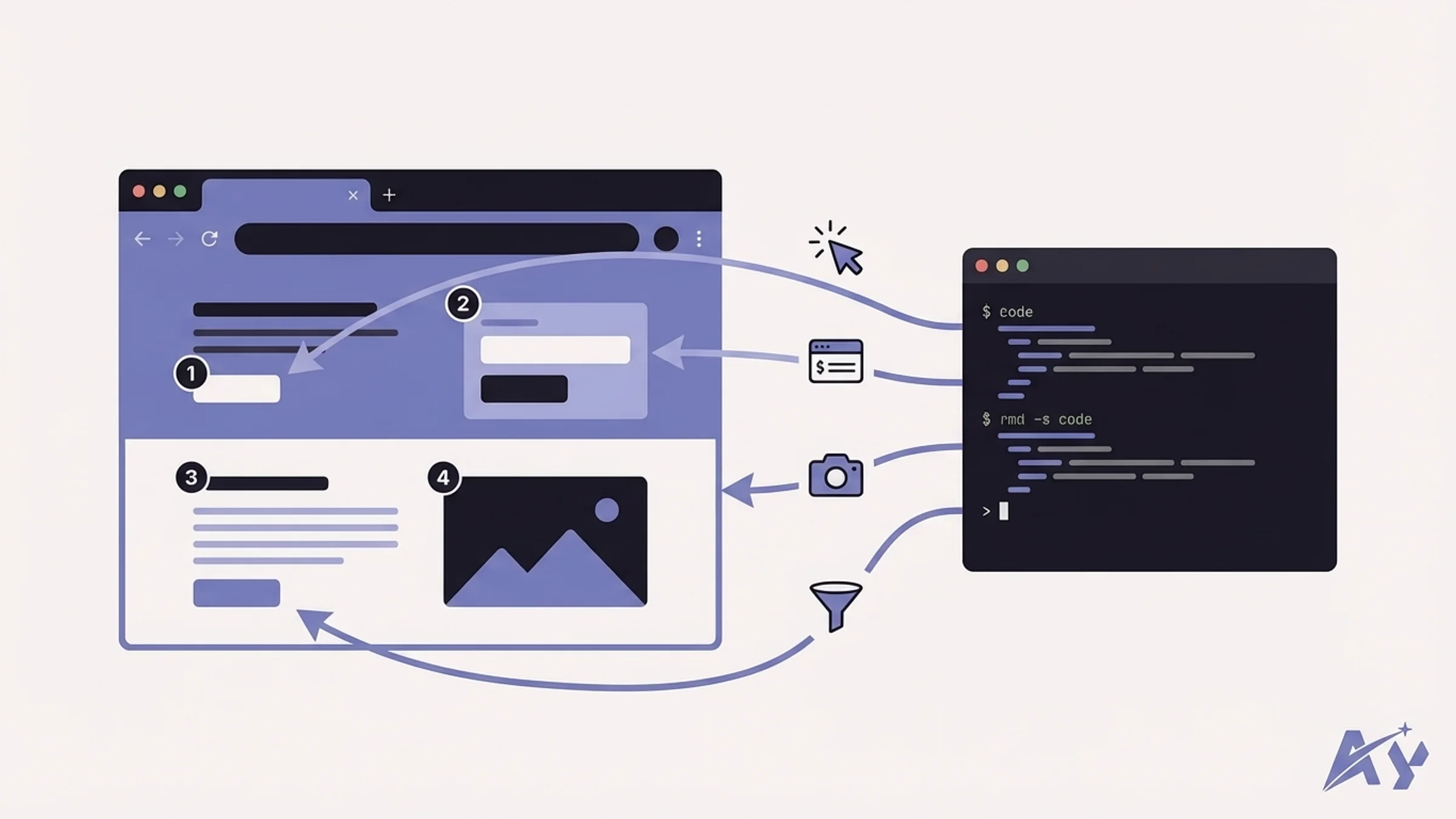
Agent Browser is a headless browser automation CLI built by Vercel Labs specifically for AI agents. It uses a fast native Rust CLI paired with a Node.js daemon, giving Claude Code the ability to navigate web pages, interact with elements, capture screenshots, and extract data, all from the terminal.
The skill uses a snapshot-ref interaction pattern where elements on the page are assigned reference numbers. Claude Code uses these refs instead of fragile CSS selectors, which reduces context consumption by roughly 93% compared to full DOM approaches. Sessions persist across commands, so you can build multi-step browser workflows that maintain state.
Key features
- Native Rust CLI for fast, low-overhead browser automation
- Snapshot-ref element selection that cuts context usage by 93% compared to CSS selectors
- Persistent sessions that maintain state across multiple browser commands
- Screenshot capture for visual verification of page state
- File upload and form interaction support
- Timeout handling and error recovery built into the skill workflow
Best for
- Developers who need to scrape or interact with web pages as part of automated workflows
- QA engineers who want Claude Code to run browser-based acceptance tests
- Teams building AI agents that need web browsing capabilities
Pros
- Vercel Labs backing means solid engineering and active maintenance
- The ref-based interaction model is significantly more reliable than CSS selector approaches
- Native Rust performance keeps browser operations fast
Cons
- Requires Node.js daemon running alongside the Rust CLI, adding setup complexity
- Limited to headless Chromium, so some sites with advanced bot detection may block it
5. Skill Creator: best for building your own skills
Skill Creator is the meta-skill that enables you to build, validate, and package your own Claude Code skills. Maintained in Anthropic's official skills repository, it walks you through an interactive Q&A workflow to define your skill's purpose, triggers, instructions, and bundled resources.
This is arguably the most important skill in the ecosystem because it multiplies the value of every other skill. Once you understand how to create well-structured skills, you can encode any specialized workflow, domain knowledge, or automation pattern into a reusable package that your entire team can install.
Getting the whole team to the point where they build and share skills consistently takes more than self-study; our Claude Code training workshops cover skills alongside CLAUDE.md conventions and shared workflow patterns in a structured day on your actual stack.
Key features
- Interactive Q&A workflow that guides you through skill creation step by step
- Generates properly structured SKILL.md files with correct YAML frontmatter
- Validates skill metadata, trigger conditions, and instruction formatting
- Supports bundling scripts, reference files, and assets alongside the skill
- Follows Anthropic's official skill authoring best practices
- Produces skills compatible with Claude Code, Codex, Gemini CLI, and other agents
Best for
- Developers who want to encode team-specific workflows into reusable skills
- Teams building internal skill libraries for their organization
- Anyone who wants to contribute skills back to the open-source community
Pros
- Backed by Anthropic's official repository, so it follows the canonical skill format
- The interactive workflow prevents common mistakes in skill structure and metadata
- Skills you create are portable across multiple AI coding agents
Cons
- The generated skill is a starting point that usually needs manual refinement for complex workflows
- No built-in testing framework for validating that your skill works as intended
6. Excalidraw Diagram: best for documentation and diagrams
Excalidraw Diagram gives Claude Code the ability to generate Excalidraw diagrams from natural language descriptions. Architecture diagrams, flowcharts, sequence diagrams, entity relationship diagrams, and system overviews can all be created directly in the terminal and exported as .excalidraw files that open in any Excalidraw editor.
The standout feature is the visual verification loop. A Playwright-based render pipeline lets Claude Code see its own output, catch layout issues like overlapping text or misaligned arrows, and fix them before delivering the final diagram. The design philosophy is "diagrams that argue, not display," meaning every shape and grouping mirrors the concept it represents rather than just looking decorative.
Key features
- Generates architecture, flow, sequence, ER, and system diagrams from text descriptions
- Playwright-based visual verification loop catches layout issues automatically
- Brand styling support for consistent colors, fonts, and visual identity
- Exports to .excalidraw format compatible with the Excalidraw editor ecosystem
- Iterative refinement where Claude Code reviews and corrects its own diagram output
- Supports both simple quick diagrams and complex multi-layer architecture views
Best for
- Developers who need to document system architecture without switching to a visual tool
- Teams that want auto-generated diagrams that stay in sync with code changes
- Technical writers who need professional diagrams embedded in documentation
Pros
- The self-review loop produces significantly better diagrams than one-shot generation
- Brand styling keeps diagrams consistent across a project or organization
- Excalidraw format is widely supported and easy to edit manually
Cons
- Requires Playwright installation for the visual verification feature
- Complex diagrams with many interconnected components can still need manual adjustment
7. Remotion: best for video generation
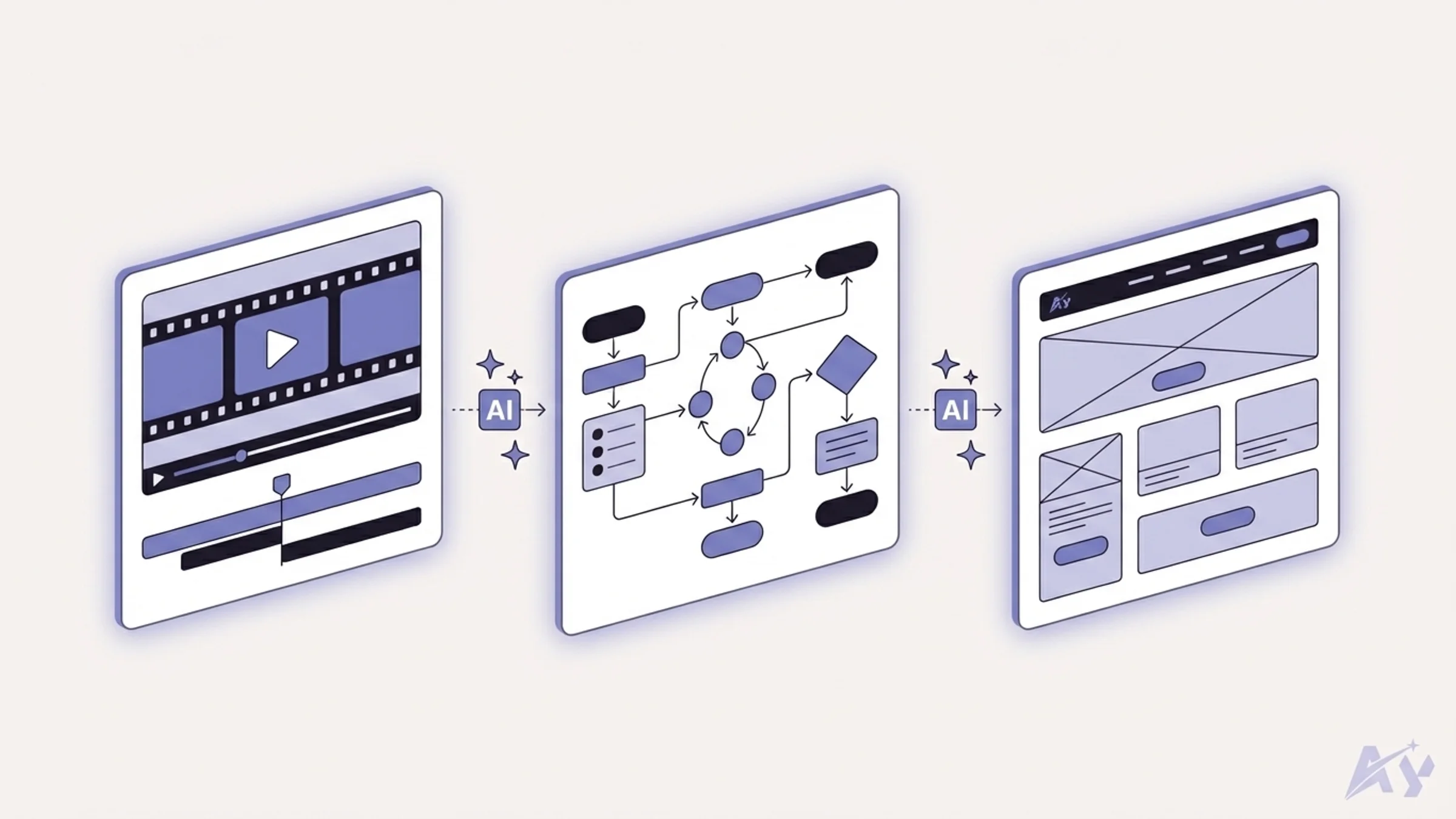
The Remotion skill provides Claude Code with best-practice rules for creating video compositions using the Remotion framework. It covers timing, transitions, rendering configuration, and export settings so Claude Code can generate professional motion graphics and animated explainers without you needing to memorize Remotion's API surface.
Source: remotion-dev/skills, Remotion's official Agent Skills repo. The skill name is remotion-best-practices, and no LICENSE file was detected on 2026-09-26. A copy also sits in AY Automate's Ay-Skills repo.
This skill is particularly valuable because video generation with code is notoriously detail-sensitive. Frame timing, easing curves, and composition ordering all need to be precise. The skill encodes these patterns so Claude Code produces correct Remotion code on the first attempt rather than requiring multiple rounds of debugging.
Key features
- Best-practice rules for Remotion composition structure and timing
- Smooth transition patterns with proper easing curve selection
- Rendering configuration optimized for common output formats (MP4, WebM, GIF)
- Clean export pipeline with correct codec and quality settings
- Component-based video architecture following Remotion conventions
- Audio synchronization patterns for narrated or music-backed content
Best for
- Developers creating programmatic video content like product demos, explainers, or social clips
- Marketing teams that need to generate video assets without dedicated video editors
- Anyone building automated video pipelines as part of a content workflow
Pros
- Eliminates the steep learning curve of Remotion's API for common use cases
- Produces correctly timed, export-ready compositions without manual frame counting
- Pairs well with other skills like excalidraw-diagram for animated technical content
Cons
- Limited to Remotion-based video generation, not general video editing
- Requires a working Remotion project setup with Node.js and ffmpeg dependencies
8. Artifacts Builder: best for prototyping
The Artifacts Builder skill enables Claude Code to create complex, multi-component HTML artifacts using React, Tailwind CSS, and shadcn/ui. Think of it as bringing Claude.ai's artifact panel into the terminal, but with the ability to build much more sophisticated interfaces that use real component libraries and styling frameworks.
Source: anthropics/skills, where the skill is now named web-artifacts-builder with the same SKILL.md description (checked 2026-09-26). A copy also sits in AY Automate's Ay-Skills repo.
This is ideal for rapid prototyping. Instead of scaffolding a full Next.js project to test a UI idea, you can describe what you want and get a working HTML artifact in seconds. The artifacts are self-contained, so you can open them in a browser, share them with stakeholders, or use them as reference implementations for production code.
Key features
- Generates self-contained HTML artifacts with embedded React and Tailwind CSS
- Full shadcn/ui component library support for professional-looking interfaces
- Multi-component compositions with proper state management
- Interactive elements including forms, modals, tabs, and data tables
- Responsive layouts that work across desktop and mobile viewports
- Export-ready artifacts that open directly in any browser
Best for
- Developers who need to prototype UI ideas quickly before committing to a full implementation
- Teams that want to share interactive mockups with stakeholders without deploying anything
- Anyone who builds interfaces and wants to test component compositions rapidly
Pros
- Dramatically faster than scaffolding a project for every UI experiment
- Uses real component libraries so prototypes translate directly to production code
- Self-contained output makes sharing and reviewing trivial
Cons
- Artifacts are single-file HTML, so complex state management and routing are limited
- Not a substitute for proper component development in a real project structure
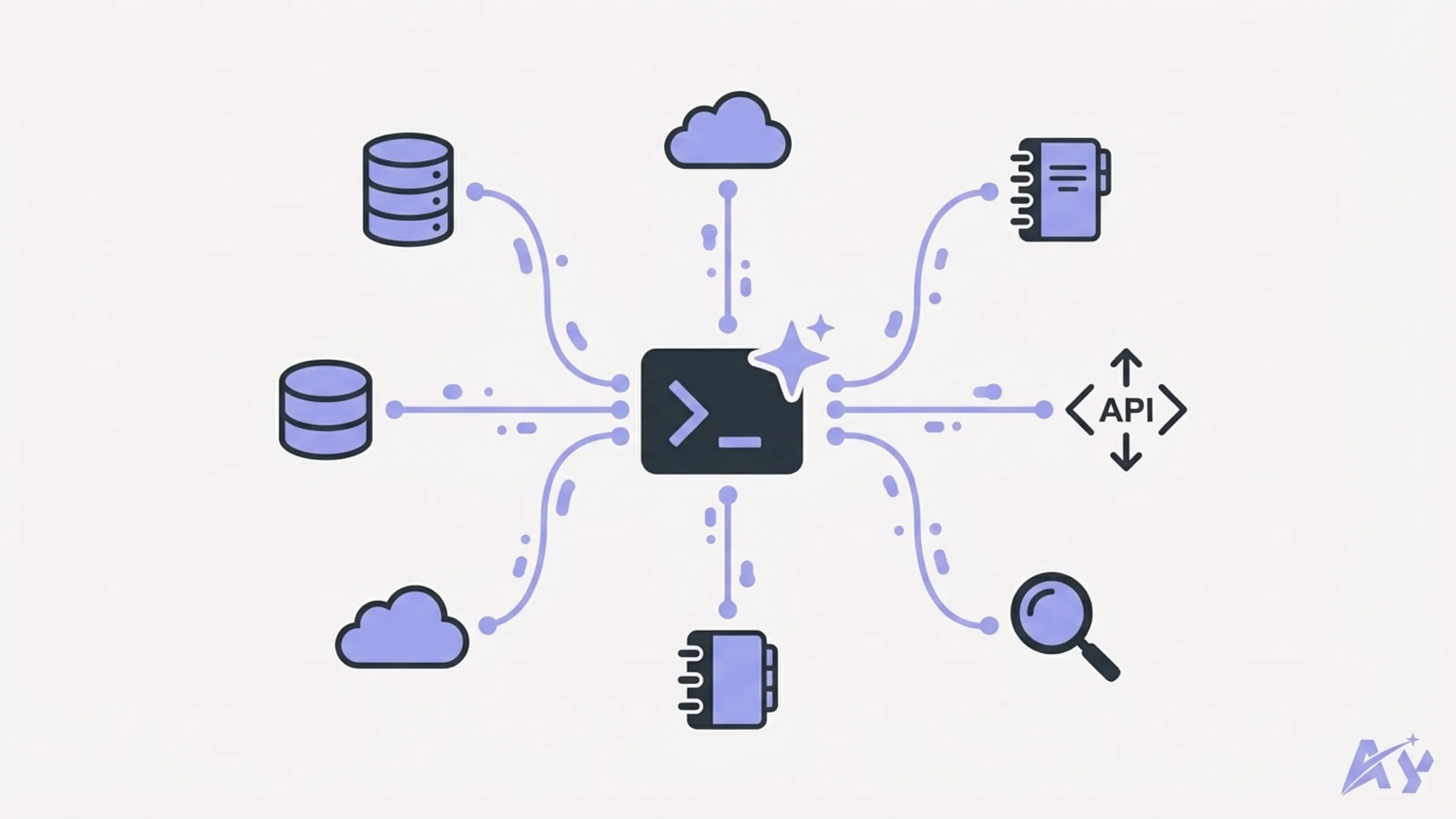
9. MCP Client: best for MCP integration
The MCP Client skill turns Claude Code into a universal connector for any MCP (Model Context Protocol) server. Instead of configuring each MCP server individually in your Claude Code settings, this skill provides a standardized interface for discovering, connecting to, and interacting with MCP servers on the fly.
MCP has become the standard protocol for connecting AI agents to external tools and data sources. The MCP Client skill removes the friction of setting up each connection manually. Point it at an MCP server URL or local process, and Claude Code can immediately use whatever tools and resources that server exposes.
Source: coleam00/second-brain-skills (repo created 2026-01-24, no license file on 2026-09-26). A copy also sits in AY Automate's Ay-Skills repo.
Key features
- Connects to any MCP server using stdio, SSE, or HTTP transport
- Automatic tool discovery that exposes available server capabilities to Claude Code
- Session management for persistent connections across multiple interactions
- Support for both local MCP servers and remote hosted endpoints
- Error messages for bad config and failed connections
- Compatible with the full MCP specification including resources, tools, and prompts
Best for
- Developers who work with multiple MCP servers and want a single, consistent interface
- Teams building custom MCP servers who need a quick way to test their implementations
- Anyone who wants to connect Claude Code to new data sources without editing configuration files
Pros
- Eliminates per-server configuration overhead for MCP connections
- Works with the full range of MCP transport types
- Useful for both production workflows and MCP server development
Cons
- Adds an abstraction layer that can make debugging MCP connection issues more difficult
- Some MCP servers require authentication setup that still needs manual configuration
If your team needs integrations that go beyond what a single MCP skill can handle, a custom workflow automation service can stitch together multiple tools, APIs, and data sources into a production-grade pipeline.
10. NotebookLM: best for research
The NotebookLM skill bridges Claude Code with Google NotebookLM, giving you source-grounded answers backed by citations from your uploaded documents. Instead of relying on Claude's training data for research questions, you can point it at your NotebookLM notebooks and get answers that are anchored to specific sources with zero hallucination risk.
This is particularly powerful for documentation-heavy projects. Upload your specs, design docs, API references, and research papers to NotebookLM, then query them directly from Claude Code. Every answer comes with citations pointing to the exact source material. The MCP server handles persistent authentication and library management, so you set it up once and it works across sessions.
Key features
- Source-grounded answers from Google NotebookLM with citation tracking
- Persistent authentication that works across Claude Code sessions
- Library management for organizing multiple NotebookLM notebooks
- Cross-client sharing so multiple team members can access the same research
- Citation-backed responses that link to specific passages in source documents
- Integration with Gemini for high-quality document analysis
Best for
- Developers working on projects with extensive documentation who need quick, accurate lookups
- Research-heavy workflows where every claim needs to be traceable to a source
- Teams that want to share a knowledge base accessible from everyone's Claude Code instance
Pros
- Eliminates hallucination risk by grounding every answer in uploaded source material
- Persistent auth and library management make it genuinely usable for daily workflows
- Citation tracking provides accountability that pure LLM answers cannot match
Cons
- Requires a Google NotebookLM account and manual document uploading
- Quality of answers depends entirely on the quality and coverage of your uploaded sources
For teams building knowledge-grounded AI systems that need to go beyond NotebookLM's capabilities, a dedicated RAG pipeline architecture gives you full control over retrieval, chunking, and embedding strategies tailored to your data.
11. Vercel Agent Skills: best for React and Next.js performance
Vercel Agent Skills is Vercel's official collection of skills for AI coding agents, written in the Agent Skills format. The best known one is react-best-practices. Its README describes it as React and Next.js performance guidance from Vercel Engineering, with 40+ rules across 8 categories ordered by impact. Eliminating request waterfalls and cutting bundle size come first.
The collection also holds a web-design-guidelines audit with 100+ rules on accessibility, performance, and UX, React Native guidelines, React view transitions, composition patterns, a writing handbook review, a Vercel project cost and performance audit, and a deploy skill. The README states an MIT license. We added this entry from the repo and README on 2026-09-26.
Key features
- react-best-practices: 40+ rules across 8 categories, starting with waterfalls and bundle size and ending with JavaScript micro-optimizations
- web-design-guidelines: audits UI code against 100+ rules covering accessibility, focus states, forms, animation, and dark mode
- vercel-optimize: collects Vercel metrics first, then investigates only the routes and files those metrics point to
- React Native guidelines: 16 rules across 7 sections for React Native and Expo apps
- composition-patterns and react-view-transitions for component architecture and page animations
- A deploy skill that packages a project, deploys it to Vercel, and returns a preview URL plus a claim URL
Best for
- Teams shipping React or Next.js apps who want Claude Code to review components against a fixed rule set
- Frontend developers who want accessibility and UX audits next to the design decisions ui-ux-pro-max makes
- Projects hosted on Vercel that want cost and performance reports based on real metrics
Pros
- Maintained by Vercel, the company behind Next.js, so the rules follow how the framework is meant to be used
- Rules carry an impact ranking, so Claude Code fixes waterfalls and bundle size before micro-optimizations
- MIT license, according to the README
Cons
- The README's install command is
npx skills add vercel-labs/agent-skills, which runs the skills package from npm without a pinned version. If your team pins dependencies, pin a version or copy the skill folders in by hand. - Most skills assume React, Next.js, or Vercel hosting, so they add little to backend or Python projects
- The deploy skill uploads a tarball of your project. The README says it excludes node_modules and .git, so check the folder for anything else you would not want to upload.
Skip it if you do not write React and do not deploy on Vercel.
12. Trail of Bits Skills: best for security audits
Trail of Bits Skills is a Claude Code plugin marketplace from the security firm Trail of Bits. It packages audit workflows as plugins you install one at a time. The list includes static analysis with CodeQL, Semgrep, and SARIF parsing, security-focused differential review of code changes, supply-chain auditing of npm, PyPI, and Go dependencies, Semgrep rule creation, and a check for fail-open insecure defaults.
The README groups plugins into smart contract security, code auditing, malware analysis, verification, reverse engineering, mobile security, and development, and keeps a trophy case of bugs found with the skills. The entry listed there is a timing side-channel in ML-DSA signing, reported as a pull request to RustCrypto. The repo is licensed CC BY-SA 4.0, and the latest commit we saw was dated 2026-09-24. We added this entry from the repo and README on 2026-09-26. For plugin marketplaces in general, see our best Claude Code plugins list.
Key features
- static-analysis: CodeQL taint tracking, Semgrep pattern scans, and SARIF parsing to merge and deduplicate findings
- differential-review: security-focused review of code changes with git history analysis
- supply-chain-risk-auditor: checks npm, PyPI, and Go dependencies for version-matched advisories, abandoned upstreams, and install scripts
- insecure-defaults: audits for fail-open defaults, with a refuting verifier per candidate file
- fp-check: systematic false positive verification with mandatory gate reviews
- C/C++ and Rust security reviews, plus smart contract scanners for 6 blockchains
Best for
- Security engineers and auditors who want repeatable review workflows inside Claude Code
- Teams that want a security pass on code Claude Code wrote before it merges
- Smart contract and cryptography teams, through building-secure-contracts and constant-time-analysis
Pros
- Written by a security research firm, with a public trophy case of bugs found using the skills
- Installs as a marketplace with
/plugin marketplace add trailofbits/skills, then/plugin menuto pick only the plugins you need - The README says Codex can load the same marketplace through its Claude marketplace compatibility
Cons
- The static-analysis plugin works through CodeQL and Semgrep, so those tools have to be set up before it does much
- CC BY-SA 4.0 is a share-alike license. If you adapt these skills and share your version, it must carry the same license.
- A large part of the catalog is specialist work (smart contracts, DWARF debug info, YARA rules) that a typical web team will never touch
Skip it if you want general coding help rather than security review. Superpowers will do more for day-to-day development.
How to choose the right Claude Code skills for your workflow
Not every skill belongs in every developer's setup. Here is a decision framework to help you pick the right combination.
Start with your biggest bottleneck. If you spend more time debugging than writing code, install superpowers for its TDD enforcement. If you constantly switch between your terminal and a browser to check pages, install agent-browser. If design decisions slow you down, install ui-ux-pro-max.
Layer skills based on your role. Full-stack developers benefit most from superpowers + agent-browser + artifacts-builder. Frontend specialists should prioritize ui-ux-pro-max + excalidraw-diagram + artifacts-builder. SEO-focused developers will get the most from claude-seo + notebooklm. React and Next.js teams should add Vercel Agent Skills, and anyone reviewing code that Claude Code writes should look at Trail of Bits Skills.
Consider your team. Skills like superpowers and skill-creator scale well across teams because they enforce consistency. If your organization builds custom tooling, invest time in skill-creator early so you can encode your internal workflows. Because every installed skill runs with the same permissions as the rest of Claude Code, teams rolling several out across an org often pair that with a Claude Code security audit to confirm nothing overreaches on file or network access.
Watch your context budget. Every installed skill adds to Claude Code's context window consumption. Start with two or three skills, measure the impact on response quality, and add more only when you have a clear need. You can always install a skill for a specific project and remove it when you are done. For techniques on managing what goes into the context window, see context engineering.
If your team needs help building custom Claude Code skills, agent workflows, or AI-powered automation pipelines, AY Automate offers AI agent development services and custom training tailored to your stack. You can also reach out directly to discuss your project.
Frequently asked questions
What are Claude Code skills?
Claude Code skills are SKILL.md files that you place in .claude/skills/ within your project. Each skill gives Claude Code a specialized set of instructions, templates, and context for a specific type of task. When Claude Code detects a relevant trigger, it loads the skill and follows its instructions. Think of skills as expert playbooks that turn Claude Code into a specialist for a particular workflow.
How do I install a Claude Code skill?
Most skills install by copying a folder into your project's .claude/skills/ directory. Some are available through the Anthropic marketplace using the /plugin marketplace add command. Once the skill folder is in place, Claude Code auto-detects and loads it. No restart required.
Can I use multiple Claude Code skills at the same time?
Yes. Claude Code can load multiple skills simultaneously. However, each skill adds to the context window, so installing too many at once can degrade response quality. Start with two or three that address your core workflow and add more as needed.
Are Claude Code skills free?
Most skills in this list are free to use, but check each license: Trail of Bits Skills is CC BY-SA 4.0, Anthropic's document skills are source-available, and some repos (remotion-dev/skills, coleam00/second-brain-skills) have no license file. Some skills connect to paid external services. For example, claude-seo's DataForSEO extension requires a paid API key, and notebooklm requires a Google account with NotebookLM access. The skill acts as the connector, but the external service may have its own pricing.
Do Claude Code skills work with other AI coding agents?
Many skills follow the standard SKILL.md format and work with other agents that support it, including Codex, Gemini CLI, Cursor, and OpenCode. The skill-creator skill specifically produces output compatible with multiple agents. Check each skill's documentation for compatibility details.
How do I create my own Claude Code skill?
Install the skill-creator skill and run through its interactive Q&A workflow. It generates a properly structured SKILL.md file with YAML frontmatter, trigger conditions, and instruction blocks. You can also create skills manually by following Anthropic's documentation on the SKILL.md format.
What is the difference between Claude Code skills and MCP servers?
Skills are instruction files that tell Claude Code how to approach a task. MCP servers are external processes that give Claude Code access to tools and data sources through the Model Context Protocol. Some skills (like claude-seo and notebooklm) combine both: a SKILL.md file provides the workflow instructions, and an MCP server provides the live data connection. They are complementary, not competing, concepts. For the servers worth wiring into Claude Code specifically, see the 12 best Claude Code MCP servers. For a broader cross-client list, see best MCP servers 2026.
Are Claude Code skills safe to install?
Treat a skill like any code you run. A skill can bundle scripts that Claude Code executes with your permissions, so read the SKILL.md and every script before installing, prefer maintained repos, and pin versions when the installer allows it. Our guide to Claude Code security risks covers the wider threat model.
What is the best Claude Code skill for security reviews?
Trail of Bits Skills is the security pick in this list. It is a plugin marketplace from the security firm Trail of Bits, with plugins for CodeQL and Semgrep static analysis, differential review of code changes, supply-chain audits, and insecure-default checks. Add it with /plugin marketplace add trailofbits/skills and choose plugins from /plugin menu.
What are the best Claude Code skills for React and Next.js?
Vercel Agent Skills is the pick for React and Next.js. Its react-best-practices skill holds 40+ performance rules across 8 categories from Vercel Engineering, and web-design-guidelines audits UI code against 100+ accessibility and UX rules. Pair it with ui-ux-pro-max for design decisions and artifacts-builder for quick prototypes.
Where can I find more Claude Code skills?
Start with Anthropic's official anthropics/skills repository, which holds skill-creator and other reference skills. Vendor collections such as vercel-labs/agent-skills and trailofbits/skills come next, and plugin marketplaces install with /plugin marketplace add. Our Claude skills marketplace guide and the best Claude Code plugins list cover more options.
Which Claude Code skill should I install first?
If you write code professionally, start with superpowers. Its TDD enforcement and structured workflow improve the quality of everything Claude Code produces. If you have a more specialized need (SEO, design, browser automation), start with the skill that matches your primary workflow bottleneck.
For those preparing for the Claude Certified Architect exam, see the Claude Certified Architect study guide for a four-week prep plan, practice questions, and a mock exam.
If you want these skills and workflows designed and operated for your business rather than assembled in-house, see how an AI automation agency runs the whole system.
Continue Reading
12 Best Claude Code Hooks to Add in 2026
The 12 best Claude Code hooks to add to your workflow, ranked: pre-commit linting, secret scanning, a Stop gate that keeps Claude working until tests pass, context re-injection after compaction, and more, each with a settings.json config.
12 Best GitHub Repositories for Claude Code in 2026
The 12 best GitHub repos for Claude Code in 2026: production skills, Anthropic's official skills repo, TDD frameworks, MCP servers, agent harnesses, CI/CD integration and usage tracking.
13 Best Claude Code Project Templates in 2026
Claude Code stopped being a curiosity in 2025. By 2026, teams shipping with it do not start from a blank repo, they start from a template with CLAUDE.md, agents, hooks and skills already wired in.
Book a Free Strategy Call
Building this in production?
Walid runs a 30-min call to map your AI engineering team. Free, no slides.
Free weekly brief
Steal our production automations
The exact n8n flows, Claude Code setups, and prompts we ship for clients, broken down step by step. No spam, unsubscribe anytime.

Taha builds and ships custom AI agents and workflow automations for AY Automate clients across SaaS, finance, and professional services.