Book a Free Strategy Call
Skip the read: talk to Walid in 30 min.
Free strategy call. We map your AI engineering team, you keep the notes.
How to Use Kimi K3: Access, API Setup, and Pricing (2026)
Kimi K3 is Moonshot AI's flagship model: 2.8 trillion total parameters (104 billion active per token), a 1,048,576 token context window, and native image and video understanding. It launched the week of July 14, 2026, and Moonshot has since released the full weights under its own Kimi K3 License. This guide covers the practical part: how to get access, what it costs, and how the run-it-yourself option really works. For the full spec rundown, see our What Is Kimi K3 explainer.
Checked September 26, 2026 against Moonshot's own docs.
There are two ways to use it: the consumer chat app at kimi.com or the developer API. The open weights on Hugging Face are covered further down, in the section on running it locally. This guide walks through both access paths, with a working code snippet for the API path and the current published pricing.
Quick Answer
- Chat app: go to kimi.com and start a conversation. Moonshot's K3 launch post lists the Kimi app (web, iOS, Android, HarmonyOS) as one of the ways to use K3.
- API: sign up at platform.kimi.ai, top up at least $1 (Moonshot unlocks K3 after a successful top-up), generate a key, and call
https://api.moonshot.ai/v1with an OpenAI-compatible request. Model ID:kimi-k3. - Pricing (checked September 26, 2026, Moonshot's official rate card): $3.00 per million input tokens, $0.30 per million cached input tokens, $15.00 per million output tokens. Cache writes cost $3.00 per million (5 minute TTL) or $6.00 per million (1 hour TTL).
- Open-weight: yes. Moonshot publishes the full weights at huggingface.co/moonshotai/Kimi-K3 under the Kimi K3 License, a custom license with conditions for large commercial users (details below).
Related Reads
How to Access Kimi K3 (Two Paths)
1. The Consumer App: kimi.com
The fastest way to try K3 with no setup. Moonshot's launch post points people to the Kimi app and the website to use K3, so opening kimi.com and starting a chat is the right first step if you just want to test what K3 can do before wiring up an integration. Moonshot also lists the Kimi Work desktop app and the Kimi Code terminal tool as K3 entry points.
2. The Developer API: platform.kimi.ai
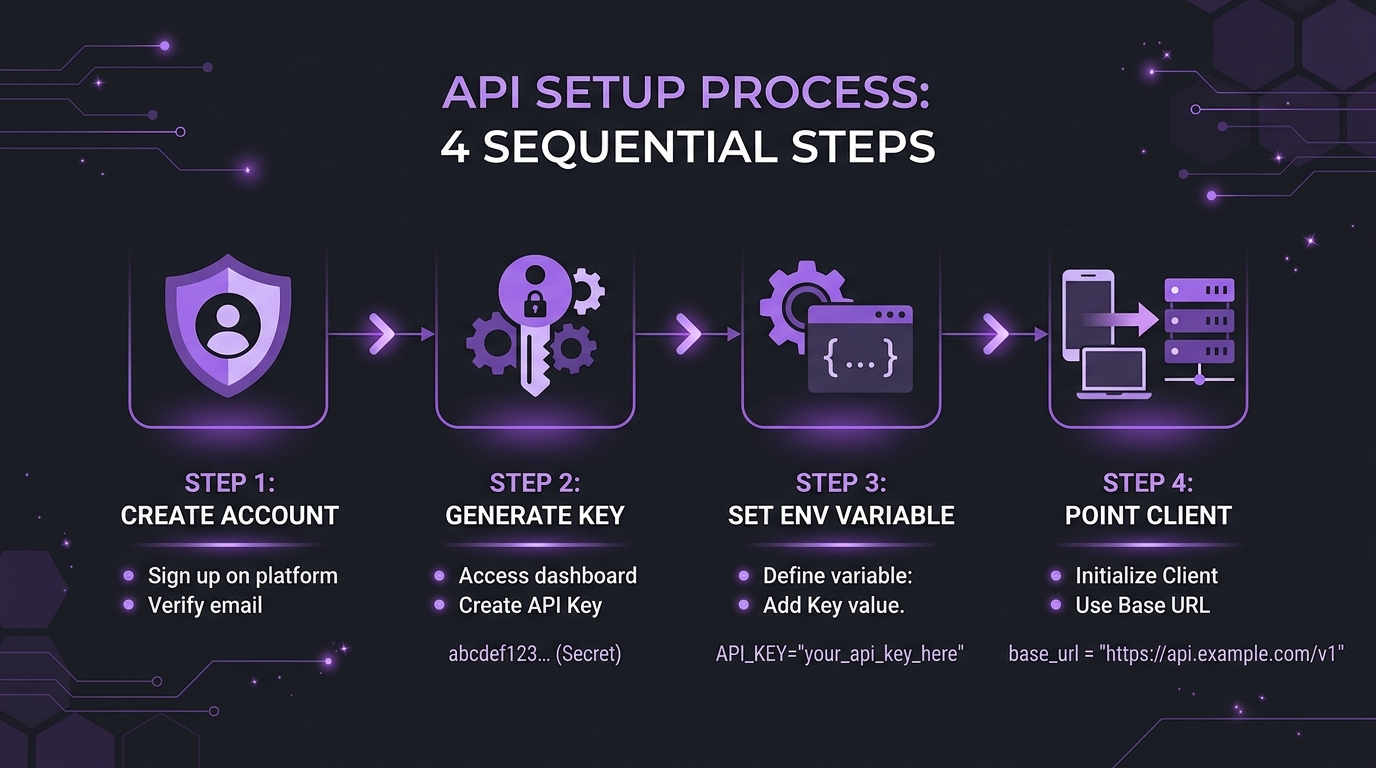
For anything programmatic, coding agents, internal tools, batch jobs, you'll want the API. Here's the setup path:
- Create an account at platform.kimi.ai.
- Top up at least $1. Moonshot's K3 quickstart says K3 "is unlocked after a successful top-up (minimum $1)", and your cumulative top-up sets your rate-limit tier.
- Open the API Keys section of the console and generate a new key, then set it as an environment variable (
MOONSHOT_API_KEYis the name Moonshot's own quickstart docs use). - Point your client at the base URL:
https://api.moonshot.ai/v1.
One thing worth flagging if you've read older coverage of Kimi's API: some older guides point to api.moonshot.cn/v1. Moonshot's current quickstart docs at platform.kimi.ai list the base URL as https://api.moonshot.ai/v1. Use that value and confirm it in Moonshot's docs before you ship.
The API is OpenAI-format compatible (Moonshot also documents an Anthropic Messages compatible format), so if you already have code calling an OpenAI-style chat completions endpoint, switching over is mostly a matter of changing the base URL, key, and model string.
Python:
import os
from openai import OpenAI

client = OpenAI(
    api_key=os.environ["MOONSHOT_API_KEY"],
    base_url="https://api.moonshot.ai/v1",
)

completion = client.chat.completions.create(
    model="kimi-k3",
    messages=[{"role": "user", "content": "Introduce Kimi K3 in one sentence."}],
)

print(completion.choices[0].message.content)
curl:
curl https://api.moonshot.ai/v1/chat/completions \
    --header "Authorization: Bearer $MOONSHOT_API_KEY" \
    --header "Content-Type: application/json" \
    --data '{
        "model": "kimi-k3",
        "messages": [{"role": "user", "content": "Introduce Kimi K3 in one sentence."}]
    }'
Both examples match the basic call in Moonshot's Kimi K3 quickstart, which requires Python 3.9+ and the OpenAI SDK (pip install --upgrade 'openai>=1.0'). To change how hard the model thinks, the same quickstart adds a top-level reasoning_effort="max" argument to client.chat.completions.create.
Free weekly brief
Steal our production automations
The exact n8n flows, Claude Code setups, and prompts we ship for clients, broken down step by step. No spam, unsubscribe anytime.
Kimi K3 Pricing: What It Actually Costs
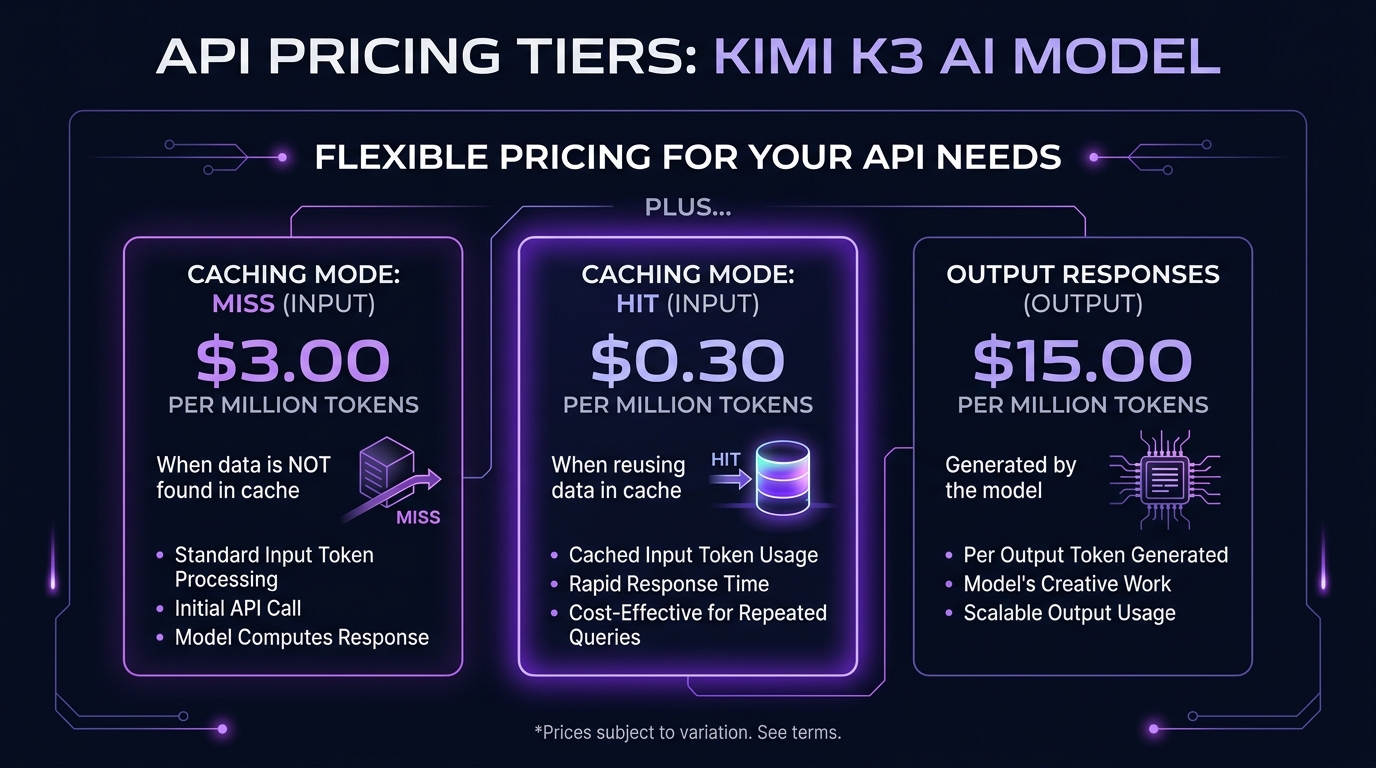
Moonshot's pricing page for the K3 series lists these rates for kimi-k3:
| Token type | Rate |
|---|---|
| Input | $3.00 per 1M tokens |
| Cached input (cache hit) | $0.30 per 1M tokens |
| Cache write, 5 minute TTL (default) | $3.00 per 1M tokens |
| Cache write, 1 hour TTL | $6.00 per 1M tokens |
| Output | $15.00 per 1M tokens |
| Context window | 1,048,576 tokens |
Source: platform.kimi.ai/docs/pricing/chat-k3, checked September 26, 2026. Prices exclude taxes.
The cache is the detail worth planning around. Moonshot's docs say the API automatically caches repeated request prefixes, and input that hits the cache is billed at the $0.30 cached rate, a tenth of the $3.00 input rate, with each hit refreshing the cache entry at no extra write charge. Structure your prompts so the stable, reusable parts come first and the part that changes per request comes last, which is standard practice for prompt caching in general and applies here too.
Separately, Moonshot's pricing docs note that file-related APIs (file content extraction and file storage) are temporarily free. Text you extract and then pass to the model is still billed as input. "Temporarily" is Moonshot's word, so don't build a cost model that assumes it stays that way.
Pricing can change without much notice. Check Moonshot's live pricing page before you commit budget to it.
What Kimi K3 Is Good For (and What It Isn't)
Moonshot's K3 quickstart describes it as "designed for frontier intelligence scenarios including long-horizon coding, knowledge work, and reasoning," and its API overview calls it "well suited for programming agent scenarios such as Claude Code." Combined with the 1 million token context window and native image and video understanding, that points to a few concrete use cases:
- Long-running coding agents. The context window is large enough to hold a substantial codebase or a long multi-step task history without truncation.
- Document-heavy knowledge work. Feed it long reports, transcripts, or research bundles and ask it to reason across all of it at once.
- Multimodal input tasks. Moonshot's vision guide lists
kimi-k3among the models that understand both images and video, so you can pass visual context alongside text without a separate pipeline.
What to watch for:
- Open weights, custom license. The weights are public, but the Kimi K3 License is not MIT or Apache. If you run a Model as a Service business and you and your affiliates earn more than $20 million over any 12 months, you need a separate agreement with Moonshot before commercial use. Products with more than 100 million monthly active users or more than $20 million in monthly revenue must display "Kimi K3" in the UI. Internal use is exempt from both conditions. Read the license text yourself before you ship.
- Benchmarks are vendor-reported. Moonshot's model card publishes benchmark tables, run at reasoning effort
max, many in its own Kimi Code harness, plus some scores it cites from Artificial Analysis. Treat them as Moonshot's numbers until independent evaluators publish their own. - Always in reasoning mode. Moonshot's docs say K3 "always has thinking mode enabled" and expose a
reasoning_effortrequest field (low,high, ormax, defaultmax) rather than an on/off switch. If you need the fastest, cheapest response for a simple task, setreasoning_efforttolowrather than expecting a separate non-reasoning model. - Pass the full assistant message back. For multi-turn chats and tool calls, Moonshot says to send the complete assistant message returned by the API back in
messages, includingreasoning_contentandtool_calls, not justcontent.
Running Kimi K3 Locally
Moonshot's own model card recommends three inference engines for the native weights: vLLM, SGLang, and TokenSpeed. At 2.8 trillion parameters, serving the full weights is a multi-GPU server job.
The smaller option comes from Unsloth, not Moonshot. Unsloth's Kimi K3 run-locally guide and its Kimi-K3-GGUF repository (files uploaded July 29 to August 7, 2026, per the repo history) offer quantized GGUF versions of Moonshot's weights, still under the Kimi K3 License. Here's exactly what the guide covers:
- Quant sizes. Files range from a 594 GB dynamic 1-bit (
UD-IQ1_S, which Unsloth recommends) through 2-bit versions up to about 1.51 TB (4-bit) and 1.56 TB (8-bit, which Unsloth calls lossless against Moonshot's MXFP4 weights). - Hardware. Unsloth's rule of thumb is that RAM plus VRAM should roughly equal the quant size, and the 1-bit walkthrough "will require at least 610GB RAM." Below that it still runs, but much slower because it offloads to disk.
- Tools. Step-by-step instructions for Unsloth Studio (Unsloth's desktop app) and llama.cpp, using Unsloth's llama.cpp fork that adds vision support.
- Settings. temperature 1.0 with top_p 0.95 by default, or top_p 1.0 for agentic tasks, and
reasoning_effortlow, high, or max.
Unsloth reports that its 1-bit quant keeps about 78.9% top-1 agreement with the full model. That is Unsloth's measurement, not Moonshot's. For most teams, the API at $3 and $15 per million tokens will cost far less than hardware with 600 GB or more of memory.
Tips for Getting the Most Out of Kimi K3
- Tune
reasoning_effortto the task. Moonshot's docs expose this as a top-level request field with three settings. Savemaxfor genuinely hard, multi-step problems and drop tolowfor straightforward lookups or formatting tasks, since reasoning effort affects both latency and output token count (which is what you're billed for). - Structure prompts for cache hits. Put stable content, system instructions, reference documents, tool definitions, ahead of the part of the prompt that changes each call. That's what makes the $0.30 cached input rate apply instead of the $3.00 input rate.
- Don't hardcode the base URL from an old tutorial. Pull the current value from Moonshot's docs rather than copying it from a guide, including this one, without checking the date.
- Keep the model string configurable. Moonshot's current docs, pricing page, and model card all use
kimi-k3, but keep it in config so a future model swap is a one-line change.
FAQ
How do I use Kimi K3?
Through the consumer app at kimi.com for chat, or through Moonshot's API at api.moonshot.ai/v1 for programmatic access. The API uses an OpenAI-compatible request format with the model ID kimi-k3. You can also download the open weights from Hugging Face and run them on your own hardware.
Is Kimi K3 free? Not on the API. Moonshot charges $3.00 per million input tokens, $0.30 per million cached input tokens, and $15.00 per million output tokens, checked September 26, 2026, and K3 unlocks after a minimum $1 top-up. File extraction and storage APIs are temporarily free. The weights themselves are free to download under the Kimi K3 License.
What is the Kimi K3 API base URL?
https://api.moonshot.ai/v1, per Moonshot's current quickstart documentation. Some older guides show api.moonshot.cn/v1, so confirm the live value in Moonshot's docs before you build against it.
Is Kimi K3 open-weight? Yes. Moonshot released the full Kimi K3 weights on Hugging Face at moonshotai/Kimi-K3, and its docs call it open-source. The license is the custom Kimi K3 License, not MIT or Apache: large Model as a Service businesses need a separate agreement, and very large products must display "Kimi K3" in their UI.
How do I run Kimi K3 locally? Moonshot recommends vLLM, SGLang, or TokenSpeed for the full weights, a multi-GPU server job at 2.8 trillion parameters. For smaller setups, Unsloth publishes GGUF quants with a llama.cpp and Unsloth Studio guide. Its smallest recommended file is 594 GB, and Unsloth says RAM plus VRAM should roughly match the file size.
Does Kimi K3 support images and video?
Yes. Moonshot's vision guide lists kimi-k3 among the models that can understand both images and video content, and its model card describes K3 as natively multimodal rather than routing images through a separate vision model.
How does Kimi K3 compare to Claude Fable 5? On specs, availability, and price. Moonshot's model card includes Fable 5 in its own benchmark tables, but those are vendor-run numbers.
Where can I compare Kimi K3 to other models we track? Our model comparison hub tracks specs and pricing across the models we cover as they're verified.
Sources (checked September 26, 2026): Moonshot Kimi API quickstart, Kimi K3 quickstart, Kimi K3 pricing, Kimi API pricing overview, Moonshot API overview docs, Kimi vision guide, Kimi K3 model card, Kimi K3 License, Moonshot AI on Hugging Face, Unsloth Kimi K3 guide
Continue Reading
GPT-6 Astra vs Claude Fable 5.1 vs Opus 5.5: Why Model Routing Wins
GPT-6 Astra and Claude Fable 5.1 both list at $10 and $50 per million tokens. Claude Opus 5.5, GPT-6 Sol and GPT-6 Luna, all released September 22, cost far less. Verified prices, one independent index and a task-by-task routing table, prices checked September 26, 2026.
GPT-6 Sol and Luna: What OpenAI's Cheaper Model Tiers Mean for Automation
OpenAI released updated GPT-6 Sol and Luna on September 22, 2026 at half the API cost of their GPT-5.6 predecessors, positioned below GPT-6 Astra. Here is what the three-tier lineup means for routing automation tasks by cost and complexity.
What Is Kimi K3? Moonshot AI's New Flagship Model Explained
Kimi K3 is Moonshot AI's new flagship model: 2.8T parameters, 1M-token context, natively multimodal, released the week of July 14, 2026. Specs, access, and an honest pricing/benchmark gap.
Book a Free Strategy Call
Building this in production?
Walid runs a 30-min call to map your AI engineering team. Free, no slides.
Free weekly brief
Steal our production automations
The exact n8n flows, Claude Code setups, and prompts we ship for clients, broken down step by step. No spam, unsubscribe anytime.

Walid founded AY Automate to help businesses ship AI workflows that actually move revenue. He leads strategy and oversees every client engagement end-to-end.
Full Bio →