Book a Free Strategy Call
Skip the read: talk to Walid in 30 min.
Free strategy call. We map your AI engineering team, you keep the notes.
How to Self-Host Your AI Stack Without OpenAI (2026 Guide)
The fastest self-hosted AI stack that replaces OpenAI in 2026: run Ollama for local model inference, LiteLLM for OpenAI-compatible API routing, and n8n for workflow orchestration. If you need to route across multiple hosted providers instead of just self-hosting, see our best LLM orchestration tools comparison. At scale, this configuration costs 60-80% less than OpenAI API pricing and keeps all data on-premises.
OpenAI's API pricing was acceptable when most teams ran a few hundred queries per day. At scale, that math breaks. A startup processing 10 million tokens per month pays hundreds of dollars. An enterprise running 100 million tokens per month can face bills that rival a full-time salary. Add GDPR, HIPAA, or SOC 2 requirements, and suddenly sending every customer query to a third-party API is more than expensive. It is a compliance risk.
The good news: running your own AI stack is no longer a research-team-only project. Tools like Ollama, Open WebUI, n8n, and Qdrant have matured to the point where a team with basic DevOps skills can have a self-hosted AI stack running in a weekend. This guide walks you through exactly how to do it.
Why Self-Host Your AI Stack?
Before the setup instructions, it is worth grounding the decision in concrete numbers.
Cost at Scale
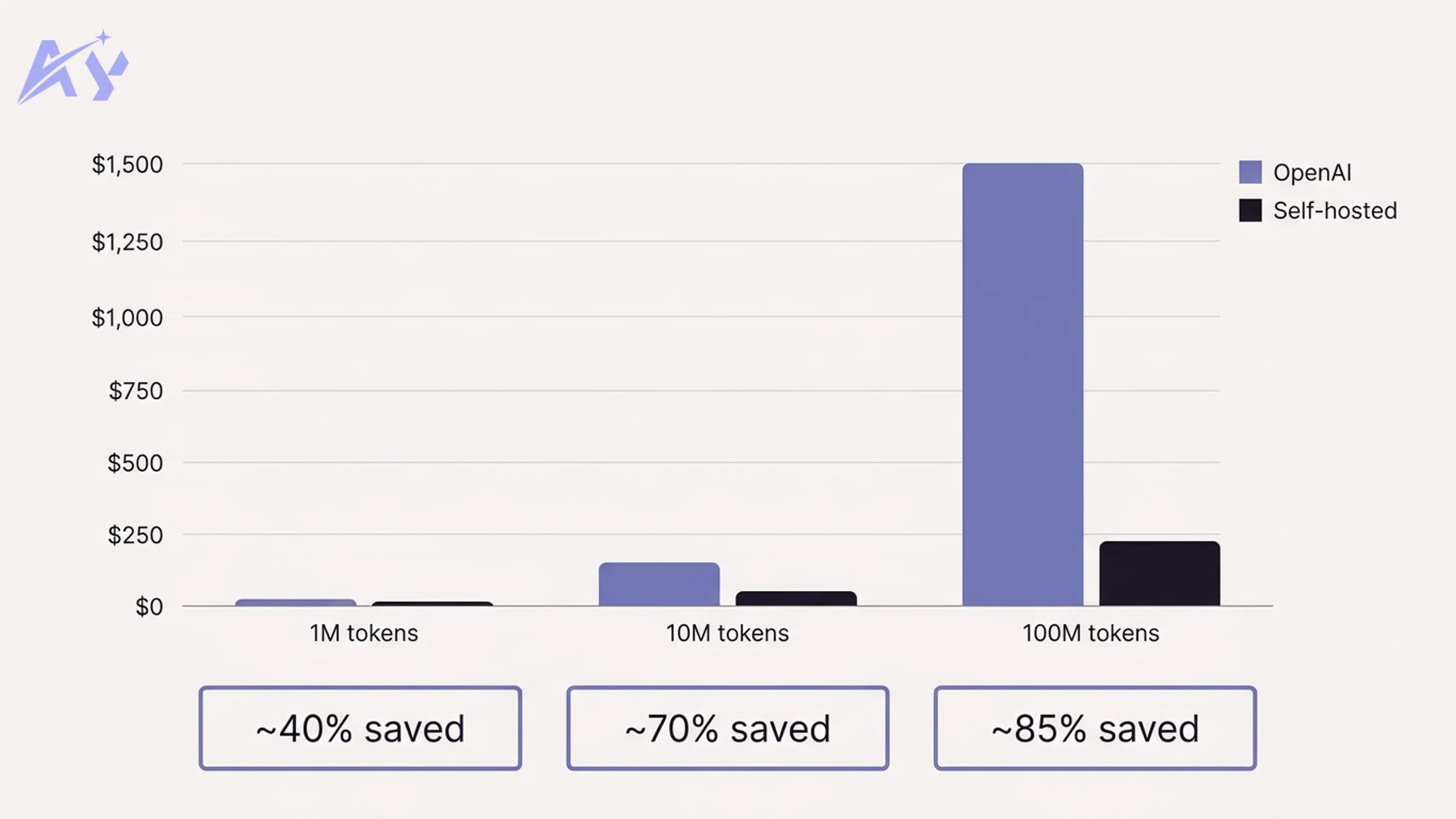
| Monthly volume | OpenAI API (GPT-4o) | Self-hosted (GPU cloud) | Savings |
|---|---|---|---|
| 1M tokens | ~$15 | ~$9 | ~40% |
| 10M tokens | ~$150 | ~$45 | ~70% |
| 100M tokens | ~$1,500 | ~$225 | ~85% |
Estimates based on OpenAI's published pricing and mid-tier GPU cloud instances (e.g. Lambda Labs A10 at ~$0.60/hr). Actual costs vary by model size and usage patterns.
At low volumes, the savings are modest. At 100M tokens per month, self-hosting saves roughly $15,000 per year, which covers a solid GPU server with money to spare.
Data Privacy and Residency
When you call OpenAI's API, your prompts and completions pass through their infrastructure. For many use cases (internal knowledge bases, customer support, legal document review), this is a problem. EU data residency requirements, healthcare data rules, and enterprise security policies increasingly require that sensitive data never leaves your network perimeter.
With a self-hosted stack, your data stays on your infrastructure, period.
No Vendor Lock-In
OpenAI changes pricing, rate limits, and model availability on their schedule. In 2024 and 2025, several major model upgrades broke existing integrations. Self-hosting means you control when (and whether) to upgrade.
Compliance Advantages
ISO 27001, SOC 2 Type II, and HIPAA audits become significantly easier when you can demonstrate that AI-processed data never leaves your controlled environment.
Related Reads
The Self-Hosted AI Stack: What You Need
A production-grade self-hosted AI stack has four layers. Each layer has a recommended open-source tool.
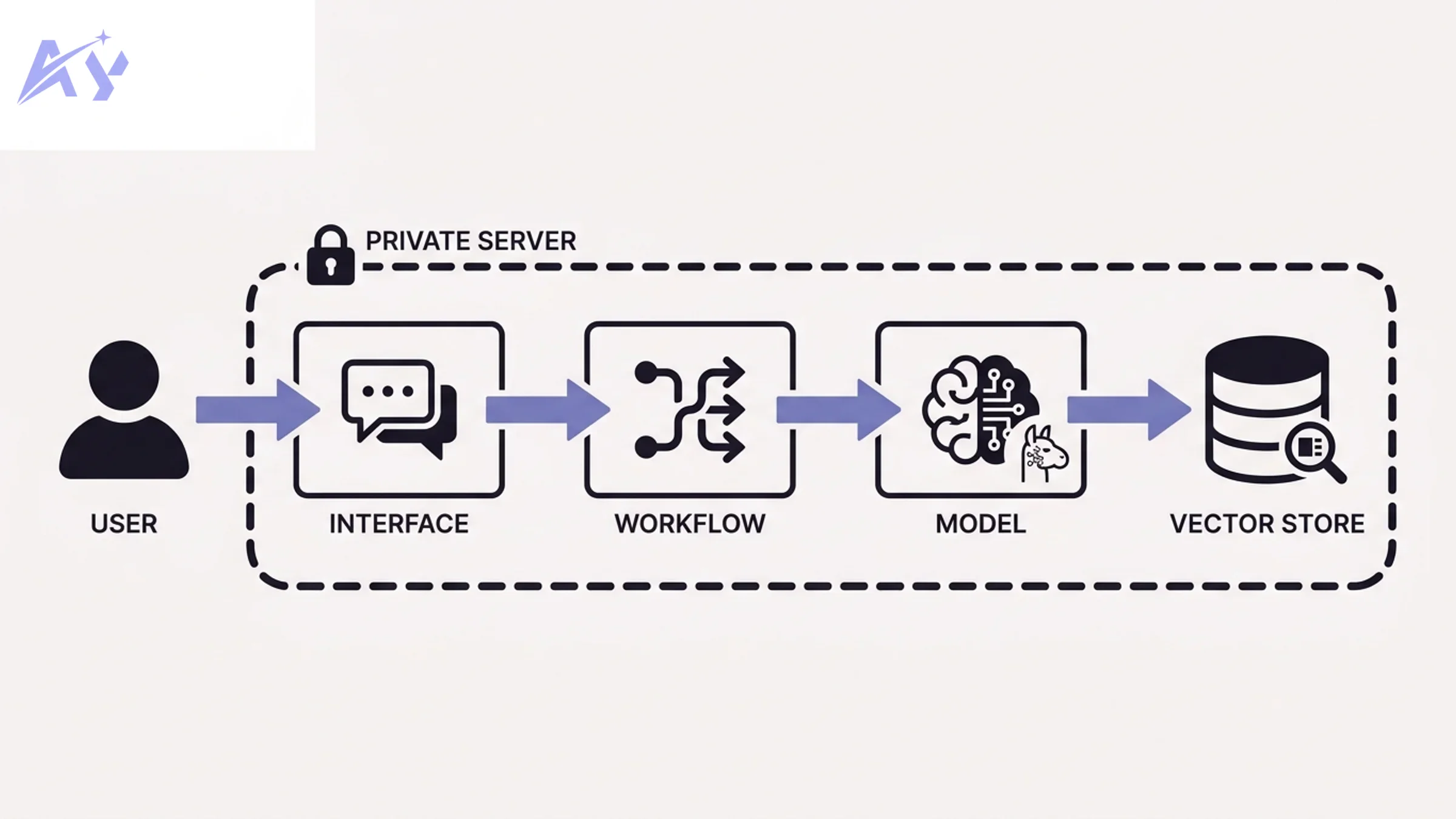
| Layer | Purpose | Recommended tool |
|---|---|---|
| Model runner | Runs LLMs locally | Ollama |
| Interface | Chat UI, API gateway | Open WebUI (or OpenClaw) |
| Workflow orchestration | Connects AI to business logic | n8n (or Dify) |
| Vector store | Enables RAG and semantic search | Qdrant (or Chroma) |
You do not need all four layers on day one. Start with Ollama and add layers as your use case expands.
Free weekly brief
Steal our production automations
The exact n8n flows, Claude Code setups, and prompts we ship for clients, broken down step by step. No spam, unsubscribe anytime.
Step 1: Set Up Ollama to Run Local LLMs
Ollama is the easiest way to run large language models on your own hardware. It handles model downloading, quantization, and serving through a simple CLI and REST API.
Hardware Requirements
| Use case | Minimum RAM/VRAM | Recommended |
|---|---|---|
| Small models (7B) | 8 GB RAM | 16 GB RAM |
| Medium models (13B-14B) | 16 GB RAM / 8 GB VRAM | 32 GB RAM / 16 GB VRAM |
| Large models (70B) | 48 GB VRAM | A100 / H100 GPU |
| CPU-only fallback | 16 GB RAM | 32 GB RAM (slow) |
For most small teams, a machine with 32 GB RAM and a mid-tier NVIDIA GPU (RTX 3090 or better) handles 13B parameter models well. For serious production workloads, a cloud GPU instance (Lambda Labs, RunPod, or Vast.ai) is more cost-effective than buying hardware.
Install Ollama
macOS / Linux:
curl -fsSL https://ollama.com/install.sh | sh
Windows: Download the installer from ollama.com.
Docker:
docker run -d -v ollama:/root/.ollama -p 11434:11434 --name ollama ollama/ollama
With GPU support (NVIDIA):
docker run -d --gpus=all -v ollama:/root/.ollama -p 11434:11434 --name ollama ollama/ollama
Pull a Model
# Llama 3.1 8B — good all-around choice
ollama pull llama3.1

# Mistral 7B — fast, strong reasoning
ollama pull mistral

# Gemma 2 9B — Google's open model, excellent for instruction following
ollama pull gemma2

# Qwen 2.5 14B — strong multilingual, good for coding
ollama pull qwen2.5:14b
Test It
ollama run llama3.1 "Explain RAG in one paragraph"
Ollama also exposes an OpenAI-compatible REST API at http://localhost:11434/v1. This means any tool built for OpenAI's API works with Ollama by just swapping the base URL.
Step 2: Add a Chat Interface (Open WebUI or OpenClaw)
Running models from the terminal is useful for testing. For actual users, you need a chat interface.
Open WebUI
Open WebUI is a self-hosted ChatGPT-style interface that connects directly to Ollama. It supports multi-user authentication, conversation history, document uploads, and model switching.
Docker Compose setup:
version: "3.8"

services:
  ollama:
    image: ollama/ollama
    container_name: ollama
    volumes:
      - ollama_data:/root/.ollama
    ports:
      - "11434:11434"
    restart: unless-stopped
    # Add: deploy.resources.reservations.devices for GPU support

  open-webui:
    image: ghcr.io/open-webui/open-webui:main
    container_name: open-webui
    ports:
      - "3000:8080"
    environment:
      - OLLAMA_BASE_URL=http://ollama:11434
      - WEBUI_AUTH=true
    volumes:
      - open_webui_data:/app/backend/data
    depends_on:
      - ollama
    restart: unless-stopped

volumes:
  ollama_data:
  open_webui_data:
Save this as docker-compose.yml and run:
docker compose up -d
Open http://localhost:3000 to access the interface. Create an admin account on first login.
Open WebUI also exposes its own OpenAI-compatible API endpoint at /api/v1, which means you can use it as a drop-in proxy for other tools in your stack.
OpenClaw (Alternative)
OpenClaw is worth considering if you need tight integration with external services, webhooks, or custom tool definitions. It is built specifically for teams that want AI as a component inside larger automation pipelines, rather than as a standalone chat product. For integration-heavy use cases (connecting AI to CRMs, databases, or internal APIs), OpenClaw's architecture is better suited.
Step 3: Add Workflow Automation (n8n or Dify)
A chat interface is only one way to use your local LLMs. For business automation, you need a workflow layer that routes inputs, processes documents, calls APIs, and triggers actions. This is where we build the automations that actually save time.
If you are building custom automation workflows, our custom automation service can help you design and implement these pipelines without starting from scratch.
n8n
n8n is an open-source workflow automation platform with 400+ integrations. It connects to Ollama via its built-in OpenAI node by simply changing the base URL.
Docker setup:
docker run -d \
  --name n8n \
  -p 5678:5678 \
  -v n8n_data:/home/node/.n8n \
  docker.n8n.io/n8nio/n8n
Connecting n8n to Ollama:
In n8n, add a new credential of type "OpenAI API". Set:
- API Key: any non-empty string (Ollama does not require a real key)
- Base URL:
http://host.docker.internal:11434/v1(if Ollama runs on the host) orhttp://ollama:11434/v1(if both run in Docker Compose)
Now every n8n AI node that supports OpenAI will work with your local Ollama models.
Dify (Alternative)
Dify is a more opinionated platform that combines LLM app building, workflow orchestration, and a RAG pipeline in one UI. It has native Ollama support and is worth considering if you want a faster path to a finished AI product without writing custom workflow logic.
Step 4: Add a Vector Store for RAG
Retrieval-augmented generation (RAG) lets your LLM answer questions based on your own documents, rather than only its training data. For this, you need a vector store: a database that stores text embeddings and retrieves the most relevant chunks given a query.
If you need a production-grade RAG pipeline with chunking strategies, embedding model selection, and retrieval tuning, our RAG pipeline architecture service provides end-to-end design and implementation.
Qdrant
Qdrant is a purpose-built vector database written in Rust. It is fast, supports filtering alongside vector search, and has excellent Docker support.
docker run -d \
  --name qdrant \
  -p 6333:6333 \
  -p 6334:6334 \
  -v qdrant_storage:/qdrant/storage \
  qdrant/qdrant
The Qdrant UI is available at http://localhost:6333/dashboard.
Basic Python example (creating a collection and adding a document):
from qdrant_client import QdrantClient
from qdrant_client.models import Distance, VectorParams, PointStruct

client = QdrantClient(host="localhost", port=6333)

# Create a collection
client.create_collection(
    collection_name="knowledge_base",
    vectors_config=VectorParams(size=768, distance=Distance.COSINE),
)

# Add a document (you would generate the vector from an embedding model)
client.upsert(
    collection_name="knowledge_base",
    points=[
        PointStruct(
            id=1,
            vector=[0.1] * 768,  # replace with real embedding
            payload={"text": "Ollama runs LLMs locally.", "source": "docs/overview.md"},
        )
    ],
)
Chroma (Alternative)
Chroma is a lighter-weight option that is easier to embed directly in Python applications. It stores vectors in a local SQLite database, which makes it ideal for prototyping, but Qdrant is generally preferred for production due to its performance and filtering capabilities.
Putting It All Together: A Real Example
Here is what a complete self-hosted AI pipeline looks like for a common use case: an internal knowledge base assistant.
For more complex pipelines connecting multiple services, our custom workflow automation service can accelerate your deployment.
Flow:
User submits question via Open WebUI (or direct API call)
       |
       v
n8n workflow receives the request via webhook
       |
       v
n8n calls Qdrant: semantic search on "knowledge_base" collection
       |
       v
Qdrant returns top 3 most relevant document chunks
       |
       v
n8n constructs prompt: [system context] + [retrieved chunks] + [user question]
       |
       v
n8n calls Ollama API (llama3.1) with the augmented prompt
       |
       v
Llama 3.1 generates answer grounded in your documents
       |
       v
n8n returns response to Open WebUI / calling application
What this replaces:
- OpenAI Embeddings API (replaced by a local embedding model, e.g.
nomic-embed-textvia Ollama) - OpenAI Chat Completions API (replaced by Llama 3.1 or Mistral via Ollama)
- Pinecone or Weaviate hosted vector database (replaced by Qdrant on your infrastructure)
The full Docker Compose for this stack:
version: "3.8"

services:
  ollama:
    image: ollama/ollama
    container_name: ollama
    volumes:
      - ollama_data:/root/.ollama
    ports:
      - "11434:11434"
    restart: unless-stopped

  open-webui:
    image: ghcr.io/open-webui/open-webui:main
    container_name: open-webui
    ports:
      - "3000:8080"
    environment:
      - OLLAMA_BASE_URL=http://ollama:11434
    volumes:
      - open_webui_data:/app/backend/data
    depends_on:
      - ollama
    restart: unless-stopped

  n8n:
    image: docker.n8n.io/n8nio/n8n
    container_name: n8n
    ports:
      - "5678:5678"
    volumes:
      - n8n_data:/home/node/.n8n
    restart: unless-stopped

  qdrant:
    image: qdrant/qdrant
    container_name: qdrant
    ports:
      - "6333:6333"
    volumes:
      - qdrant_storage:/qdrant/storage
    restart: unless-stopped

volumes:
  ollama_data:
  open_webui_data:
  n8n_data:
  qdrant_storage:
Run docker compose up -d and your full AI stack is live, entirely on your own infrastructure.
What You Give Up vs OpenAI
This guide would not be complete without honest trade-offs. Self-hosting is not right for every team.
For teams that decide to self-host, keeping the stack running reliably requires ongoing effort. Our automation maintenance and support service covers monitoring, model updates, and infrastructure management so your team can focus on building.
Model Quality
As of 2026, Llama 3.1 70B and Qwen 2.5 72B are competitive with GPT-4o-mini on many tasks, particularly coding, summarization, and instruction following. However, GPT-4o and Claude Opus 4 class models still lead on complex reasoning, nuanced instruction following, and multimodal tasks. If your use case requires top-tier reasoning quality and response consistency, the gap is real.
The practical answer: run a self-hosted model for 80% of your workload (classification, summarization, drafting, search) and route only the most complex queries to a commercial API. This hybrid approach captures most of the cost savings while preserving quality for high-stakes interactions.
Maintenance Burden
Running your own infrastructure means you own the uptime. Models need to be updated. Docker containers need to be monitored. GPU drivers occasionally need updates. For a team with a dedicated DevOps engineer, this is manageable. For a solo founder or a small team without infrastructure experience, the operational overhead can be significant.
GPU Costs for Serious Workloads
A 70B parameter model requires significant VRAM. An NVIDIA A100 GPU cloud instance runs roughly $2-3/hr. At continuous usage, that adds up. For high-throughput production workloads, the economics of self-hosting vs managed APIs require careful modeling. The break-even point depends heavily on your actual token volume and the model size you need.
Key Takeaways
- Self-hosting becomes cost-effective at 10M tokens/month and above. Below that threshold, the operational overhead may not be worth the savings.
- The four-layer stack (Ollama, Open WebUI, n8n, Qdrant) covers the majority of enterprise AI use cases without requiring any commercial API.
- Start with Ollama alone. Add Open WebUI for a chat interface, then add n8n for workflow automation, then Qdrant when you need RAG.
- The OpenAI-compatible API in Ollama means most existing integrations work with zero code changes. Swap the base URL, keep everything else.
- Model quality is the honest trade-off. For complex reasoning tasks, the gap between open-weight models and GPT-4o class models is real. A hybrid approach mitigates this.
- Data stays on your infrastructure. For regulated industries, this alone justifies the operational investment.
FAQ
Is Ollama free?
Yes. Ollama is open source (MIT license) and free to use. The models it runs (Llama, Mistral, Gemma, Qwen) are also free under their respective open licenses. You pay only for the hardware or cloud instance that runs them.
Can self-hosted models match GPT-4o quality?
For most practical tasks (summarization, classification, code generation, document Q&A), modern 13B-70B models are competitive with GPT-4o-mini and approaching GPT-4o. For highly complex multi-step reasoning, creative writing, and the newest benchmarks, commercial frontier models still lead. The gap is closing quickly, particularly on coding benchmarks.
What hardware do I need to get started?
For development and testing, any machine with 16 GB RAM and a modern CPU will run 7B parameter models. For production use with 13B models, 32 GB RAM and a GPU with 8-16 GB VRAM is recommended. For 70B models, you need at least 48 GB of VRAM (multiple consumer GPUs or a data center GPU).
Can I use a cloud GPU instead of buying hardware?
Yes, and for most teams this is the better choice. RunPod, Lambda Labs, and Vast.ai all offer GPU instances by the hour. A Lambda Labs A10 instance (~$0.60/hr) handles 13B models well. You can run the instance only when needed, which keeps costs low.
Does Open WebUI replace ChatGPT for my team?
For most day-to-day use cases (drafting, Q&A, summarization), yes. Open WebUI supports multi-user auth, conversation history, document uploads, and model switching. It lacks GPT-4o's image generation, voice mode, and plugin ecosystem, but covers the core chat use cases well.
Can I connect my self-hosted stack to existing tools like Slack, Notion, or a CRM?
Yes. n8n has 400+ integrations including Slack, Notion, HubSpot, Salesforce, and Airtable. You connect these via n8n workflows that use Ollama as the AI backend. The OpenAI-compatible API means any integration that supports OpenAI also supports Ollama.
Is this production-ready out of the box?
The Docker Compose setup described here is a solid starting point, but production hardening requires additional work: SSL/TLS termination, authentication for all services, backup strategy for vector store data, monitoring and alerting, and GPU health checks. Treat the setup in this guide as a foundation to build on, not a production deployment checklist.
What embedding model should I use for RAG?
nomic-embed-text (available via ollama pull nomic-embed-text) is the most commonly used open embedding model. It produces 768-dimensional vectors and performs well on document retrieval tasks. For multilingual documents, mxbai-embed-large is a strong alternative.
Ready to build your own AI stack? Start with a single ollama pull llama3.1 command and go from there. If you want expert help designing the architecture or setting up the workflows, reach out to our team; we have built self-hosted AI stacks for startups and enterprises across regulated industries.
For enterprise-scale self-hosted AI infrastructure built on OpenClaw or NemoClaw, see AY Automate enterprise AI setup.
Continue Reading
Vector Databases for AI Agents: When You Actually Need One (2026)
What a vector database does differently from a traditional database, when an AI agent genuinely needs one, and what to consider when choosing between options.
Synthetic Data Generation for AI Training: A Practical Guide (2026)
What synthetic data is actually useful for, the main generation approaches, and where it falls short of real-world validation before a launch.
Spec-Driven Development: Writing Specs AI Agents Can Build (2026)
What spec-driven development means for AI coding agents, how it differs from prompting, what a good spec contains, and a lightweight workflow to start using it.
Book a Free Strategy Call
Building this in production?
Walid runs a 30-min call to map your AI engineering team. Free, no slides.
Free weekly brief
Steal our production automations
The exact n8n flows, Claude Code setups, and prompts we ship for clients, broken down step by step. No spam, unsubscribe anytime.

Ex-IBM AI engineer and enterprise architect. Adel owns the technical architecture behind every automation and AI agent system AY Automate ships.