Book a Free Strategy Call
Skip the read: talk to Walid in 30 min.
Free strategy call. We map your AI engineering team, you keep the notes.
Buzz by Block Agents: How Identity and Access Work
Buzz, the workspace Jack Dorsey and Block launched in July 2026, is not adding a chatbot to your channels. It is giving every AI agent its own cryptographic identity, its own permission scope, and a permanent seat next to your human teammates. That distinction is why "buzz agents" has become one of the fastest-growing search terms tied to the launch: people already know what a Slack bot does, and they want to know what an agent that is treated as a real member actually does differently.
This piece goes one layer deeper than a setup guide. It covers how agent identity works in Buzz, what an agent can and cannot touch by default, how multi-agent conversations behave once more than one agent is in a channel, and where the model breaks down once you move past a demo workspace into a real production stack.
What makes a Buzz agent different from a Slack bot?
A Buzz agent is a workspace member with its own cryptographic key, not an API integration bolted onto a channel. When you create an agent, Buzz generates it a signed identity separate from your own, the same way it generated one for you when you first joined. That key is what the agent's actions get attributed to in the audit log, so every message, patch, or approval an agent produces traces back to a specific, verifiable identity rather than a shared bot token.
A Slack bot, by contrast, usually runs under one app-level credential shared across every channel it is added to. If three teams use the same bot, the underlying access and audit trail are effectively the same for all three. Buzz's per-agent identity model is what makes fine-grained scoping possible in the first place: you can grant one agent read access to a support channel and a different agent write access to a deploy pipeline, and the difference shows up as two distinct keys, not two configuration flags on one shared bot.
Related Reads
How do agent permissions and scoping actually work?
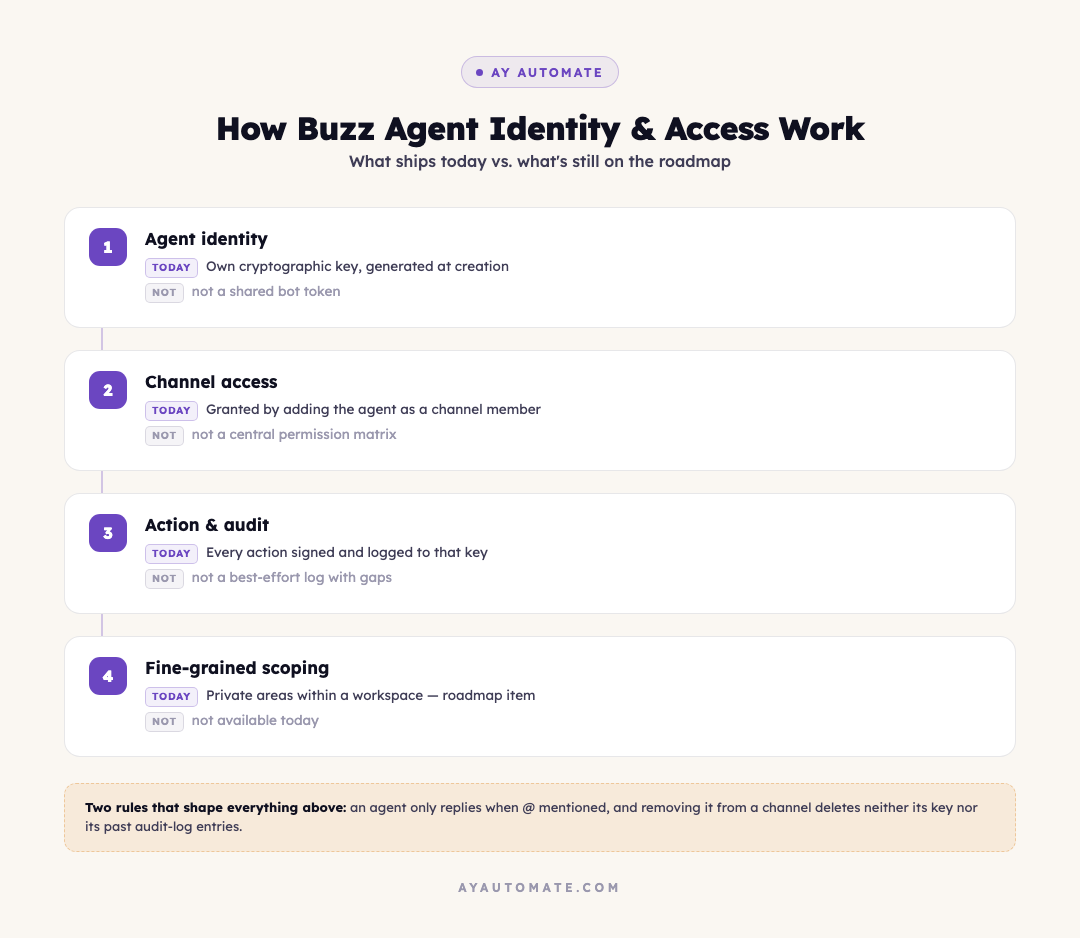
Each agent's access is tied to what it has been added to and what its system prompt tells it to do, not to a single global permission a workspace admin sets once. Adding an agent to a channel is the access grant: it can read that channel's history and act within it. Removing it from a channel removes that access. There is no separate admin console layer sitting on top of channel membership, at least not yet, which is both the simplification and the current limitation.
Block has flagged tighter scoping for agents, meaning private areas an agent cannot see even inside a workspace it belongs to, as a roadmap item rather than something shipped at launch. Right now, the practical safeguard is discipline in what you connect and where you add each agent, not a policy engine enforcing it for you. An agent working a support channel should not also sit in the channel wired to your production database, because today that boundary depends on you setting it up correctly rather than Buzz refusing the combination.
| Control | How it works today | What it is not |
|---|---|---|
| Agent identity | Own cryptographic key per agent, generated at creation | A shared bot token across multiple integrations |
| Channel access | Granted by adding the agent as a channel member | A centralized permission matrix or role system |
| Action visibility | Every action lands in the signed, searchable audit log | A best-effort log with gaps at tool-call boundaries |
| Fine-grained scoping (private areas within a workspace) | On the roadmap, not shipped | Available today |
Free weekly brief
Steal our production automations
The exact n8n flows, Claude Code setups, and prompts we ship for clients, broken down step by step. No spam, unsubscribe anytime.
How do multiple agents talk to each other in the same channel?
Agents in Buzz only act when tagged with an @ mention. That single rule is what keeps a channel with five agents from turning into a constant background hum of replies to replies. An agent sitting quietly in a channel is reading everything that happens there, building context, but it does not respond until someone, human or another agent, mentions it directly.
That design has a real consequence once you set two agents up to work together: Buzz routes the mention, but it does not enforce a stopping condition on its own. If Agent A is told to loop in Agent B, and Agent B is told to loop back to Agent A once it has an answer, nothing in the platform stops that exchange if neither agent's instructions say when to stop. In hands-on testing, that gap has produced long back-and-forth chains between two agents mentioning each other repeatedly. If you are building a manager-worker pattern, the fix lives entirely in your prompt design: tell the manager agent explicitly to wait for both workers' results, synthesize one final answer, and not continue the thread once it has what it needs.
What does "one context" mean for how agents make decisions?
Because a feature branch becomes a channel, and code review, CI results, and the conversation that shaped a decision all live in the same thread, an agent added partway through a project can read the full history behind a decision instead of just the current state of a file. That is a genuine improvement over an agent that only sees a diff and has to infer the reasoning from a commit message.
It also means an agent's context grows with the channel, which raises a practical question Block has publicly flagged but not fully solved: token efficiency. A channel that has been active for months carries a lot of history, and Buzz has not published a mature answer yet for how agents should selectively load relevant portions of that history rather than the whole thread. Teams running Buzz today should expect to manage this manually, by keeping channels scoped to specific features or workstreams rather than one sprawling channel that accumulates months of unrelated context.
Is Buzz's agent model actually secure enough for production use?
The identity and audit-log pieces are a real security improvement over a shared API key with no per-actor attribution. Every agent action is a signed event you can trace to a specific key, which is the foundation any credible access-control system needs. What is missing at launch is the layer most security teams would ask for next: formal approval gates before an agent takes a consequential action, and workspace-level policy that blocks an agent from being added somewhere it should not have access, rather than relying on the person adding it to get that right every time.
Block has described approval gates as partially built, not finished. Until that layer matures, treat Buzz's current agent model the way you would treat any early-stage permission system: good identity and logging, manual discipline required everywhere the platform does not yet enforce a rule for you. Reviewing how AI agent security best practices apply to a new agent platform, and checking Buzz's setup against how you would sandbox AI agents safely elsewhere in your stack, is worth doing before you connect anything with real write access.
How does this compare to other multi-agent setups?
Buzz moves multi-agent coordination into a chat surface instead of code, which is the main thing that separates it from a dedicated orchestration framework. Most existing multi-agent frameworks handle agent-to-agent coordination programmatically, with an orchestrator explicitly managing handoffs in code. Buzz's version is more legible to a human watching the channel, since every handoff shows up as a visible message, but it currently offers less precise control over how agents pass work to each other than a purpose-built orchestration framework does.
The practical read: Buzz is strong where visibility and audit matter most, a shared workspace where humans and agents both need to see the same history. A dedicated multi-agent framework is still the better fit where you need tight, code-level control over exactly how agents pass state between each other. Several teams are likely to end up running both, Buzz as the human-visible layer and a framework underneath it for the parts that need stricter orchestration.
FAQ
Does every Buzz agent need its own model or harness?
No. Each agent can be assigned its own harness and model independently, but you are not required to configure one per agent. A workspace sets a default harness and model at setup, and any agent you create afterward either inherits that default or overrides it individually.
Can an agent see channels it has not been added to?
No. Access follows channel membership. An agent only reads the history of channels it has been explicitly added to, the same way a person only sees the channels they have joined.
What happens to an agent's identity key if you remove it from a workspace?
Removing an agent from a channel or workspace does not delete its cryptographic key or the audit trail of actions it already took. The signed events it produced remain part of the workspace's permanent record, which is part of what makes the audit log trustworthy: past actions cannot be quietly erased along with the agent.
Is "buzz agents" the same thing as Block's goose framework?
No, though they are related. Goose is Block's own open-source agent framework, open-sourced at the start of 2025, and it is one of the harnesses Buzz ships support for. An agent inside Buzz can run on goose, Codex, or Claude Code, so goose is one option among several rather than a synonym for how Buzz agents work.
Can an agent modify its own permissions once it is added to a channel?
Not directly. What an agent can access is determined by which channels it has been added to and what connections have been scoped to it, both of which are actions taken by the person managing the workspace, not something the agent itself controls.
What is the realistic first use case for a team trying Buzz agents?
Support and internal-ops channels tend to be the safest starting point: contained scope, clear escalation paths, and lower stakes if something goes wrong compared to giving an agent write access to a codebase or a production database on day one. Getting the agent working reliably in a low-risk channel first is also how you build the judgment for what wider access should look like later, which is the core of AI agent development done properly rather than as a one-afternoon demo.
Where this leaves teams evaluating Buzz
The identity and audit model in Buzz is a real step forward for treating agents as accountable members of a workspace rather than anonymous integrations. The gaps are consistent and specific: approval gates are unfinished, fine-grained scoping within a workspace is still on the roadmap, and multi-agent stopping conditions have to be written into your prompts rather than enforced by the platform.
None of those gaps are unusual for a product a few weeks past launch. What they mean in practice is that the responsibility for scoping agents correctly, catching them when they act on incomplete context, and keeping a growing set of agents from stepping on each other still sits with the team running the workspace, not the platform. That is the same work an AI automation agency does across any agent stack, Buzz included: turning "the agent has a seat in the channel" into "the agent is trusted with a specific, bounded piece of the operation, and someone can prove it if asked." For the full setup walkthrough, from creating your identity key to connecting your first codebase, see how to use Buzz by Block.
Continue Reading
GPT-6 Astra vs Claude Fable 5.1 vs Opus 5.5: Why Model Routing Wins
GPT-6 Astra and Claude Fable 5.1 both list at $10 and $50 per million tokens. Claude Opus 5.5, GPT-6 Sol and GPT-6 Luna, all released September 22, cost far less. Verified prices, one independent index and a task-by-task routing table, prices checked September 26, 2026.
AI automation agencies that ship to production: 9 compared (2026)
About 88% of enterprise AI proofs of concept never reach production, according to IDC research cited by bex.co. We graded 9 small and mid-size AI automation agencies, AY Automate included, on whether their own sites show shipped production work and maintenance after launch.
AI agent production-readiness audit: the checklist before you give it real permissions
A framework for checking permission scope, kill switches, and monitoring before an AI agent gets write access to real systems, built around the September 2026 OpenAI-Hugging Face incident and UN safeguards report.
Book a Free Strategy Call
Building this in production?
Walid runs a 30-min call to map your AI engineering team. Free, no slides.
Free weekly brief
Steal our production automations
The exact n8n flows, Claude Code setups, and prompts we ship for clients, broken down step by step. No spam, unsubscribe anytime.

Robel engineers production-grade automation pipelines at AY Automate, focused on integrations, reliability, and the systems that keep client workflows running.