Book a Free Strategy Call
Skip the read: talk to Walid in 30 min.
Free strategy call. We map your AI engineering team, you keep the notes.
Claude Code rate limits in 2026 reset every 5 hours, scale with your subscription tier (Pro, Max 5x, Max 20x), and compound fastest in long refactor sessions due to context-token accumulation. The 18 fixes below cover zero-config tweaks (.claude/settings.json token hygiene) through full routing workarounds (Ollama, OpenRouter).
You hit your claude code rate limit at 10am on a Tuesday. You're in the middle of a refactor, your session just reset, and you have four hours before your next reset window. Most people blame Anthropic. The real problem is something more fixable: how tokens actually compound in a long session.
This post covers both. First, the honest explanation of what changed with Claude Code usage limits in 2026 and why Anthropic did it. Then, 18 ranked fixes you can implement today, from zero-config tweaks to a full model swap that cuts costs by 35x.
What Actually Changed with Claude Code Rate Limits
In early April 2026, Anthropic adjusted how fast your 5-hour session limit drained based on the time of day, introducing a peak hours window (weekdays 5am to 11am Pacific, 8am to 2pm Eastern) where your session budget burned faster than off-peak hours.
That peak-hours penalty is gone. On May 6, 2026, Anthropic permanently doubled the 5-hour session limits for Pro, Max, Team, and seat-based Enterprise plans, and removed the peak-hours throttle for Pro and Max entirely. If you are on one of those plans, your session budget now drains at the same rate all day, every day, from a larger pool than it did in April.
Weekly caps saw a separate, temporary move: from mid-May 2026, Anthropic ran a promotion giving Pro, Max, Team, and legacy seat-based Enterprise users 50% higher weekly limits. Originally set to end July 19, 2026, Anthropic extended it through August 19, 2026. Check Anthropic's official status page for the current state, since that boost may have lapsed or been extended again by the time you read this.
Key facts about the change:
- The April 2026 peak-hours penalty affected roughly 7% of users, primarily on Pro tier, before Anthropic removed it in May
- The $200/month Max plan historically allowed up to $5,000 of actual compute per month (a 25x subsidy) before the May 6 doubling shifted the math further in users' favor
- May 6, 2026: 5-hour limits permanently doubled for Pro, Max, Team, and seat-based Enterprise; peak-hours throttle removed for Pro and Max
- Mid-May through August 19, 2026: temporary 50% weekly-limit boost for Pro, Max, Team, and legacy seat-based Enterprise (originally slated to end July 19, extended once already, verify current status on Anthropic's site)
- A separate caching bug was also identified during the April change and has since been patched; it was not intentional
The announcement was poorly communicated. Anthropic's developer advocate Thoric was largely left to explain it on social media without full context, which fueled conspiracy theories about intentional context bloating. That has been investigated and ruled out.
Related Reads
Why Anthropic Made This Change
The change was not about greed. It was about compute.
Anthropic's revenue has grown faster than its GPU capacity. The trajectory: roughly $100 million in 2025, $1 billion shortly after, with 2026 on track to hit $14 billion if current growth holds. The number of enterprise customers spending over $1 million annually has grown from a dozen to over 500. Eight of the Fortune 10 are now Claude customers.
That growth creates a structural problem. Anthropic has a fixed pool of GPUs. Those GPUs serve three groups that compete for allocation: research (building the next models), product (running Claude.ai and Claude Code), and users (everyone on a subscription). As the user base exploded, the product and user side started consuming GPU budget that research and enterprise teams depended on.
The 5am to 11am Pacific window was specifically cited because that is when demand spikes. Anthropic's original April solution was to slow down how fast the session budget drained during peak hours rather than cut the weekly total. By May, additional compute capacity (Anthropic cited a deal adding over 300 megawatts via SpaceX's Colossus 1 cluster) let them reverse course: double the 5-hour limit and drop the peak-hours penalty for Pro and Max entirely. From a systems perspective, both the April throttle and the May reversal are reasonable responses to a moving compute-supply picture.
Theo from t3.gg summarized the structural issue bluntly: "Anthropic bought too little compute and now users are paying the cost." That is accurate. But it also reflects the reality that $200 for $5,000 of compute was never a sustainable price. The subsidy is compressing, not disappearing.
Free weekly brief
Steal our production automations
The exact n8n flows, Claude Code setups, and prompts we ship for clients, broken down step by step. No spam, unsubscribe anytime.
The Real Culprit: Token Compounding
Here is what most developers do not realize: the rate limit change is not the biggest reason you are running out of tokens. Token compounding is.
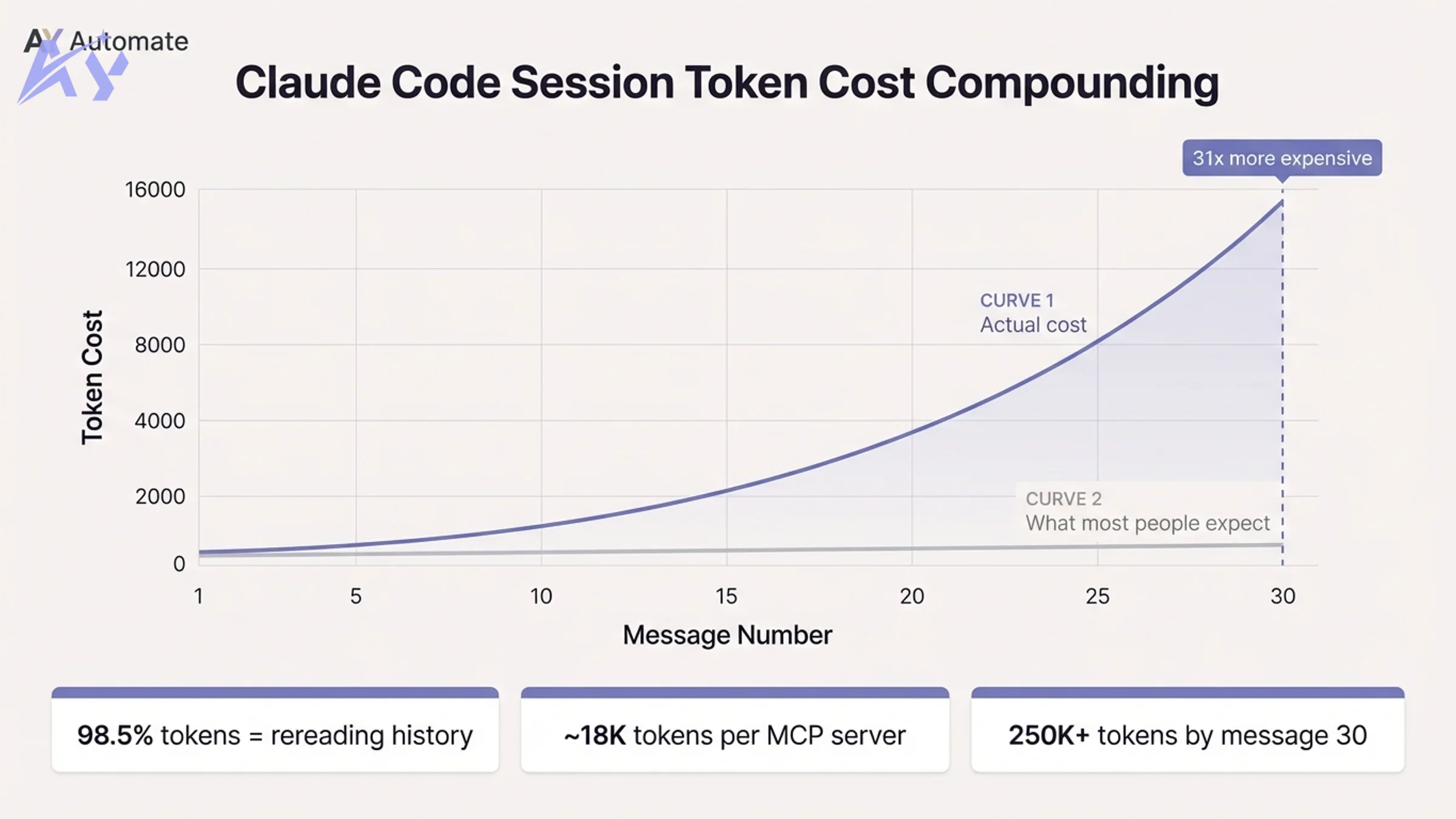
Every message Claude processes requires it to reread the entire conversation from message one. Message one might cost 500 tokens. Message 30 costs over 15,000, because Claude is rereading 29 prior exchanges before reading your new prompt. One developer tracked a 100+ message session and found that 98.5% of all tokens were spent rereading prior history. The new content was less than 2% of the total spend.
The math is not additive. It is roughly quadratic. After 30 messages, cumulative token spend can hit 250,000 or more in a single session.
On top of conversation history, every message also reloads:
- Your entire CLAUDE.md file on every turn
- All connected MCP server tool definitions (one server alone can add ~18,000 tokens per message as invisible overhead)
- Any loaded files or system prompts
This means that before you type a single word, a fresh session can already be 50,000+ tokens deep just from MCP servers and configuration files.
There is also a quality problem called "loss in the middle." Models pay the most attention to the beginning and end of a session. Content in the middle gets less weight. A bloated context is expensive and actively degrades the output. You are paying more and getting worse results.
The implication: most people do not need a bigger plan. They need better context hygiene.
18 Fixes for Claude Code Rate Limits, Ranked by Effort
These are distilled from Nate Herk's research on token optimization for Claude Code. Structured in three tiers by implementation effort.
Tier 1: Zero Config, Instant Impact
1. Use /clear between unrelated tasks. Every message in a long session compounds on all prior messages. Starting a fresh conversation for a new task is the single highest-leverage action. The same prompt costs exponentially less in a fresh session than at message 30.
2. Disconnect unused MCP servers.
Before each session, run /mcp and disconnect anything you are not actively using. One idle server can add 18,000 tokens of overhead to every message. If a CLI alternative exists (e.g., a Google Workspace CLI instead of the MCP server), prefer the CLI.
3. Batch multiple instructions into one message. Three separate messages cost roughly three times what one combined message costs, because each new message appends to the history before being processed. Send "do X, then Y, then Z" as a single prompt rather than three sequential ones.
4. Edit, do not follow up. If Claude's response was slightly wrong, edit your original message and regenerate instead of sending a correction. Follow-up messages stack permanently onto history. Edits replace the bad exchange entirely.
5. Use plan mode before any real task. Add this instruction to your CLAUDE.md: "Do not make any changes until you have 95% confidence in what needs to be built. Ask follow-up questions until you reach that confidence level." Going down the wrong path, writing code, and then scrapping it is the single largest source of token waste. Plan mode eliminates most of it.
6. Run /context and /cost regularly.
/context shows you exactly what is consuming your budget right now: conversation history, MCP overhead, loaded files. /cost shows your actual token spend for the current session. Most developers have no idea where their tokens are going. These two commands make the invisible visible.
7. Keep your CLAUDE.md lean. Your CLAUDE.md is reloaded on every single message. Every paragraph you add is tokens you pay on every turn, permanently. Keep it to stable architectural decisions, not running commentary.
8. Close files you are not actively using. Files loaded into context stay there. Explicitly close or exclude files once a task involving them is complete.
9. Schedule heavy sessions around your weekly cap, not the clock. The old advice here was to save large refactors for off-peak hours. That stopped mattering for Pro and Max in May 2026, when Anthropic removed the peak-hours throttle and doubled the 5-hour limit for those plans. What still matters: your weekly cap. If you are close to it with days left in the week, spread heavy sessions out rather than burning the pool early.
Tier 2: Moderate Effort, Significant Return
10. Compact at 60% context.
Run /compact when you reach roughly 60% of your context window. This compresses the session history into a summary while preserving the essential context. Compacting at 60% keeps quality high; waiting until 90% means the model starts ignoring the compressed middle.
11. Use sub-agents for isolated research tasks. If you need to explore, summarize, or process something as a one-off, spawn a sub-agent. Sub-agents start with their own context, keeping the parent session clean. The cost: sub-agent workflows use roughly 7 to 10x more tokens than a single-agent session because each sub-agent reloads the full system context on startup. Use them deliberately, not by default.
12. Delegate sub-agent tasks to Haiku. When spawning sub-agents for simple tasks (research, formatting, summarization), explicitly specify Haiku as the model. Haiku at sub-agent scale costs a fraction of Sonnet and handles most lightweight work reliably.
13. Add applied learning rules to CLAUDE.md. A short "applied learning" section at the bottom of your CLAUDE.md can instruct Claude to log one-line lessons from repeated failures or workarounds. Keep bullets under 15 words each. This reduces rexplaining the same context across sessions and cuts prompt length over time.
Tier 3: Advanced Optimization
14. Use the right model for the task. Sonnet should be your default for most coding work. Haiku handles sub-agents, formatting, and simple tasks. Reserve Opus for deep architectural planning and only when Sonnet is genuinely insufficient; try to keep Opus under 20% of total usage. For large codebase reviews, consider pulling in Codex (via the official plugin) rather than running everything through Opus.
15. Understand sub-agent token multiplication. Agent teams are expensive. Each agent in a multi-agent workflow wakes up with its own full context, reloads all tool definitions, and runs independently. The cost multiplier is real: 7 to 10x versus a single-agent session. Use agent teams for tasks that genuinely benefit from parallelism, not as a default pattern.
16. Track your allocation against the reset window. If you are near a reset with budget remaining, run heavy tasks now. If you are near your limit with time remaining, step away. Burning the last 5% of your budget on a small task and getting stuck mid-session mid-task is worse than taking a break and returning with a full allocation.
17. Build an evolving CLAUDE.md. Treat your CLAUDE.md as a living constitution. Every architectural decision you record there is a paragraph you never have to retype. Stable decisions (naming conventions, folder structure, API patterns) belong there. Running commentary and task-specific context do not.
18. Combine the above with token monitoring. Enable the status line in your Claude Code config to show model, context percentage, and token count at all times. Awareness is the first step. Most of these fixes become obvious once you can see your token spend in real time.
The Nuclear Option: Swap the Model Entirely
If context hygiene is not enough, there is a more aggressive fix: replace Claude entirely as the underlying model while keeping the Claude Code agent harness.
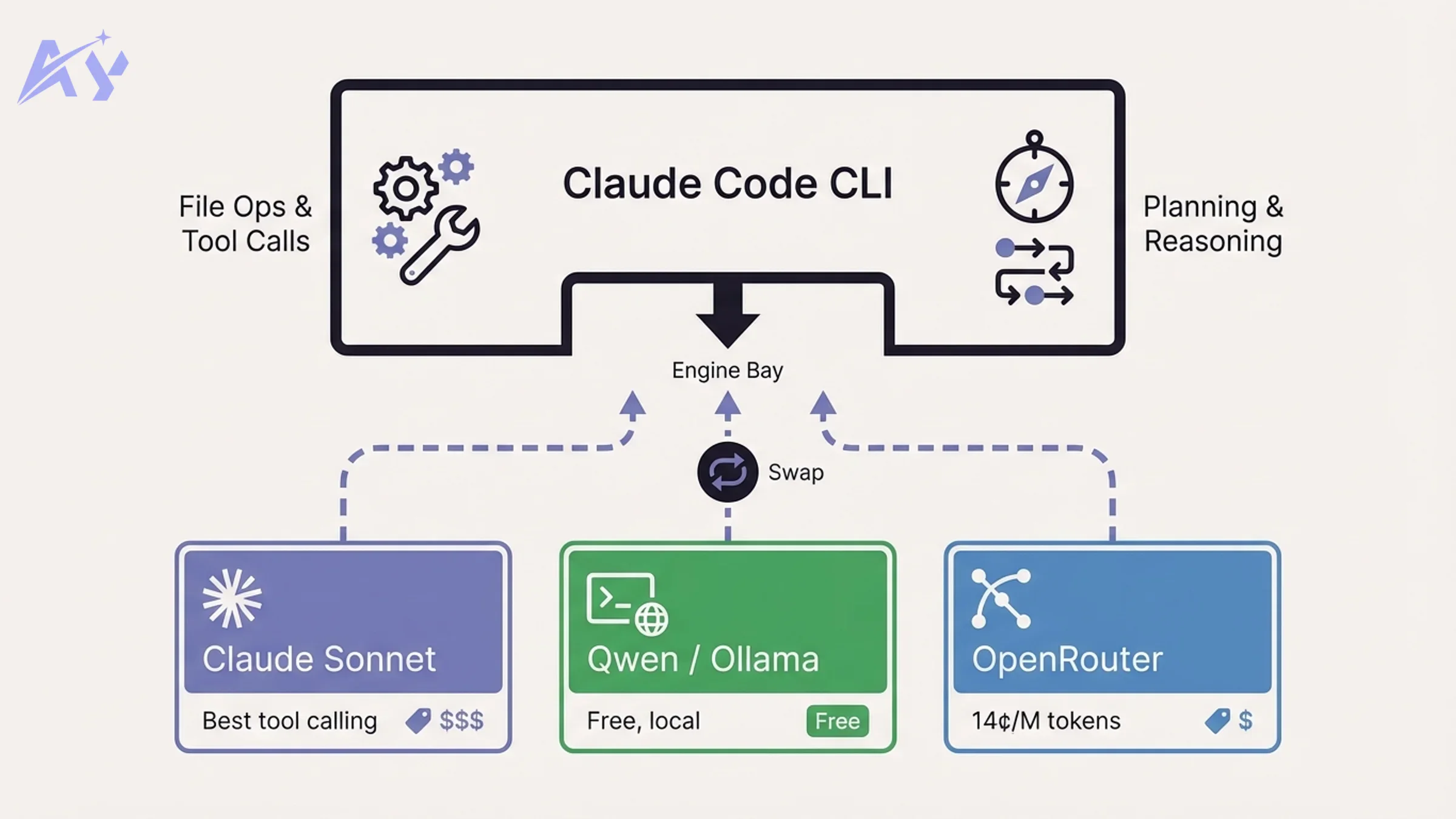
Think of it this way: Claude Code is the car. The AI model is the engine. Claude Code handles tool use, file operations, planning loops, and task orchestration. The model just provides the reasoning. You can swap the engine without replacing the car.
This is not against Anthropic's terms of service. You are using their agent harness with a different model.
Method 1: Ollama (Local, Free)
Install Ollama, pull a model, and point Claude Code's API endpoint at your local instance.
# Install Ollama and pull a model
brew install ollama
ollama pull qwen2.5-coder:14b

# Set environment variables
export ANTHROPIC_BASE_URL=http://localhost:11434/v1
export ANTHROPIC_API_KEY=ollama
export ANTHROPIC_MODEL=qwen2.5-coder:14b
export CLAUDE_SMALL_MODEL=qwen2.5-coder:7b
export CLAUDE_LARGE_MODEL=qwen2.5-coder:14b
The critical gotcha: you must set all model slot variables, the main slot and all fallback slots. If you only set ANTHROPIC_MODEL, Claude Code will fall back to calling Haiku or Sonnet via the Anthropic API for tool calls and sub-tasks. You will see charges appearing without understanding why. Set CLAUDE_SMALL_MODEL and CLAUDE_LARGE_MODEL explicitly.
Method 2: OpenRouter (Cloud, Free or Cheap)
OpenRouter provides access to hundreds of models through a single API. Free-tier models include Qwen 3.6, Meta Llama 3.3 70B, and others. Paid models like Gemma 4 cost a fraction of Anthropic pricing.
export ANTHROPIC_BASE_URL=https://openrouter.ai/api/v1
export ANTHROPIC_API_KEY=your_openrouter_key
export ANTHROPIC_MODEL=qwen/qwen-3.6-chat:free
export CLAUDE_SMALL_MODEL=qwen/qwen-3.6-chat:free
export CLAUDE_LARGE_MODEL=qwen/qwen-3.6-chat:free
Same gotcha applies: set all three model variables or Haiku will silently bill you.
Cost Comparison
| Method | Monthly Cost | Model Quality | Tool Calling | Context Window |
|---|---|---|---|---|
| Claude Max plan | $200 | Best (Sonnet/Opus) | Excellent | 200K tokens |
| OpenRouter free (Qwen 3.6) | $0 | Good | Moderate | 128K tokens |
| OpenRouter paid (Gemma 4) | ~$0.14/M input | Very good | Good | 128K tokens |
| Ollama local (Qwen 3.6) | $0 (hardware) | Good | Moderate | 128K tokens |
| Opus via API (direct) | ~$5/M input | Best | Excellent | 200K tokens |
Gemma 4 costs 14 cents per million input tokens and 40 cents per million output tokens. Opus costs $5 and $25 respectively. For most coding tasks, Gemma 4 delivers strong results at 35x lower cost.
The trade-offs are real. Open-source models were not trained on Claude Code's specific tool-calling protocol. Tool use, file operations, and multi-step agent tasks can be less reliable than with native Claude models. Some open-source models also have smaller context windows, which limits how much project context you can hold in a session.
For AI agent development workflows that depend on complex tool orchestration, stay on Claude. For research, summarization, code review, and documentation tasks, the free tier models perform well.
Model Mixing Strategy: What to Use When
You do not have to choose one model for everything. A practical allocation:
| Task | Recommended Model | Why |
|---|---|---|
| Default coding, feature work | Claude Sonnet | Best reliability for tool use and file ops |
| Sub-agent tasks (research, formatting) | Haiku | Cheap, fast, sufficient for lightweight work |
| Deep architectural planning | Opus (use sparingly) | Best reasoning, but expensive; keep under 20% |
| Large codebase review | Codex (via plugin) | Saves Claude tokens on analysis-heavy passes |
| Isolated research or summarization | OpenRouter free (Qwen) | Zero cost for tasks that do not need tool calling |
| Privacy-sensitive local work | Ollama | Stays on your machine, no API calls |
The goal of custom workflow automation at the model level is routing the right task to the cheapest model that can handle it reliably. That principle applies here too.
Teams rolling this out across multiple developers benefit from standardizing the model allocation rules in a shared CLAUDE.md or team configuration. If your team needs a structured approach to adopting Claude Code at scale, corporate AI training covers Claude Code configuration, token optimization, and agent workflow design in a hands-on format.
What This Means for You
-
If you are hitting limits daily: Start with Tier 1 fixes. Run
/contextin your next session before doing anything. Disconnect every MCP server you do not actively use. Use/clearwhen switching tasks. Most developers who implement these three changes alone see a 2 to 3x extension of their session life. -
If you are on Pro tier: The peak-hours penalty that used to hit you hardest is gone as of May 6, 2026, and your 5-hour session limit is now permanently doubled. The token-compounding fixes below still matter for weekly-cap headroom, but you no longer need to plan your day around a peak-hours window.
-
If you manage a team on Claude Code: The cost-per-developer math changes significantly once you factor in token compounding. A developer sending 40 messages per session is not spending 40x the cost of one message. They are spending hundreds of times more. Team-wide CLAUDE.md standards and model allocation rules are worth formalizing. AI strategy consulting can help you design that system across your organization.
-
If you want to eliminate the limit entirely: The Ollama or OpenRouter setup takes about 20 minutes. The trade-off is tool-call reliability on complex tasks. Use it for research and light work; keep Claude for production-quality agent workflows.
-
If you care about security: Routing Claude Code through third-party providers (OpenRouter, local Ollama) changes your threat model. Code and prompts leave your local environment through different channels. If you are working with sensitive codebases, audit your setup with an AI code security review before switching providers.
Sources: Nate Herk: 18 Claude Code Token Hacks, Theo: We need to talk about the Claude Code rate limits, Nate Herk: Ollama + Claude Code = 99% cheaper, OpenRouter Claude Code Integration, Claude Code Router on GitHub
FAQ
What are Claude Code rate limits in 2026? Claude Code rate limits control how fast your 5-hour session budget and weekly cap drain. Anthropic briefly ran a peak-hours penalty (5am to 11am Pacific, weekdays) starting in April 2026, then reversed it on May 6, 2026: 5-hour limits were permanently doubled for Pro, Max, Team, and seat-based Enterprise, and the peak-hours throttle was removed for Pro and Max. Weekly limits also got a temporary 50% boost from mid-May through August 19, 2026 (originally set to end July 19, then extended), so check Anthropic's current status before assuming it has reverted.
Why did Anthropic change Claude Code usage limits? Anthropic's user base grew faster than its GPU capacity. The $200/month Max plan was subsidizing up to $5,000 of actual compute per user per month (a 25x ratio). With revenue growing toward a projected $14 billion in 2026 and enterprise customers multiplying, the demand on shared GPU infrastructure exceeded supply during peak hours. The rate limit adjustment was a structural response to compute scarcity, not a pricing move.
What are the Claude Code peak hours and how do they affect me? Peak hours (5am to 11am Pacific, weekdays) briefly meant your session limit drained faster during that window, starting in April 2026. Anthropic removed this penalty for Pro and Max plans on May 6, 2026, alongside a permanent doubling of the 5-hour session limit. If you are on Pro or Max, your usage now drains at the same rate all day, regardless of when you work.
How do I check my current Claude Code token usage?
Run /context inside any Claude Code session to see a real-time breakdown of what is consuming your token budget: conversation history, MCP server overhead, loaded files, and system prompts. Run /cost to see the estimated spend for the current session. Enabling the status line in your Claude Code configuration adds a persistent token count and context percentage to your terminal view.
Can I use Claude Code with Ollama to avoid rate limits?
Yes. Claude Code's API endpoint is configurable. Set ANTHROPIC_BASE_URL to your local Ollama server, set ANTHROPIC_API_KEY to any non-empty value, and set all three model variables (ANTHROPIC_MODEL, CLAUDE_SMALL_MODEL, CLAUDE_LARGE_MODEL) to your chosen Ollama model. The critical gotcha: if you do not set all three, Claude Code will silently fall back to calling Haiku or Sonnet via the Anthropic API for tool calls. Trade-offs include less reliable tool calling and smaller context windows compared to native Claude models.
Is using OpenRouter with Claude Code against Anthropic's terms of service? No. You are using the Claude Code agent harness (Anthropic's software) with a different underlying model. Anthropic's terms govern the use of their models, not the harness itself. OpenRouter routes your requests to third-party model providers. This is a supported configuration and has been publicly discussed by Anthropic developer advocates.
What is the cheapest way to use Claude Code without hitting limits?
The free route: install Ollama, pull Qwen 3.6 or a comparable open-source model, and point Claude Code at your local instance. Total cost is $0 beyond hardware. The cheap-but-reliable route: use OpenRouter with Gemma 4 at 14 cents per million input tokens, 35x cheaper than Opus. The no-setup route: apply the Tier 1 context hygiene fixes (use /clear, disconnect unused MCP servers, batch prompts) and extend your existing plan's effective capacity by 2 to 3x without changing anything else.
For a detailed walkthrough on configuring Claude Code from scratch, including subscription tier selection, see how to set up Claude Code.
Continue Reading
CLAUDE.md vs AGENTS.md: What Changed When Claude Code Added AGENTS.md Support (2026)
Claude Code 2.1.277 reads AGENTS.md when a folder has no CLAUDE.md. Here is the exact precedence, the /config setting, what to do with old symlink and import workarounds, and how to verify it works.
AGENTS.md Explained: The Open Spec for AI Coding Agent Instructions
AGENTS.md is an open, cross-tool markdown file for giving AI coding agents project context: build commands, tests, and conventions. Codex, Cursor, and opencode read it natively, and since version 2.1.277 (September 18, 2026) Claude Code falls back to it when a folder has no CLAUDE.md.
Claude Skills Marketplace: Where to Find and Submit Claude Skills (2026)
There's no single official Claude Skills Marketplace. Skills ship inside plugins across two Anthropic-run catalogs and Anthropic's own GitHub repo, plus a few independent community sites that index or curate skills separately. Here's where to actually find them, and the real path to submit one.
Book a Free Strategy Call
Building this in production?
Walid runs a 30-min call to map your AI engineering team. Free, no slides.
Free weekly brief
Steal our production automations
The exact n8n flows, Claude Code setups, and prompts we ship for clients, broken down step by step. No spam, unsubscribe anytime.

Ex-IBM AI engineer and enterprise architect. Adel owns the technical architecture behind every automation and AI agent system AY Automate ships.