Book a Free Strategy Call
Skip the read: talk to Walid in 30 min.
Free strategy call. We map your AI engineering team, you keep the notes.
Most SaaS teams treat SEO pages as a volume problem: publish more, rank more. Then six months in, half the pages are unindexed, the ones that got crawled sit on page 4, and traffic barely moved. The volume was never the issue. The category was.
Search-driven SaaS growth comes from a small set of page types that map to a specific moment in someone's buying decision, not from a pile of generic "best tools for X" content. Get the category right and a single page with real intent behind it will outperform twenty pages nobody was searching for. This breaks down 9 page types worth building, ranked by how fast each one actually pays off, and the reasoning behind each one. It also covers why this happens to be one of the rare SEO workflows that genuinely automates well: the research per page is bounded and repeatable, and once a human sets the pattern, an agent can reproduce it without drifting.
1. Alternative pages
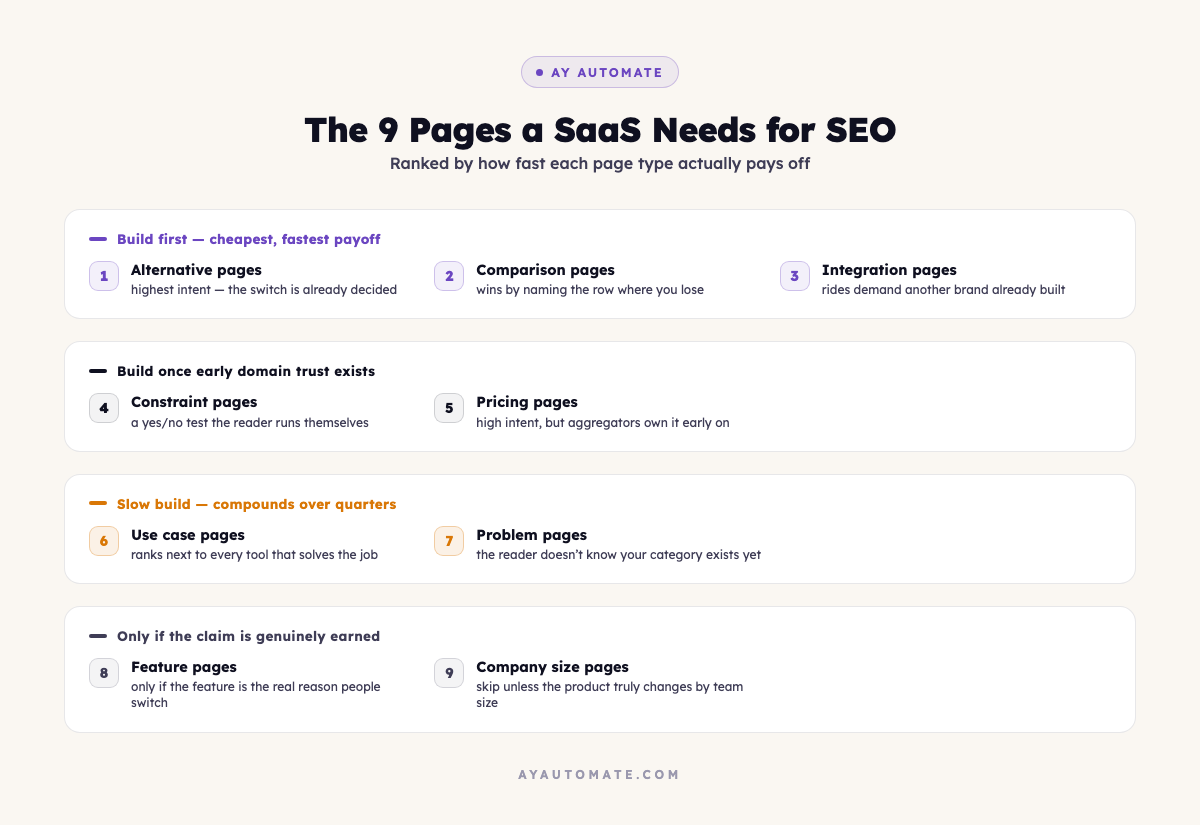
These target someone already comparing a specific replacement: an open-source alternative, a free alternative, a cheaper option, or a version built for a particular team type, all anchored to one named competitor.
This is the highest-intent page type on the list. Nobody types "alternative to [tool]" while still deciding whether they like their current tool. That search happens after the decision to switch is already made, when the only remaining question is where to land.
The reason this category stays wide open: the incumbent is structurally incapable of writing this page. A company is never going to hand its own customers directions to the exit, so the search results end up owned by review aggregators and whoever else bothers to show up with a straight answer. Our own Claude Fable 5 alternatives guide fits this exact pattern: a specific product ran into trouble, and the people searching for a replacement wanted a direct answer, not a roundup padded with tools nobody asked about.
Build these first. Nothing else on this list converts search volume into pipeline this cheaply.
Related Reads
2. Comparison pages
This covers the head-to-head format in its various shapes: two names joined by "vs," a three-way matchup, a straight "or" when someone's down to a final decision, or a narrower cut like pricing-only or feature-only side by sides.
Most of what shows up here today is thin affiliate content written by someone who has never touched either product. That's a low bar, and it means the honest version wins by default.
What actually earns the win is naming the row where you lose. Anyone who lands on a page one vendor wrote about its own comparison already discounts it as marketing before reading a word, so the page has to spend that trust back before it can be believed. Conceding a real weakness is what does that. Skip it, and the page reads as an ad and gets closed within seconds, no matter how good the design is. Our Windsurf vs Cursor vs Claude Code breakdown is built this way on purpose: a straight comparison table, a "pick this one if" section per tool, and an explicit downside listed for each, rather than a scoreboard tilted toward one winner.
Free weekly brief
Steal our production automations
The exact n8n flows, Claude Code setups, and prompts we ship for clients, broken down step by step. No spam, unsubscribe anytime.
3. Integration pages
These pair your product with a specific tool someone already uses: a CRM, a calendar app, a payments platform, a spreadsheet tool, a messaging app, whatever sits next to yours in a typical customer's stack.
This is the cheapest ranking win on the list. You're riding on demand another company's brand already generates, and because most teams never bother writing a page for every tool their customers happen to connect, that demand usually sits there unclaimed. Build one page per real, working integration: eight genuine connections means eight pages, each answering an actual "does this work with X" question instead of a templated shell with the tool name swapped in.
Ship these early, back when a page count in the single digits still moves the needle on a young domain's overall footprint.
4. Constraint pages
These target a hard requirement: open-source only, no-code, no card on file, nothing to install locally, no long-term contract.
The reason this category converts so cleanly is that the qualifier isn't a matter of opinion, it's a yes-or-no test the reader runs themselves against your product. Meet the bar and the page wins outright, with nothing left to argue about.
The failure mode is claiming a constraint you don't actually satisfy. A free tier that still asks for a card on file has no business ranking for "no credit card required," and getting caught on that gap costs more trust than the traffic was ever worth. Only publish the version where the claim checks out.
5. Pricing pages
This covers cost-anchored searches: a plain "[product] pricing" page, a free-tools roundup, a "tools under [budget]" cutoff, per-seat pricing breakdowns, or a page weighing the free tier against every paid plan.
A lot of buyers lock in a budget ceiling before they've even shortlisted which product to evaluate, which is exactly what makes this search intent run so high. The catch is that review sites and pricing aggregators have been sitting on this territory for years, so a young domain going head-to-head for something like "project management tool pricing" is starting from behind.
Save this category for after the first three or four have had time to build up real domain trust, not before.
6. Use case pages
These rank for the outcome someone is trying to reach rather than the product category itself: a page built around cutting onboarding time, one around reducing churn, one around speeding up support replies, one around automating handoffs between teams.
This is where you stop competing only against tools that look like yours and start showing up next to every product that solves the same underlying job, category label be damned. It puts you in the same result set as the market leaders, which is a harder room to enter but a much better one to be in.
It takes longer to land than the first three categories here. The wait is worth it, because this traffic tends to convert into real trials rather than just page views.
7. Problem pages
These are built around the symptom, not the solution: cutting down time lost to a specific task, eliminating a recurring manual step, preventing a costly mistake, making a clunky process simpler.
Whoever runs this search usually has no idea a whole category of product exists to fix what they're dealing with. That's exactly why the category has value: you're not competing against anyone using your industry's vocabulary, because the person searching hasn't learned it yet, and neither have most of your competitors' pages. It's a slow build, low intent up front, but the ones that stick tend to compound into real traffic well after launch.
Write these expecting a payoff measured in quarters, not weeks.
8. Feature pages
These target one capability directly: built-in AI, an open API, granular permission controls, a mobile app, white-label options, whatever your product actually does that others don't.
The rule here is stricter than it looks: only write one if the feature is a genuine reason people choose you over the alternative. If your reporting dashboard looks like every competitor's, "tools with reporting" isn't a real page, it's a spec sheet with your logo on it, and nobody searches for that. It becomes a real page only once that feature is the actual reason a switch happens.
9. Company size pages
These segment by who's using the product: enterprise teams, solo founders, five-person startups, mid-market companies.
Skip most of these. In practice, the only thing that changes between them is the audience name in the headline, while the body copy stays identical underneath. That's the doorway-page pattern search engines are specifically built to catch, and getting flagged for it can drag down trust across pages that had nothing to do with the violation.
The exception is real: if your onboarding flow, pricing tier, or support model genuinely changes based on team size, that page has earned its place. If nothing but the headline changed, it hasn't.
Why this list is worth automating, and where it isn't
Every category above shares the same shape: a fixed research checklist, a template that repeats with new variables plugged in, and a small number of judgment calls only a human should make. That combination is exactly what makes it a good fit for an agent-assisted build instead of a person opening a blank document nine separate times.
What actually automates cleanly:
- Research per page. Pulling a competitor's real feature set, current pricing, and the specific gap your product fills is bounded, repeatable work. An agent can gather this reliably if it's told to verify facts against the live product, not guess from training data.
- The skeleton. Once a human has approved the pattern for one alternative page or one comparison page, an agent can reproduce that structure for the next nine without drifting from it.
- The gate before publish. Draft-first, human-reviewed, checked for accuracy and honesty before it goes live: the same discipline that keeps a comparison page credible in the first place is the same discipline an automated pipeline needs to not publish something false.
What doesn't automate, and shouldn't:
- Constraint pages need a real audit of your own product, not an assumption. An agent guessing whether you actually require a credit card is how a false claim ends up published.
- Feature pages need an honest read on whether you actually lead, not a generated list of every feature in your changelog.
- Company size pages need someone to decide if the product genuinely differs by team size, because that's the one category where the automation itself will happily produce the doorway-page pattern you're trying to avoid.
The point isn't to remove judgment from SEO. It's to stop spending judgment on the parts of the process that are actually mechanical: the eighth "tool + integration" page doesn't need the same deliberation as the first alternative page you write, and it shouldn't take the same amount of a person's afternoon.
If you're building out a page cluster like this and want the research, drafting, and review-gate pipeline set up properly instead of one-off, that's exactly the kind of workflow we build. Book a free automation consultation and we'll map out what's worth automating in your SEO pipeline and what still needs a human in the loop.
Continue Reading
AI Vendor Management: What to Automate, Where Judgment Leads (2026)
Where AI genuinely helps in vendor management (contract tracking, risk monitoring, SLA tracking), and where negotiation and relationship judgment still lead.
AI automation agencies that ship to production: 9 compared (2026)
About 88% of enterprise AI proofs of concept never reach production, according to IDC research cited by bex.co. We graded 9 small and mid-size AI automation agencies, AY Automate included, on whether their own sites show shipped production work and maintenance after launch.
AI agent production-readiness audit: the checklist before you give it real permissions
A framework for checking permission scope, kill switches, and monitoring before an AI agent gets write access to real systems, built around the September 2026 OpenAI-Hugging Face incident and UN safeguards report.
Book a Free Strategy Call
Building this in production?
Walid runs a 30-min call to map your AI engineering team. Free, no slides.
Free weekly brief
Steal our production automations
The exact n8n flows, Claude Code setups, and prompts we ship for clients, broken down step by step. No spam, unsubscribe anytime.

Ex-IBM AI engineer and enterprise architect. Adel owns the technical architecture behind every automation and AI agent system AY Automate ships.