

Book a Free Strategy Call
Skip the read: talk to Walid in 30 min.
Free strategy call. We map your AI engineering team, you keep the notes.
No-code AI agents are software systems that use an AI model, instructions and connected tools to complete work through a visual builder instead of hand-written code.
They are useful when a task requires judgment within clear limits, such as sorting support requests, researching accounts or drafting product descriptions. You configure the trigger, context, actions and approval rules. The agent then chooses steps within that setup, while your workflow controls what it may read, change or send.
This matters because an agent can affect customer records, orders and messages. A visual builder removes much of the coding work, but it does not remove the need to define the process, manage access, test edge cases and monitor what happens after launch.
How do no-code AI agents work?
A no-code AI agent receives a goal, reads the context available to it, chooses an allowed action and returns a result. The visual workflow controls when it starts and which systems it can access. The AI model handles language or judgment, while fixed rules set boundaries around its choices.
Watch "Creating no-code AI AGENTS that run locally on your laptop | AnythingLLM" on YouTube
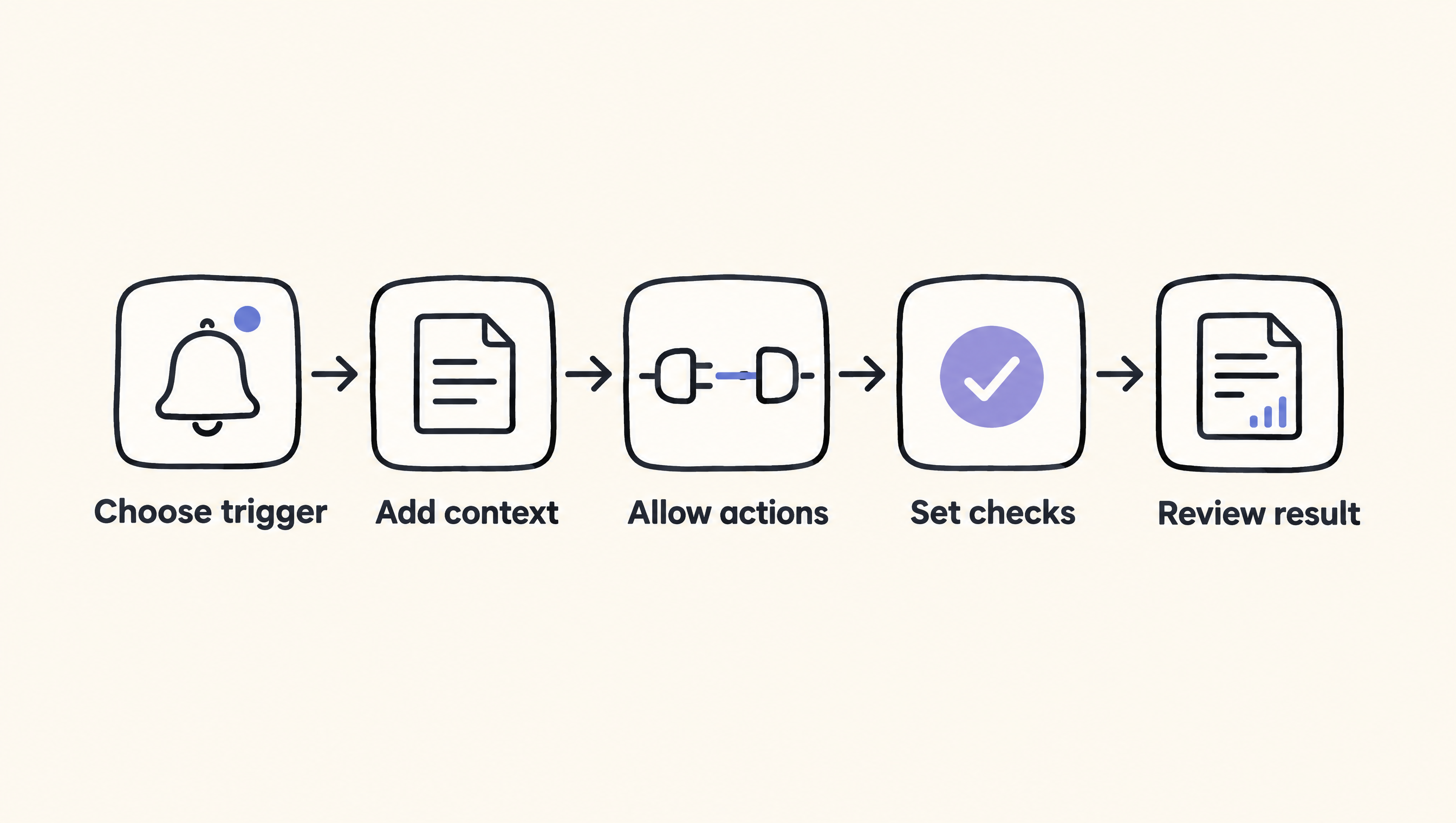
Here is the usual process.
-
Choose a trigger. The agent starts when an event occurs or a person submits a request. For example, an ecommerce team might start a workflow when a new support ticket arrives.
-
Provide instructions and context. You describe the task in plain language and connect the information needed to perform it. A software as a service team could provide product documentation, account details and rules for classifying an issue.
-
Give it controlled actions. The agent receives permission to use selected tools. It might search an internal knowledge base, create a draft reply or update a field, but it should not receive broad access that the task does not require.
-
Set checks and approval points. Rules decide when the agent may proceed and when a person must review its work. A sales agent might research an account and draft an email, while a representative approves the message before it is sent.
-
Record and review the result. The workflow stores enough information to show what happened. You can inspect failed runs, unexpected choices and changes in output before adjusting the instructions or permissions.
The video below shows how a local no-code agent can be created with AnythingLLM: "Creating no-code AI AGENTS that run locally on your laptop | AnythingLLM" by Tim Carambat.
A useful design separates flexible judgment from fixed business rules. Let the model interpret a message or draft text. Use ordinary workflow conditions for hard limits, such as whether a refund exceeds an internal approval threshold or whether a required account field is missing.
That distinction also helps with testing. You can check deterministic steps with known inputs and expected outputs. For model decisions, create examples that cover normal requests, unclear wording, missing information and requests that should be refused or sent to a person.
What parts make up a no-code AI agent?
A working agent needs more than a prompt. It combines a starting event, instructions, context, an AI model, approved actions and controls. Each part has a separate job. Keeping those parts separate makes failures easier to find and gives you more control over what the agent can do.
| Part | What it does | B2B example |
|---|---|---|
| Trigger | Starts the workflow | A prospect submits a qualification form |
| Instructions | Define the goal and boundaries | Classify the request without changing account data |
| Context | Supplies relevant business information | Product documentation and customer history |
| AI model | Interprets language or chooses among allowed options | Identify the likely support category |
| Actions | Read or change connected systems | Create a draft response or update a ticket field |
| Controls | Limit, review and record activity | Require approval before sending a customer message |
These parts can live inside one visual platform or across connected services. The important issue is not how tidy the canvas looks. It is whether you can identify which data entered the workflow, what the model was asked to do, which action occurred and where a person can intervene.
For example, a product-description agent may look simple because its visible output is text. Behind that output, it still needs a product record, brand rules, prohibited claims, an output destination and a review step. Without those parts, the task is a prompt demonstration rather than an operating business process.
How are no-code AI agents different from basic automation?
Basic automation follows predefined conditions, while an AI agent can interpret unstructured input and choose among permitted actions. Use basic automation when the decision can be expressed as fixed rules. Add an agent when the work involves language, classification or judgment that fixed conditions cannot handle cleanly.
An ordinary workflow can copy an order number from one system to another because the source and destination are known. It can also route an invoice when a field matches a set condition. These tasks do not need an AI model, and adding one would introduce unnecessary variation.
An agent becomes relevant when the input is less predictable. A support message may describe the same billing problem in many ways. The agent can interpret the wording, compare it with available context and select an allowed category, while the surrounding automation performs the predictable system updates.
This is why many useful implementations are mixed systems. Fixed workflow steps handle permissions, data movement and approvals. The agent handles the narrow section that needs interpretation. If you want to compare agent building with coding assistance, our guide to GitHub Copilot vs Claude Code explains the separate role of AI coding tools.
Free weekly brief
Steal our production automations
The exact n8n flows, Claude Code setups, and prompts we ship for clients, broken down step by step. No spam, unsubscribe anytime.
No code ai agents github?
GitHub can help you inspect projects related to no-code AI agents, but a repository is not proof that a system is safe or suitable for business use. Review what the project contains, how it is maintained and what setup it expects. Open source also does not necessarily mean no configuration.
Start by identifying what the repository actually provides. It may contain the complete application, only integrations, example workflows or deployment files. A project described as no-code for end users may still require technical work to install, host, secure and update.
Use this practical review list:
- Check whether the repository explains installation, configuration and required services.
- Identify where credentials are stored and which permissions integrations request.
- Read the license before adapting or distributing the software.
- Inspect how failures, logs and human approvals are handled.
- Look for recent maintenance activity without treating activity alone as a quality measure.
- Test with non-sensitive sample data before connecting business systems.
GitHub is especially useful when your technical team needs visibility into how a tool works or wants control over deployment. It is less useful if your team expects a ready-to-run service with support and managed updates. A visual interface can hide code from the builder without removing the technical work behind operation.
If your team is deciding whether to configure a platform or build supporting code, our Claude Code workflow guide covers ways developers can organize coding work. That is a different task from operating a no-code agent, but the distinction helps you assign ownership correctly.
No code ai agents reviews?
Reviews can reveal recurring setup problems and practical limitations, but they should not replace a test using your own workflow. Read reviews for details about permissions, debugging, integrations and support. Give less weight to broad praise or complaints that do not explain the task, data or deployment conditions.
Begin with your own acceptance criteria. An ecommerce team assessing a returns agent may care about order lookup, exception handling, approval before refunds and a clear record of each action. A review from someone building a personal research assistant may say little about those requirements.
When reading no-code AI agent reviews, ask:
- Does the reviewer describe a real workflow or only a short demonstration?
- Which integrations and data sources were involved?
- Did the reviewer test failures and unclear inputs?
- Could a person inspect and correct the agent's actions?
- Did the review separate platform limits from model limits?
- Is the review independent, sponsored or connected to an affiliate offer?
Then run a small evaluation. Use representative examples with private details removed, including incomplete and conflicting requests. Record whether the agent selected the correct action, asked for missing information or stopped when it reached a boundary.
Do not reduce the decision to a single rating. The right question is whether the system can perform your defined task within acceptable access, review and maintenance limits. A tool can work well for content preparation and still be a poor fit for changing billing or account records.
No code ai agents free?
Some no-code agent projects or service plans may be available without an initial software charge, but "free" does not describe the full operating cost. Before adopting one, check the current terms directly and account for model access, hosting, connected services, setup, monitoring and maintenance. Do not assume every required component is included.
A local or self-hosted option can give your team more control over deployment. It can also move responsibility for installation, security, backups and updates to your team. A hosted builder may reduce that operational work, but you still need to understand how it handles data and credentials.
Treat a free option as a way to test a narrow case, not as evidence that production use will cost nothing. For example, you could test whether an agent classifies anonymized support tickets correctly before connecting it to a live help desk. That test should include bad inputs and actions the agent must not take.
Model choice can also affect a test. AY Automate publishes access pages for models such as Z.ai Zhipu AI GLM-4.6V Flash and Google Gemini 3.5 Flash. Availability on those pages does not remove the need to confirm the model's current terms and suitability for your data before use.
When do no-code AI agents not fit?
A no-code agent does not fit every process. Avoid it when a simple rule can complete the task more predictably, when errors cannot be reviewed or reversed, or when the platform cannot meet your access and data requirements. No-code tools also cannot remove ownership for testing, security and maintenance.
Do not use an agent merely because a task includes text. If every incoming form maps to a known destination based on one field, ordinary automation is easier to inspect. An AI decision adds variation without solving a real interpretation problem.
Be cautious when the proposed agent would have broad permission to send payments, delete records or publish unreviewed claims. Narrow the action, introduce approval or redesign the workflow. If safe boundaries cannot be defined, the process is not ready for autonomous execution.
No-code also stops being the right label when the team must write and maintain substantial custom code around the builder. That approach can still be valid, but it is a custom software system with a visual workflow component. Plan its ownership and maintenance accordingly.
AY Automate builds and maintains automations, workflows and agents, combining existing business tools with production testing on real data. Our AI automation agency audits workflows, builds with n8n, Claude Code and the client's existing stack, then maintains systems after launch.
FAQ
No code ai agents github
GitHub can provide source code, deployment files, integrations or example workflows for no-code AI agents. Check what the repository includes, its license, its setup requirements and how it handles credentials before using it. A visual end-user experience does not mean installation or maintenance requires no technical work.
No code ai agents reviews
No-code AI agent reviews are most useful when they describe the workflow, integrations, failures and approval controls tested. Compare each review with your own requirements, then run representative examples in a limited environment. A general rating cannot show whether the agent fits your data, permissions or risk level.
No code ai agents free
A no-code AI agent may have a free project or service option, but the full workflow can still involve model, hosting, integration and maintenance costs. Confirm current terms directly. Test with non-sensitive data first, and decide who will own security, updates and monitoring before production use.
If you want this built and maintained for your team, talk with AY Automate about an agent designed around your existing workflow and controls.
Sources
AY Automate and AY Automate AI automation agency. Video: Tim Carambat, "Creating no-code AI AGENTS that run locally on your laptop | AnythingLLM".
Last checked: 2026-11-17
Book a Free Strategy Call
Building this in production?
Walid runs a 30-min call to map your AI engineering team. Free, no slides.
Free 30-minute call
Want us to look at your setup?
Leave your name and email. You get the calendar right after.

Ex-IBM AI engineer and enterprise architect. Adel owns the technical architecture behind every automation and AI agent system AY Automate ships.