In short
- An AI cold calling agent is three parts: a voice assistant (Vapi) with a tight prompt, a trigger that starts a call when a lead appears (Make calling Vapi's API), and a logger that catches Vapi's end-of-call report and writes the outcome to your sheet or CRM. Vapi's API needs three things per call: an
assistantId, aphoneNumberId, and thecustomernumber. - The build is the easy half. The hard half is who you call and how you behave. In the US, the FCC ruled in 2024 that AI-generated voices count as "artificial" under the TCPA, so you need the person's prior consent. Start with warm leads who asked to hear from you. That is where these agents work.
- You end up with: An AI agent that calls new leads from a sheet, qualifies them, and writes the result back.
Who it is for: Sales and ops teams with inbound leads or requests that need a fast first call.
Overview
At a glance
| Good fit | Poor fit |
|---|---|
| Calling back a form or quote request within minutes | Cold lists with no consent |
| Confirming details and booking a visit | Complex, high-ticket negotiation |
| Re-activating past customers who opted in | Anything regulated you cannot script safely |
| Reminders and follow-ups | Calls where a wrong answer costs a deal |
Calling back a form or quote request within minutes
- Poor fit
- Cold lists with no consent
Confirming details and booking a visit
- Poor fit
- Complex, high-ticket negotiation
Re-activating past customers who opted in
- Poor fit
- Anything regulated you cannot script safely
Reminders and follow-ups
- Poor fit
- Calls where a wrong answer costs a deal
Before you start
Before you start
- A Vapi account and an API key
- A Make account (a free plan is enough to test)
- A phone number in Vapi, bought there or imported from your telephony provider
- A Google Sheet with columns: name, phone (with country code), context, status
- Proof of consent for every number you will call
- One clear goal for the call, written in one sentence
Step 1 · 30 minutes
Pick one call to automate
Do not build "an AI sales rep". Build one call with one outcome. Write it as: we call [who] because [they did what], to [get what outcome]. Example: "we call people who requested an estimate, to confirm the address and book a visit."
Template
Call spec (fill before you open Vapi)
Who we call:          [e.g. estimate requests from the website form]
Why they expect it:   [e.g. form says "we'll call you within 1 hour"]
Goal of the call:     [e.g. booked visit with full address]
Must collect:         [field 1], [field 2], [field 3]
Hand off to a human:  [when: angry, legal question, price negotiation]
Never say:            [prices, promises, competitor names]
Calling hours:        [e.g. Mon-Fri 9:00-18:00 in the lead's time zone]
Consent proof:        [where it is stored]
We built this exact pattern for a real estate agency: the agent prescreens buyers and sellers, collects their requirements, books viewings and syncs with their CRM and calendar. One call, one outcome, then expand.
Step 2 · 1 hour
Build the assistant in Vapi
In the Vapi dashboard, create an assistant. Set the first message to use the lead's name, for example Hi, this is Sam from [company]. Am I speaking with {{customer.name}}?, then paste the prompt below. The {{context}} variable is filled per call from your sheet in step 4.
Prompt
System prompt template
[Identity]
You are [agent name], calling on behalf of [company]. You are an AI
assistant and you say so if asked. Your job on this call: [one goal,
e.g. confirm the details of an estimate request and book a visit].

[Context about this person]
{{context}}

[Style]
- Short sentences. One question at a time. Max 2 sentences per turn.
- Sound like a helpful person, not a script. Match their pace.
- Use their first name once at the start, not in every sentence.

[Call flow]
1. Confirm you are speaking with {{customer.name}}. If not, ask for a
   better time to reach them and end politely.
2. Say why you are calling in one sentence, linked to what they did
   (form, request, previous call).
3. Ask the qualifying questions:
   - [question 1]
   - [question 2]
   - [question 3]
4. If they qualify, offer two time slots: [slot rules].
5. Repeat back what you collected and confirm it.

[Rules]
- Never invent prices, availability or policies. If unsure, say a person
  will follow up.
- If they ask to stop being called, confirm it and end the call.
- If they are busy, offer a callback time and end the call.
- Do not end the call before step 5, unless they ask to stop.

[Objections]
"Is this a robot?" -> "I'm an AI assistant for [company]. I can help
with [goal], or have someone call you back. What works better?"
"Not interested." -> "Understood. Should I close your request?"- Transcriber, model and voice picked for low latency
- Max call duration set, so a stuck call ends
- Voicemail behavior decided: leave a short message or hang up
- End-call phrases set ("goodbye", "stop calling")
- Analysis tab: summary and a success check for the goal
- Server URL left empty for now, you add it in step 5
Step 3 · 30 minutes
Test it in the browser before any real call
Use Talk with Assistant in the Vapi dashboard and play five people: the easy yes, the busy one, the "is this a robot?", the wrong person, and the one who says stop. Fix the prompt after each run. Then attach your phone number and call your own phone.
| Test caller | Pass if the agent... |
|---|---|
| Easy yes | Collects every field and repeats them back |
| Busy | Offers a callback time and ends within 30 seconds |
| "Is this a robot?" | Says it is an AI assistant, then offers help or a human |
| Wrong person | Asks for a better time, does not pitch |
| "Stop calling me" | Confirms and ends the call |
Easy yes
- Pass if the agent...
- Collects every field and repeats them back
Busy
- Pass if the agent...
- Offers a callback time and ends within 30 seconds
"Is this a robot?"
- Pass if the agent...
- Says it is an AI assistant, then offers help or a human
Wrong person
- Pass if the agent...
- Asks for a better time, does not pitch
"Stop calling me"
- Pass if the agent...
- Confirms and ends the call
Step 4 · 45 minutes
Trigger calls from Make
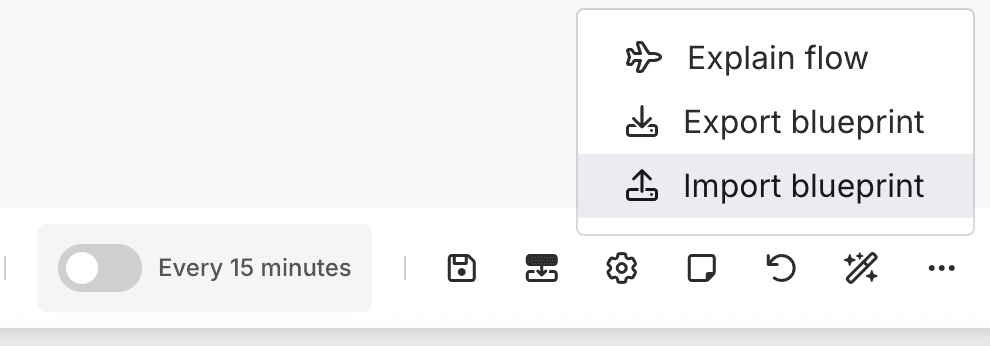
Scenario 1 watches your sheet and calls Vapi's API for each new row. In Make, start from a blueprint (or build it): Google Sheets: Watch Rows then HTTP: Make a request with POST https://api.vapi.ai/call and the header Authorization: Bearer YOUR_VAPI_API_KEY.
Prompt
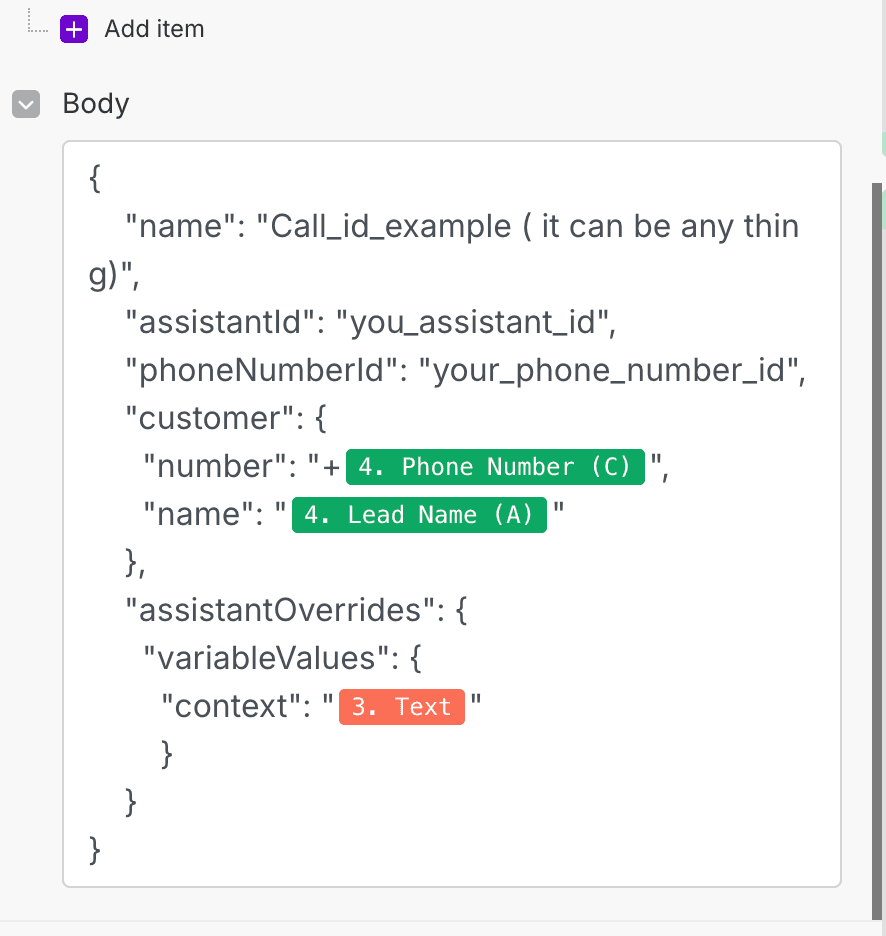
HTTP request body for POST /call
{
  "assistantId": "YOUR_ASSISTANT_ID",
  "phoneNumberId": "YOUR_PHONE_NUMBER_ID",
  "customer": {
    "number": "+{{phone}}",
    "name": "{{name}}"
  },
  "assistantOverrides": {
    "variableValues": {
      "context": "{{context}}"
    }
  }
}
Map {{phone}}, {{name}} and {{context}} to your sheet columns. Numbers need the country code.
Two options from Vapi's docs worth using: schedulePlan.earliestAt to respect calling hours, and customers (an array) to batch several numbers in one request. Batching drops per-person overrides, so keep one request per lead if each call needs its own context.
Step 5 · 45 minutes
Log every call back to your sheet or CRM
Scenario 2 starts with a Custom webhook in Make. Paste that webhook URL as the assistant's Server URL in Vapi. When a call ends, Vapi sends an end-of-call-report with the reason the call ended, the transcript and the recording. Filter on that message type, then write a row.
Code
Shape of the end-of-call report (from Vapi's docs)
{
  "message": {
    "type": "end-of-call-report",
    "endedReason": "hangup",
    "call": { "...": "call object, includes customer number" },
    "artifact": {
      "recording": { "...": "recording URLs" },
      "transcript": "AI: ... User: ...",
      "messages": [ { "role": "assistant", "message": "..." } ]
    }
  }
}
Config
Log sheet columns
called_at,name,phone,ended_reason,goal_met,summary,next_step,recording_url,transcriptStep 6 · 1 week
Pilot 20 calls, then scale
Diagram
Do not turn on the full list on day one. Every loop below fixes the prompt, not the tech.
20 real calls
consented, warm leads
Listen to all
recordings + transcripts
Tag failures
by endedReason and transcript
Fix the prompt
one change at a time
Next 20
then open the tap
20 real calls
consented, warm leads
Listen to all
recordings + transcripts
Tag failures
by endedReason and transcript
Fix the prompt
one change at a time
Next 20
then open the tap
Keep a human on the follow-up for the pilot week. If the agent books something wrong, a person fixes it the same day and you add the case to the prompt's rules.
Watch out
What breaks, and the fix
The agent talks too much
Fix: Cap turns at 2 sentences and one question. Long answers make people hang up.
Calls fail on the number format
Fix: Store numbers with the country code and add the
+in the request body.Nothing shows up in the log sheet
Fix: Check the Server URL on the assistant, and that scenario 2 is switched on and filtered on
end-of-call-report.Voicemail eats the call
Fix: Decide the voicemail behavior in Vapi and track it via
endedReason.Long silences before replies
Fix: Pick faster model and voice options. Vapi shows a latency estimate per assistant.
Calling people who never asked
Fix: Stop. Under the FCC's 2024 ruling, AI voice calls need prior consent in the US. Only call consented leads. This is not legal advice, check with counsel.
Results
How to measure it
| Metric | How to track it | What good looks like |
|---|---|---|
| Connect rate | Calls answered by a person / calls placed | Track it per hour of day, then call when people answer |
| Goal met rate | goal_met column from the Analysis success check | Rises each pilot round |
| Speed to lead | Time from row created to call placed | Minutes, not hours |
| Cost per booked outcome | Total call minutes x your per-minute cost / bookings | Below what a human first call costs you |
| Handoffs to a human | Calls tagged for follow-up | Each one becomes a new prompt rule |
Connect rate
- How to track it
- Calls answered by a person / calls placed
- What good looks like
- Track it per hour of day, then call when people answer
Goal met rate
- How to track it
goal_metcolumn from the Analysis success check- What good looks like
- Rises each pilot round
Speed to lead
- How to track it
- Time from row created to call placed
- What good looks like
- Minutes, not hours
Cost per booked outcome
- How to track it
- Total call minutes x your per-minute cost / bookings
- What good looks like
- Below what a human first call costs you
Handoffs to a human
- How to track it
- Calls tagged for follow-up
- What good looks like
- Each one becomes a new prompt rule
Questions
FAQ
Is AI cold calling legal?
It depends on where you call. In the US, the FCC ruled in February 2024 that AI-generated voices are "artificial" under the TCPA, so calls need the person's prior express consent. Call warm, consented leads and check local rules with a lawyer.
How much does an AI outbound calling agent cost to run?
You pay per minute for transcription, the language model, the voice and Vapi, plus telephony and your Make plan. Vapi shows a live estimate per assistant. Use our AI voice agent cost calculator for your volumes.
Can I use n8n instead of Make?
Yes. The pattern is the same: an HTTP request to POST https://api.vapi.ai/call, and a webhook that receives the end-of-call report. Pick the tool your team already maintains.
Can the agent book meetings in my calendar?
Yes, through a tool or function the assistant calls during the conversation, or by having Make book the slot after the call. Start with booking after the call: it is easier to test.
Should the agent say it is an AI?
Yes. Our prompt tells it to say so when asked. Hiding it breaks trust the moment someone notices, and rules in several places expect disclosure.
How many calls can it make at once?
It depends on your Vapi plan's concurrency and your phone provider. Vapi's API also supports scheduled and batched calls. Pilot small first, whatever your limit.