

A warp generator may mean a tool that creates Cloudflare WARP connection files, an AI terminal called Warp, or a visual editor that bends text. For most B2B, SaaS, and ecommerce teams, the right starting point is to identify the intended output before comparing products. We found too few confirmed, comparable options to publish a fair ranking, so this guide explains the main categories and the checks that matter.
A warp generator is a tool that produces a configuration, command, or visual transformation associated with a product or feature named Warp or WARP. The categories are not interchangeable. A network configuration generator affects connectivity, Warp Terminal supports development work, and a text warp editor changes graphics. Start with the result you need, then assess operating system support, security, maintenance, documentation, and cost.
The short answer
Choose by output, not by the shared word "warp." A network team needs a configuration generator, a development team may mean Warp Terminal or Warp Agent, and a design team needs a text editor. Treat any unfamiliar script or generated configuration as code that requires review before use.
- WARP configuration generator: Best for technical users who need a connection configuration for a compatible network client.
- Warp Terminal and Warp Agent: Best for developers who want terminal commands, visible agent runs, and reusable workflows in a shared development surface.
- Warp text editor: Best for designers who want to bend, curve, or reshape text for a visual asset.
- Custom agent or workflow: Best for teams whose real need is to automate a business process rather than generate a WARP file or edit text.
| Name or category | What it does | Best for | Pricing basis |
|---|---|---|---|
| WARP configuration generator | Produces configuration data for use with a compatible network client | Technical users who understand the target protocol and client | Not published |
| Warp Terminal and Warp Agent | Provides natural language commands, agent runs you can watch and steer, and reusable team workflows | Software development work | Not published |
| Warp text editor | Changes the shape or curve of text in a graphic | Design and content production | Not published |
| Custom agent or workflow | Connects business tools and executes defined multi-step work | B2B, SaaS, and ecommerce operations | Project scope |
How we ranked these
We did not rank named warp generator products because fewer than three comparable options could be confirmed. Instead, we ordered the categories by likely relevance to the search phrase: WARP configuration creation first, the Warp development product second, visual text tools third, and custom business automation when the request is really about repeatable work.
The decision criteria are:
- Output: The exact file, command, visual asset, or completed business task you need.
- Compatibility: The operating system, terminal, network client, design app, or business tools involved.
- Control: Whether a person can inspect the result before it changes a system.
- Security: How credentials, private data, generated commands, and configuration files are handled.
- Maintenance: Whether documentation, releases, and issue handling are available.
- Cost: The pricing basis and any separate infrastructure or service costs.
The available search results mix GitHub repositories, a networking issue, Warp Terminal, scientific software documentation, and visual text tools. That mixed intent makes a single product ranking misleading. We did not rank by search position, popularity, customer count, user ratings, or unsupported claims about performance.
AY Automate is the publisher of this guide and appears only as the custom automation option. We have not placed our service first, and it is not a substitute for a network configuration generator, terminal product, or graphics editor.
What should you look for in a WARP configuration generator?
Look for the exact output format, supported client, required inputs, visible source code, current documentation, and a safe review process. A generated file can be syntactically valid yet unsuitable for your network or client. Confirm every field before importing it, and keep a known working configuration available for recovery.
New WARP GENERATOR👉 Bypass Internet Blocks and Keep Services and Apps RunningWatch "New WARP GENERATOR👉 Bypass Internet Blocks and Keep Services and Apps Running" on YouTube
Search results for this phrase include a Bash generator described as creating Cloudflare WARP configurations for AmneziaWG and Clash. Another result reports that a generator left an interface address field incomplete, which illustrates why output validation matters. These descriptions identify the category, but they do not establish that a particular generator is safe or suitable for your environment.
Best for
- Technical users who already know the required client and configuration format.
- Teams that can review scripts, generated fields, routing behavior, and deployment steps.
Strengths
- Can reduce repetitive manual configuration work.
- Gives technical users an artifact they can inspect before import.
- May fit scripted or repeatable setup processes.
Limits
- A generator cannot decide your security policy or network architecture.
- Generated values may be missing, stale, or incompatible.
- An unfamiliar script may expose credentials or make unwanted system changes.
Who should skip it: Skip this category if you cannot explain the target client, expected fields, and rollback process. Use approved network tooling or ask a qualified administrator to review the requirement instead.
The video below shows one creator's WARP generator process for bypassing internet blocks and keeping services and apps running. Treat it as a demonstration, not as validation for a business network: New WARP GENERATOR.
When does Warp Terminal or Warp Agent fit?
Warp Terminal fits when your request concerns software development rather than network configuration. Its search description presents a shared terminal workspace with natural language commands, agent runs that users can watch and steer, and workflows a team can reuse. Those functions do not create the same output as a WARP network configuration generator.
A terminal agent can help a developer work through commands and development tasks. Human review still matters because a command can modify files, dependencies, infrastructure, or remote services. Before adoption, define which repositories and environments the tool may access, how approvals work, and whether generated commands remain visible before execution.
Best for
- Developers who want terminal-based assistance and observable agent runs.
- Teams that want repeatable development workflows in a shared surface.
Strengths
- Keeps command work and agent activity in a terminal context.
- Allows users to watch and steer agent runs, according to the Warp Terminal search description.
- Supports workflows that a team can reuse, according to the same description.
Limits
- It does not replace a WARP network configuration generator.
- It cannot remove the need for access controls, code review, testing, or deployment approval.
- Pricing details were not confirmed for this comparison.
Who should skip it: Skip this category if you only need a configuration file, a graphic, or a nontechnical business workflow. A developer tool adds the wrong interface and governance model to those jobs.
For broader technical comparisons, see our guides to the best open source AI agent frameworks and best multi-agent frameworks.
When is a Warp text editor the right category?
A Warp text editor is the right category when the desired output is curved, bent, or reshaped lettering in a visual asset. It belongs to graphic design, not networking or terminal automation. Check export formats, editability, licensing, and whether the transformed text must remain accessible or searchable.
The phrase can lead to tools such as Canva Type Warp, Pixlr warp and curve tools, and text warpers that export SVG files. Their presence in results explains part of the ambiguity around the keyword. This guide does not compare their plans or individual features because verified product details and prices were not available for a fair product ranking.
Best for
- Designers creating display text for graphics.
- Content teams that need a visual text effect rather than live web typography.
Strengths
- Produces a visual transformation that can be reviewed directly.
- Keeps the task within a design workflow.
Limits
- It does not generate network configurations or terminal commands.
- Flattened or outlined text may no longer behave like editable text.
- Product pricing and export limits were not confirmed here.
Who should skip it: Skip this category if "Warp" refers to a terminal, network connection, agent, or scientific software. Confirm the expected file type before selecting a design tool.
When should you build a custom agent or workflow?
Choose a custom agent or workflow when the actual goal is to complete repeatable business work across existing systems. This category fits tasks such as passing data between tools, applying business rules, retrieving internal information, or executing a defined multi-step process. It does not generate WARP network credentials or replace Warp Terminal.
AY Automate audits workflows and builds automations with n8n, Claude Code, and a client's existing stack. We test systems on real data and maintain them after launch. Our AI automation agency also provides API integration, workflow engineering, custom agents, internal knowledge bases, and private retrieval pipelines.
Best for
- SaaS, ecommerce, and B2B teams with repeated handoffs between business systems.
- Teams that need an agent to execute defined work rather than answer a single prompt.
Strengths
- Connects to tools a business already uses.
- Can replace manual handoffs with API integrations and workflow logic.
- Includes production testing and ongoing maintenance.
Limits
- It is not an off-the-shelf WARP configuration generator.
- Delivery depends on the workflow, systems, data, permissions, and maintenance needs.
- A custom build requires process ownership and access from the client team.
Who should skip it: Skip custom development when a standard configuration generator, terminal, or design editor already produces the exact output you need. Teams that want a simpler interface without custom engineering can also review no-code AI agent builders.
How do you choose the right warp generator category?
Start by writing down the required output and the system that will consume it. Then choose the category that produces that output, verify compatibility, and test in a controlled environment. Do not select a tool because its name contains Warp when its purpose does not match your task.
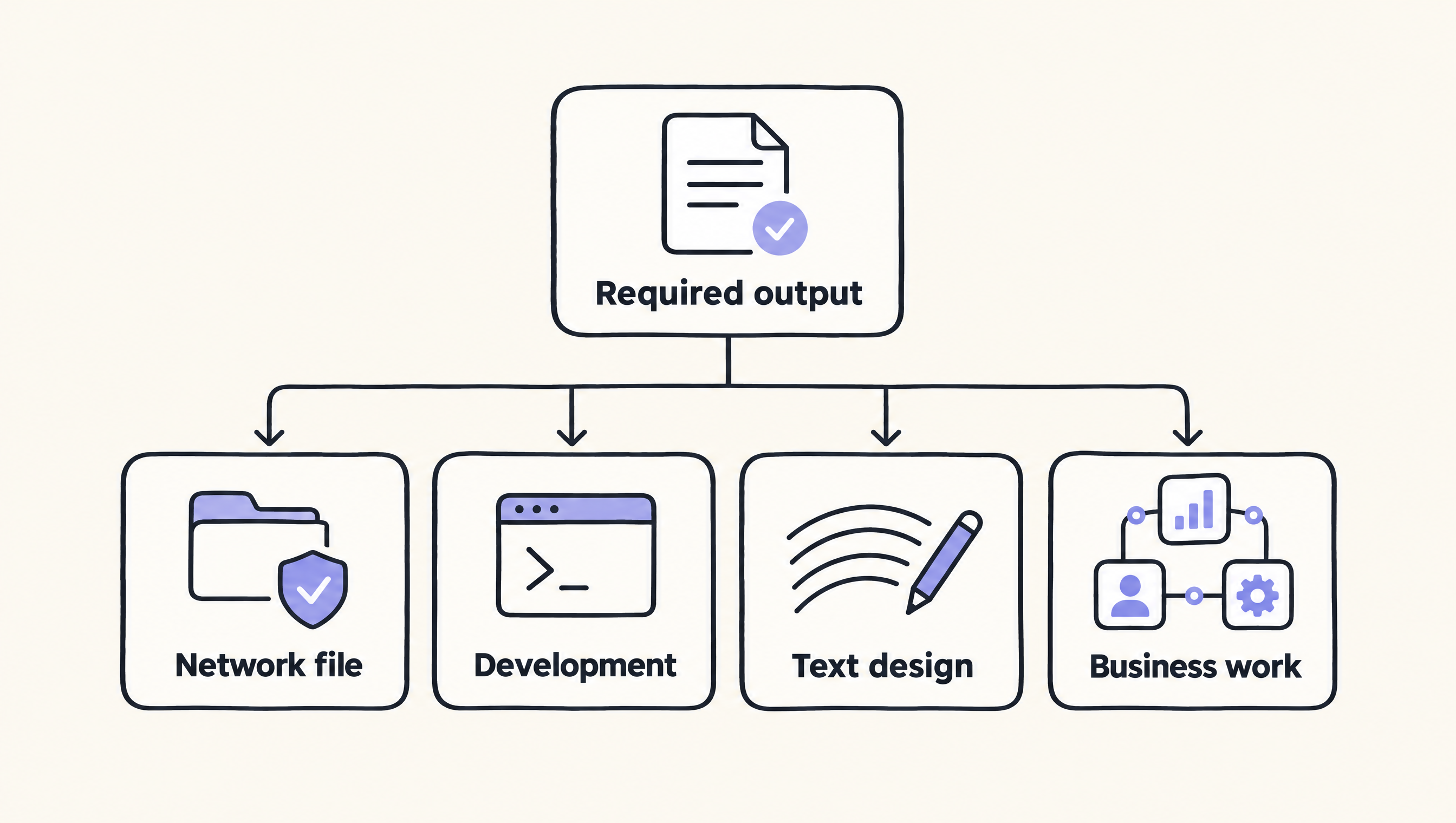
Choose a WARP configuration generator for a network file
Use this route when you know the target network client and expected configuration fields. Review the generator's code or provenance, inspect its output, and test without disrupting an essential connection. If you cannot validate routing, addresses, and credentials, involve someone who can.
Choose Warp Terminal for development work
Use Warp Terminal or Warp Agent when the work begins and ends in a development environment. Establish repository access, command approval, secret handling, and test boundaries before an agent acts. Keep deployment approval separate from command generation.
Choose a text editor for curved or reshaped lettering
Use a visual editor when your output is an image or design asset. Decide whether you need editable text, vector output, or a raster image before choosing the tool. Confirm that the export can be used in the destination channel.
Choose custom automation for cross-system business work
Use a custom agent when the task crosses tools, follows business rules, and needs ongoing ownership. Map the trigger, inputs, decisions, actions, exceptions, and approval points before building. If that describes your project, our ai agent development work focuses on agents and internal knowledge bases that execute multi-step work.
Decision path: configuration file means a WARP configuration generator. Development commands mean Warp Terminal or Warp Agent. Shaped lettering means a text editor. Cross-system business execution means a custom workflow.
FAQ
Warp Agent
Warp Agent refers to the agent capability associated with the Warp development environment in this context. It belongs to the development-tool category, not the WARP network configuration category, so assess command visibility, repository access, secret handling, testing, and approval controls.
Warp in Windows
Warp on Windows refers to using the Warp development product on the Windows operating system. A search result describes Warp as available for Windows as well as macOS and Linux, but compatibility with your shell, security controls, and development stack should be confirmed before adoption.
Warp Oz
"Warp Oz" is too ambiguous to identify as a warp generator category from the available product information. Check the full product name, URL, expected output, and vendor before installing software or entering credentials.
Warp editor
A Warp editor may mean Warp Terminal for command and code work or a visual tool for reshaping text. Identify whether the output should be commands, files, network configuration, or graphics before choosing a product.
Warp tutorial
A useful Warp tutorial should match the exact category and operating system you plan to use. For a configuration generator, it should explain inputs, output fields, import steps, validation, and recovery. For Warp Terminal, it should cover access, commands, agent controls, testing, and approvals.
Warp agent CLI
Warp Agent CLI generally points to agent-driven work in a command-line environment. Before using it, define which commands may run, what files and services it can access, where secrets are stored, and which actions require human approval.
Warp docs
Warp docs should be matched to the product owner and category because unrelated projects use the same name. Confirm the domain, product name, operating system, version, and task before following installation or configuration instructions.
Warp terminal free
Pricing for Warp Terminal was not confirmed for this guide. Check the product's current pricing page and verify which terminal, agent, collaboration, security, and organization features are included before making a cost comparison.
If your requirement is cross-system business automation rather than a network or design tool, AY Automate can map the workflow and determine whether a standard tool or custom build is the better fit.
Sources
Sources: AY Automate, AY Automate AI automation agency, WARP generator video.
Last checked: 2026-11-25.
Book a Free Strategy Call
Building this in production?
Walid runs a 30-min call to map your AI engineering team. Free, no slides.

Walid founded AY Automate to help businesses ship AI workflows that actually move revenue. He leads strategy and oversees every client engagement end-to-end.
Full Bio →