In short
- Pick one sales ops job. Call notes to fields, a stalled deal sweep, or lead routing are good first jobs. Do not start with "an AI SDR".
- Write a field map before any code: which fields the agent may read, which it may write, and which need a person's yes.
- Give the agent its own CRM user with the smallest set of permissions. Never use an admin's token.
- The agent proposes, a person approves in Slack, the write is logged with the old value. Cap volume so you do not flood the team.
- Backtest on last quarter's deals before it touches live records, then measure field fill rate and time from call to update.
Who it is for: RevOps and sales ops leads, and founders who run sales, on HubSpot or Salesforce. You need admin rights in the CRM and someone who can build in n8n or code.
Overview
What you will have at the end
Every sales team has the same CRM problem. The call happened, the next step was agreed, and none of it is in the CRM. Notes sit in a call recorder. Deals look alive on the board and have been dead for a month. Forecasts are built on fields nobody updated.
We see it on GTM builds all the time. On one, call notes were already landing in HubSpot from the meeting recorder, and the CTO told us he never looked at the CRM. The data was there. Nothing turned it into fields, next steps or alerts. That gap is the job for this agent.
Diagram
The agent loop, for any of the three jobs
Trigger
call ended, a schedule, or a new lead
Read the record and its history
only the fields on the field map
Model proposes changes
JSON with the fields, the evidence and a risk flag
Field the agent owns (summary, risk flag)
Write directly
old value saved in the log
Field the rep owns, or any change in weeks 1-2
Owner approves in Slack
approve, edit or reject
Write to the CRM and log it
who approved, what changed, what it was before
The pattern is the same on HubSpot and Salesforce. What changes is how you authenticate, what the objects are called and how you lock permissions down. Both are covered below.
Decision
Build it, or use HubSpot Breeze or Salesforce Agentforce?
Both CRMs now sell their own agents. HubSpot has Breeze agents and an agent builder in its Agent Hub. Salesforce has Agentforce, with sales agents such as an SDR agent and a sales coach. Check the current list and pricing on their sites, because both change often. Sometimes the vendor agent is the right call.
| Situation | Vendor agent | Custom agent (this playbook) |
|---|---|---|
| Your process matches the vendor's out-of-the-box job | Good fit, fastest start | More work than needed |
| Data lives outside the CRM (call recorder, billing, product usage) | Depends on their connectors | Pull from any API you like |
| You want your own model, prompts or language | Limited control | Full control |
| You need a custom approval step and a full audit log | Depends on the product | Built in from day one |
| You run both HubSpot and Salesforce, or plan to switch | Two separate setups | One agent, two connectors |
| Nobody on the team can build or maintain workflows | Better fit | Needs a builder |
Your process matches the vendor's out-of-the-box job
- Vendor agent
- Good fit, fastest start
- Custom agent (this playbook)
- More work than needed
Data lives outside the CRM (call recorder, billing, product usage)
- Vendor agent
- Depends on their connectors
- Custom agent (this playbook)
- Pull from any API you like
You want your own model, prompts or language
- Vendor agent
- Limited control
- Custom agent (this playbook)
- Full control
You need a custom approval step and a full audit log
- Vendor agent
- Depends on the product
- Custom agent (this playbook)
- Built in from day one
You run both HubSpot and Salesforce, or plan to switch
- Vendor agent
- Two separate setups
- Custom agent (this playbook)
- One agent, two connectors
Nobody on the team can build or maintain workflows
- Vendor agent
- Better fit
- Custom agent (this playbook)
- Needs a builder
Step 1
Pick one sales ops job
"An AI that runs our sales ops" is too broad for an agent to do well. Give it one job with a clear input, a clear output and a person who checks the result. Pick from this list based on where your team loses the most time.
- Very low risk
Pre-call brief
Reads the deal, contacts and last activities. Posts a short brief in Slack before the meeting. Writes nothing to the CRM.
- Low risk
Stalled deal sweep
Finds open deals with no activity for N days. Writes a risk flag and a proposed next step, and pings the owner.
- Low risk
Call notes to fields
Reads the call transcript or recorder notes. Writes next step, date, summary and risk flag into the agent's own fields.
- Medium risk
Lead routing
Reads the form fill plus enrichment. Writes owner, segment and priority. A wrong owner costs a lead.
- Medium to high risk
Data hygiene
Finds duplicates and empty required fields. Proposes merges and fill-in tasks. Merges are hard to undo.
If you are not sure, start with the stalled deal sweep or the pre-call brief. Both are useful on day one and neither can break a record.
Step 2
Write the field map
This is the most important document in the project. It says, field by field, what the agent may read, what it may write, and what needs a person's yes. Two rules hold on every build: stage changes and closed-lost stay with the rep, and the agent gets its own new fields (an AI summary, a risk flag) that it owns fully.
| CRM field | Agent may read | Agent may write | Needs approval |
|---|---|---|---|
dealname | Yes | No | - |
dealstage | Yes | No: stage moves stay with the rep | - |
amount | Yes | No | - |
closedate | Yes | Propose only | Yes |
next_step (custom) | Yes | Yes | First 2 weeks |
next_step_date (custom) | Yes | Yes | First 2 weeks |
ai_risk_flag (new, agent owns it) | Yes | Yes | No |
ai_summary (new, agent owns it) | Yes | Yes | No |
hubspot_owner_id | Yes | Routing only | Yes |
dealname- Agent may read
- Yes
- Agent may write
- No
- Needs approval
- -
dealstage- Agent may read
- Yes
- Agent may write
- No: stage moves stay with the rep
- Needs approval
- -
amount- Agent may read
- Yes
- Agent may write
- No
- Needs approval
- -
closedate- Agent may read
- Yes
- Agent may write
- Propose only
- Needs approval
- Yes
next_step(custom)- Agent may read
- Yes
- Agent may write
- Yes
- Needs approval
- First 2 weeks
next_step_date(custom)- Agent may read
- Yes
- Agent may write
- Yes
- Needs approval
- First 2 weeks
ai_risk_flag(new, agent owns it)- Agent may read
- Yes
- Agent may write
- Yes
- Needs approval
- No
ai_summary(new, agent owns it)- Agent may read
- Yes
- Agent may write
- Yes
- Needs approval
- No
hubspot_owner_id- Agent may read
- Yes
- Agent may write
- Routing only
- Needs approval
- Yes
In Salesforce, the same map uses Opportunity fields such as StageName, CloseDate and NextStep, plus your custom __c fields.
Step 3
Set up access with the smallest permissions
The agent should log in as itself, never with an admin's personal token. That way every change shows who made it, and you can switch the agent off in one place.
| HubSpot | Salesforce | |
|---|---|---|
| Identity | A private app with its own access token | A dedicated integration user |
| Connection | Token in your workflow tool's credential store (n8n supports an app token) | OAuth through a connected app or external client app |
| Scopes | Only what the field map needs, e.g. crm.objects.deals.read and crm.objects.deals.write | A permission set listing exactly the objects and fields it may edit |
| Field limits | Enforced by your workflow (write only mapped properties) | Field-level security on the permission set |
| Kill switch | Rotate or delete the token | Freeze or deactivate the integration user |
Identity
- HubSpot
- A private app with its own access token
- Salesforce
- A dedicated integration user
Connection
- HubSpot
- Token in your workflow tool's credential store (n8n supports an app token)
- Salesforce
- OAuth through a connected app or external client app
Scopes
- HubSpot
- Only what the field map needs, e.g.
crm.objects.deals.readandcrm.objects.deals.write - Salesforce
- A permission set listing exactly the objects and fields it may edit
Field limits
- HubSpot
- Enforced by your workflow (write only mapped properties)
- Salesforce
- Field-level security on the permission set
Kill switch
- HubSpot
- Rotate or delete the token
- Salesforce
- Freeze or deactivate the integration user
- Start read-only. For the backtest in step 6 the agent needs no write scope at all.
- Add write scopes the day you go live, and only for the objects on the field map.
- Keep secrets in credentials, never in a prompt, a code node or a shared doc.
Step 4
Write the prompts with evidence and limits
Three rules make CRM prompts safe. Ask for evidence for every field, so a reviewer can check it in seconds. Leave fields empty when the source does not say it clearly. And never let the agent overwrite a rep's value silently: flag the conflict instead.
Prompt
Call notes to CRM fields
You update a CRM deal from a sales call transcript.

Deal record (current values):
{{deal_json}}

Transcript:
{{transcript}}

Fill only these fields. Leave a field null if the transcript does not say it clearly.
- next_step (text, max 140 chars, starts with a verb, has an owner and a date if one was agreed)
- next_step_date (YYYY-MM-DD or null)
- decision_maker_named (true/false/null)
- budget_discussed (true/false/null)
- competitor_mentioned (string or null; only if a company was named on the call)
- risk_flag ("none" | "timing" | "budget" | "champion_left" | "competitor" | "no_next_step")
- summary (3 bullets, facts only, max 300 chars total)

Rules:
- Never overwrite a field the rep filled in by hand unless the call clearly contradicts it. If it does, set "conflict": true and explain in "conflict_note".
- Quote the line from the transcript that supports each non-null field in "evidence".
- Do not guess dates. "Next week" without a day is null.

Return JSON only:
{"fields": {...}, "evidence": {"field": "quote"}, "conflict": false, "conflict_note": null}
Prompt
Stalled deal review
You review one open deal that has had no logged activity for {{days}} days.

Deal: {{deal_json}}
Last 5 activities: {{activities_json}}
Our sales process: {{stage_definitions}}

Decide:
1. risk: "low" | "medium" | "high"
2. next_step: one concrete action for the owner, max 140 chars, verb first
3. field_updates: only fields from this list: {{allowed_fields}}
4. evidence: the activity or field that drove your decision

Rules:
- If the deal is in a late stage and the last activity was a lost champion or a "not now", risk is high.
- Never propose closing a deal as lost. Only a person does that.
- Never invent facts that are not in the deal or the activities.
Return JSON only.
Prompt
Inbound lead routing
You route an inbound lead to the right owner.

Lead form and enrichment:
{{lead_json}}

Routing rules (in order, first match wins):
{{rules_table}}

Return JSON:
{"segment": "...", "owner_id": "...", "rule_matched": "...", "priority": "now" | "today" | "this_week", "reason": "one line"}

If no rule matches, return owner_id null and reason "no rule matched". Do not pick an owner by guessing.
Keep the routing rules in a table your RevOps lead edits, and pass the table in. The model applies rules; it does not invent them.
Step 5
Build the workflow with an approval step
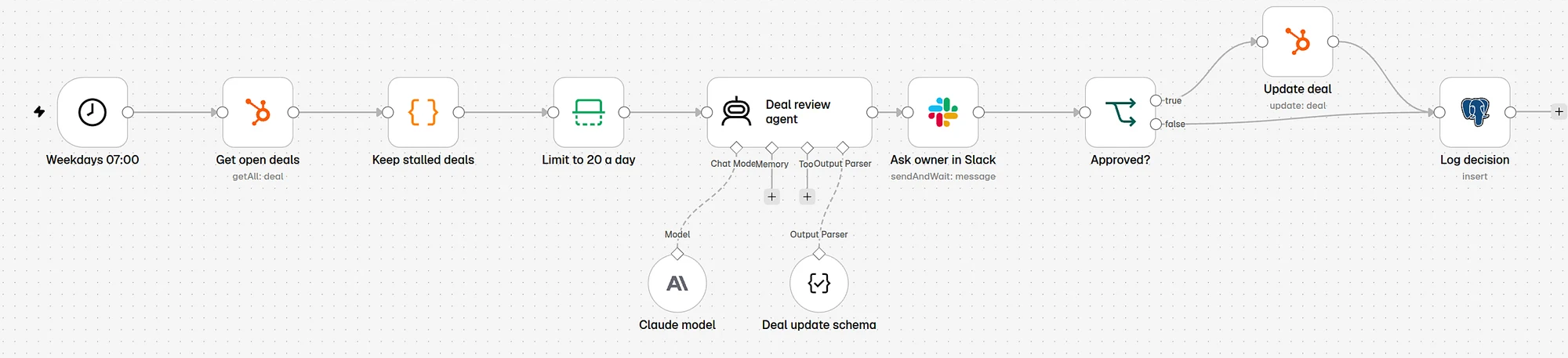
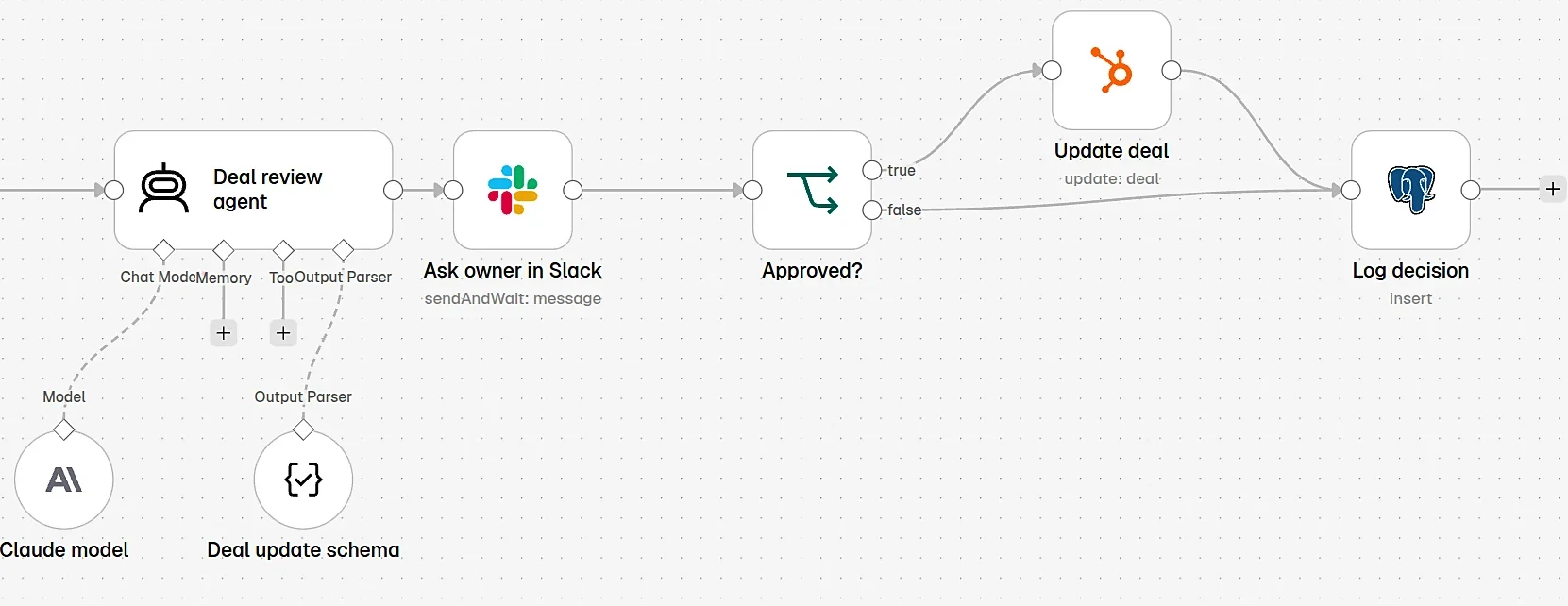
Here is the stalled deal sweep built in n8n. On weekdays at 07:00 it pulls open deals from HubSpot, keeps the ones with no contact for 14 days, caps the list at 20, asks a model for a next step, and sends each one to the owner in Slack. Only approved changes are written back. Everything is logged.
SQL
Audit log for every proposed and written change
create table agent_actions (
  id            bigint generated always as identity primary key,
  created_at    timestamptz not null default now(),
  crm           text not null,             -- 'hubspot' | 'salesforce'
  record_type   text not null,             -- 'deal' | 'contact' | 'lead' | 'opportunity'
  record_id     text not null,
  job           text not null,             -- 'call_notes' | 'stalled_sweep' | 'routing'
  proposed      jsonb not null,            -- what the agent wanted to write
  approved_by   text,                      -- null until a person approves
  decision      text,                      -- 'approved' | 'edited' | 'rejected' | 'auto'
  written       jsonb,                     -- what was actually written
  previous      jsonb,                     -- values before the write, for rollback
  model         text,
  cost_usd      numeric(10,5)
);
The previous column is your undo button. Without it, a bad week of writes is very hard to reverse.
Step 6
Backtest on last quarter's deals
Before the agent touches a live record, run it on the past. Take about 50 deals closed last quarter, won and lost. For each one, give the agent the record and activities as they were a few weeks before close, and compare its risk flag and next step with what really happened.
Diagram
The backtest loop
Pick 50 closed deals
won and lost, last quarter
Rebuild each as it was
record and activities a few weeks before close
Agent proposes
fields, risk flag, next step, evidence
Sales lead grades it
against what really happened
Fix prompts, run again
until it clears the bar below
Pick 50 closed deals
won and lost, last quarter
Rebuild each as it was
record and activities a few weeks before close
Agent proposes
fields, risk flag, next step, evidence
Sales lead grades it
against what really happened
Fix prompts, run again
until it clears the bar below
| Check | How | Bar to go live |
|---|---|---|
| Fields filled correctly | Sales lead marks each proposed field right or wrong | Wrong values are rare and never on money or dates |
| Evidence holds up | Each quote exists in the transcript or activity | Every time |
| Risk flag useful | Did high-risk flags match the lost deals? | The flags point at deals your lead agrees were at risk |
| Conflicts caught | Cases where the rep's value differs from the call | Flagged, never overwritten |
Fields filled correctly
- How
- Sales lead marks each proposed field right or wrong
- Bar to go live
- Wrong values are rare and never on money or dates
Evidence holds up
- How
- Each quote exists in the transcript or activity
- Bar to go live
- Every time
Risk flag useful
- How
- Did high-risk flags match the lost deals?
- Bar to go live
- The flags point at deals your lead agrees were at risk
Conflicts caught
- How
- Cases where the rep's value differs from the call
- Bar to go live
- Flagged, never overwritten
Real data hardens prompts. On a document-processing build, prompts that looked fine in testing broke on the client's real, messy documents. The backtest is where you find that, without a customer or a rep seeing it.
Step 7
Roll out to one team, then widen
Timeline
A two-week rollout for the first job
Field map and access, day 1 to 2. Field map signed off by RevOps, integration user or app created, read-only.
Prompts and workflow, day 2 to 5. Prompts, the n8n workflow, Slack approval and the audit log.
Backtest, day 5 to 7. 50 past deals, review with the sales lead, fix prompts.
Live with one team, day 8 to 10. Approval on every write, daily cap, daily check of the log.
- Field map and accessDay 1-2
Field map signed off by RevOps, integration user or app created, read-only.
- Prompts and workflowDay 2-5
Prompts, the n8n workflow, Slack approval and the audit log.
- BacktestDay 5-7
50 past deals, review with the sales lead, fix prompts.
- Live with one teamDay 8-10
Approval on every write, daily cap, daily check of the log.
Working days for one builder. Salesforce permission sets and custom fields can add a few days if an admin has to approve them.
- Weeks 1 and 2 live: every write needs approval, even on the agent's own fields.
- After that: the agent writes its own fields directly. Rep-owned fields keep approval.
- Widen to the next team when the approval rate is high and the edit rate is falling.
Watch out
Failure modes we see most
The agent overwrites the rep
A rep's careful note gets replaced by a summary. Fix: separate AI fields, and conflict flags instead of overwrites.
Admin token in production
One leaked token can change every record. Fix: a dedicated user or app with the smallest scopes.
Invented next steps
The model writes a plausible step nobody agreed. Fix: evidence quotes per field, and null when unclear.
Slack flooded with approvals
Reps mute the channel. Fix: a daily cap, batching per owner, and only real risks.
API limits hit at 07:00
The sweep pulls every deal at once. Fix: filter in the query, page through results, and respect your CRM's published rate limits.
No way to undo
A bad prompt writes for a week. Fix: log the previous value of every write, and a script that restores from the log.
Time and money
Time and cost
The first job takes about two weeks of one builder's time, as in the rollout plan. Each extra job reuses the access, the approval flow and the log, so it is faster. Running costs are small next to a rep's time: model tokens per record reviewed, workflow executions, and the minutes your team spends approving.
| Cost | Scales with | Keep it down by |
|---|---|---|
| Model tokens | Records reviewed x (record + transcript + reply) | A small model for extraction; trim transcripts to the relevant part; review only changed records |
| CRM API calls | Records read and written | Filter in the query, not in code; only fetch mapped properties |
| Workflow runs | Schedule frequency and volume | Daily sweeps, not hourly; event triggers for calls |
| Approval time | Proposals per day | A daily cap; stop sending low-risk items once trust is built |
Model tokens
- Scales with
- Records reviewed x (record + transcript + reply)
- Keep it down by
- A small model for extraction; trim transcripts to the relevant part; review only changed records
CRM API calls
- Scales with
- Records read and written
- Keep it down by
- Filter in the query, not in code; only fetch mapped properties
Workflow runs
- Scales with
- Schedule frequency and volume
- Keep it down by
- Daily sweeps, not hourly; event triggers for calls
Approval time
- Scales with
- Proposals per day
- Keep it down by
- A daily cap; stop sending low-risk items once trust is built
For the model side of the bill, the LLM cost control playbook shows how to route each step to the cheapest model that holds quality.
Results
How to measure it
| Metric | Where it comes from | Which way you want it |
|---|---|---|
| Next step filled on open deals | CRM report on the next step field | Up |
| Time from call to CRM update | Call end time vs. write time in the log | Down, from days to minutes |
| Approval rate | decision = approved in the log | Up, then stable |
| Edit rate | decision = edited | Down as prompts improve |
| Stalled deals with an owner action | Sweep log vs. later activity | Up |
| Rollbacks | Writes reverted from previous | Near zero |
Next step filled on open deals
- Where it comes from
- CRM report on the next step field
- Which way you want it
- Up
Time from call to CRM update
- Where it comes from
- Call end time vs. write time in the log
- Which way you want it
- Down, from days to minutes
Approval rate
- Where it comes from
decision = approvedin the log- Which way you want it
- Up, then stable
Edit rate
- Where it comes from
decision = edited- Which way you want it
- Down as prompts improve
Stalled deals with an owner action
- Where it comes from
- Sweep log vs. later activity
- Which way you want it
- Up
Rollbacks
- Where it comes from
- Writes reverted from
previous - Which way you want it
- Near zero
Take a baseline before launch: pull the share of open deals with an empty next step and the median time from a call to the next CRM edit. Re-measure two and six weeks after go-live.
Questions
FAQ
What can an AI agent do in HubSpot or Salesforce?
Good first jobs are turning call notes into fields, flagging stalled deals with a next step, writing pre-call briefs, and routing inbound leads. Each reads CRM records, proposes changes and writes back through the CRM API.
Should I use Agentforce or HubSpot Breeze instead of a custom agent?
Use the vendor agent if its built-in job matches your process and your data is already in the CRM. Build a custom agent when you need data from other tools, your own approval step and audit log, your own model, or one agent across both CRMs.
How do I stop the agent from overwriting what reps entered?
Give the agent its own fields for its output, keep stage and close fields with the rep, and make the prompt flag conflicts instead of overwriting. Log the previous value of every write so you can undo.
What permissions does the agent need?
Only the scopes or permission set entries for the objects and fields on your field map. In HubSpot that is a private app with narrow scopes; in Salesforce, a dedicated integration user with a permission set. Start read-only for the backtest.
How long does it take to build?
About two weeks for the first job with one builder, including a backtest on past deals and a live start with one team. Later jobs are faster because they reuse access, approvals and logging.