In short
- Log every model call with task, step, model and tokens. You cannot cut what you cannot see, and monthly invoices hide the expensive step.
- Measure cost per successful task. A cheaper model that fails more often can cost more per result.
- Route each step to the cheapest model that holds quality. On one AY build, moving a step from Claude Opus to Kimi cut that step's model cost by about 75% with quality held.
- Put the stable part of the prompt first so it caches. On Anthropic, cache reads bill at a tenth of the base input price.
- Batch anything that can wait. Both OpenAI and Anthropic price batch jobs at half. Cap agent loops, and set budgets with an alert and a hard stop.
Who it is for: CTOs, engineering leads and founders running AI agents in production whose model bill is growing faster than usage, or who cannot say what one task costs.
Overview
Why agent costs run away
A chatbot makes one model call per message. An agent makes many: it plans, calls a tool, reads the result, calls another tool, checks its work. Each call resends the system prompt, the tool definitions and the growing history. So the cost of a task is a loop of prompts, and the loop grows.
Diagram
Where the tokens come from in one agent run
System prompt + tool definitions
resent on every call in the loop
History so far
grows with every turn
Tool results
big API responses pasted back in
Model call
often a frontier model for every step
Loop again
until done, or until something stops it
System prompt + tool definitions
resent on every call in the loop
History so far
grows with every turn
Tool results
big API responses pasted back in
Model call
often a frontier model for every step
Loop again
until done, or until something stops it
Every box above is a lever. The steps below pull them one by one.
Fixing it is an architecture habit. We treat it as part of delivery: route to the cheapest model that holds quality, optimize live, and cap throughput. When usage drives a client's AI spend, we price for it too. This playbook is that habit written down.
Step 1
Log every call and measure cost per task
The provider dashboard tells you what you spent per model per day. It does not tell you that the summarise history step of your support agent is the biggest line on the bill. You need your own log, one row per model call, tagged with the task and the step.
SQL
Cost log table
create table llm_calls (
  id              bigint generated always as identity primary key,
  created_at      timestamptz not null default now(),
  run_id          text not null,      -- one agent run = one task
  task_type       text not null,      -- e.g. 'support_reply', 'extract_invoice'
  step            text not null,      -- e.g. 'classify', 'retrieve', 'draft', 'check'
  model           text not null,
  input_tokens    int not null,
  cached_tokens   int not null default 0,
  output_tokens   int not null,
  cost_usd        numeric(12,6) not null,
  success         boolean,            -- did the whole task succeed? fill at the end of the run
  latency_ms      int
);
create index on llm_calls (created_at);
create index on llm_calls (task_type, step);
Fill cost_usd from the token counts the API returns and your provider's current price list. Keep the price list in one config file so a price change is one edit.
Then measure cost per successful task, not cost per call or per month. If a cheaper model needs two retries or fails a third of the time, the cost per result can go up even as the price per token goes down.
Step 2
Find the steps that cost the most
After two weeks of logs, run this. It almost always shows that a few steps make up most of the spend, and that at least one of them is simple work running on an expensive model.
SQL
Where the money goes
-- Where does the money go? Last 14 days, by task and step.
select
  task_type,
  step,
  model,
  count(*)                                   as calls,
  round(sum(cost_usd)::numeric, 2)           as cost_usd,
  round(100 * sum(cost_usd) / sum(sum(cost_usd)) over (), 1) as pct_of_spend,
  round(avg(input_tokens))                   as avg_in,
  round(avg(output_tokens))                  as avg_out,
  round(100.0 * avg(cached_tokens::numeric / nullif(input_tokens,0)), 1) as pct_cached
from llm_calls
where created_at > now() - interval '14 days'
group by 1, 2, 3
order by cost_usd desc
limit 20;

-- Cost per successful task, the number that matters
select task_type,
       round(sum(cost_usd) / nullif(count(distinct run_id) filter (where success), 0), 4) as cost_per_success
from llm_calls
where created_at > now() - interval '14 days'
group by 1
order by 2 desc;| What you see | Likely cause | Go to |
|---|---|---|
| A simple step (classify, extract, format) on a frontier model | Nobody revisited the model choice | Step 3, routing |
High avg_in, low pct_cached | Stable prompt parts are not cached | Step 4, caching |
| Many calls per run on one task | Agent loops without a cap | Step 6, limits |
| Large spend on overnight or report jobs | Real-time calls for work that can wait | Step 5, batching |
| Cost per success much higher than cost per run | A step fails and retries | Fix the prompt before cutting price |
A simple step (classify, extract, format) on a frontier model
- Likely cause
- Nobody revisited the model choice
- Go to
- Step 3, routing
High
avg_in, lowpct_cached- Likely cause
- Stable prompt parts are not cached
- Go to
- Step 4, caching
Many calls per run on one task
- Likely cause
- Agent loops without a cap
- Go to
- Step 6, limits
Large spend on overnight or report jobs
- Likely cause
- Real-time calls for work that can wait
- Go to
- Step 5, batching
Cost per success much higher than cost per run
- Likely cause
- A step fails and retries
- Go to
- Fix the prompt before cutting price
Step 3
Route each step to the cheapest model that holds quality
Most pipelines are four or five tasks wearing a trenchcoat. Extraction, classification and reformatting are pattern work: a small model does them well and fast. A frontier model earns its price only on the step where judgment changes what a person reads.
Diagram
A routed pipeline (example: turning scraped posts into outreach angles)
Extract fields from raw text
small model, fixed schema
Classify by theme and tone
small or mid model, known labels
Write three angles for this person
frontier model: the one step a human reads
Format for the CRM or Slack
small model or plain code
Extract fields from raw text
small model, fixed schema
Classify by theme and tone
small or mid model, known labels
Write three angles for this person
frontier model: the one step a human reads
Format for the CRM or Slack
small model or plain code
In this example the frontier model handles roughly one call in seven. The rest is plumbing that a cheap model does reliably.
Test before you switch. For each step, run the same 50 to 100 real inputs through the current model and the cheaper one, and grade both with the same rubric. Switch only if the cheaper one passes. On one AY build this is how a step moved from Claude Opus to Kimi: about 75% cheaper for that step, quality held, with a second model kept as a fallback.
Prompt
Router prompt for mixed traffic
You are a router. Read the task and pick the cheapest tier that will do it well.

Tiers:
- "small": extraction into a fixed schema, classification into known labels, reformatting, short replies from a given text
- "mid": summaries, drafting from clear inputs, multi-field extraction from messy text
- "frontier": multi-step reasoning, judgment calls with money or risk attached, writing that a client reads as-is, anything that failed on a lower tier

Task type: {{task_type}}
Task: {{task_input_first_500_chars}}
Previous attempt on a lower tier failed: {{true|false}}

Return JSON: {"tier": "small" | "mid" | "frontier", "reason": "one line"}
If your task types are known in advance, skip the router call and map task type to model in config. A router is only worth it when tasks are mixed.
To compare current prices across providers before you test, use our model pricing table. Prices change often, so read them from config, never from code.
Step 4
Cache the stable part of every prompt
Agents resend the same system prompt and tool definitions on every call. Providers will cache that prefix and charge much less to read it again, but only if the prefix is identical every time. That means order matters: stable first, variable last.
Template
Prompt layout that caches
[ cached prefix: identical on every call, put it first ]
  1. System prompt and rules
  2. Tool definitions
  3. Long reference text (policies, schema docs, examples)
  ---- cache breakpoint ----
[ variable part: changes every call, put it last ]
  4. Conversation so far (trimmed or summarised)
  5. Retrieved passages for this question
  6. The new user message
Chart
Anthropic input pricing, relative to the base input price
- Cache write (5-minute cache)1.25x
The first call that stores the prefix costs a bit more.
- Base input1x
- Batch input0.5x
Message Batches API, results within 24 hours.
- Cache read0.1x
Every later call that reuses the prefix.
From Anthropic's prompt caching and batch processing docs. OpenAI caches long prompts automatically and bills cached input at a discount; check the current rate per model on its pricing page.
Step 5
Batch the work that can wait
Not every call needs an answer in two seconds. Nightly enrichment, weekly reports, backfills, evaluation runs and document re-processing can wait hours. Both OpenAI and Anthropic offer batch APIs at half the normal price, with results inside 24 hours.
| Job | Needs an answer now? | Run it as |
|---|---|---|
| Customer chat reply | Yes | Real-time, cached prefix |
| Classify yesterday's tickets for a report | No | Batch |
| Enrich 10,000 CRM records | No | Batch |
| Re-run the eval set after a prompt change | No | Batch |
| Agent step inside a live workflow | Yes | Real-time, routed model |
Customer chat reply
- Needs an answer now?
- Yes
- Run it as
- Real-time, cached prefix
Classify yesterday's tickets for a report
- Needs an answer now?
- No
- Run it as
- Batch
Enrich 10,000 CRM records
- Needs an answer now?
- No
- Run it as
- Batch
Re-run the eval set after a prompt change
- Needs an answer now?
- No
- Run it as
- Batch
Agent step inside a live workflow
- Needs an answer now?
- Yes
- Run it as
- Real-time, routed model
Step 6
Trim context and cap the loop
Most cost spikes we see come from one run that did not stop: an agent retrying a failing tool, or a history that grew to tens of thousands of tokens. Limits turn an expensive surprise into a handoff.
Config
Agent limits
# Agent limits we set on every build (adjust per task)
max_iterations:        6        # tool-call loops per run
max_output_tokens:     800      # per model call
max_input_tokens:      30000    # trim history or retrieval above this
tool_output_max_chars: 4000     # truncate big API/tool responses before they go back in
history_policy:        "keep last 6 turns, summarise older ones into 1 message"
retry_policy:          "2 retries on timeout/5xx, then fallback model, then hand off"
on_budget_hit: "stop, save state, hand to a person"- Cap iterations. In n8n the AI Agent node has a max iterations option; in code, count the loop yourself.
- Truncate tool output. A raw API response can be bigger than the whole prompt. Keep only the fields the agent needs.
- Summarise old turns. Keep the last few turns verbatim and replace the rest with a short summary.
- Retrieve less. Top three passages often answer as well as top ten, at a fraction of the input.
Step 7
Set budgets, alerts and a kill switch
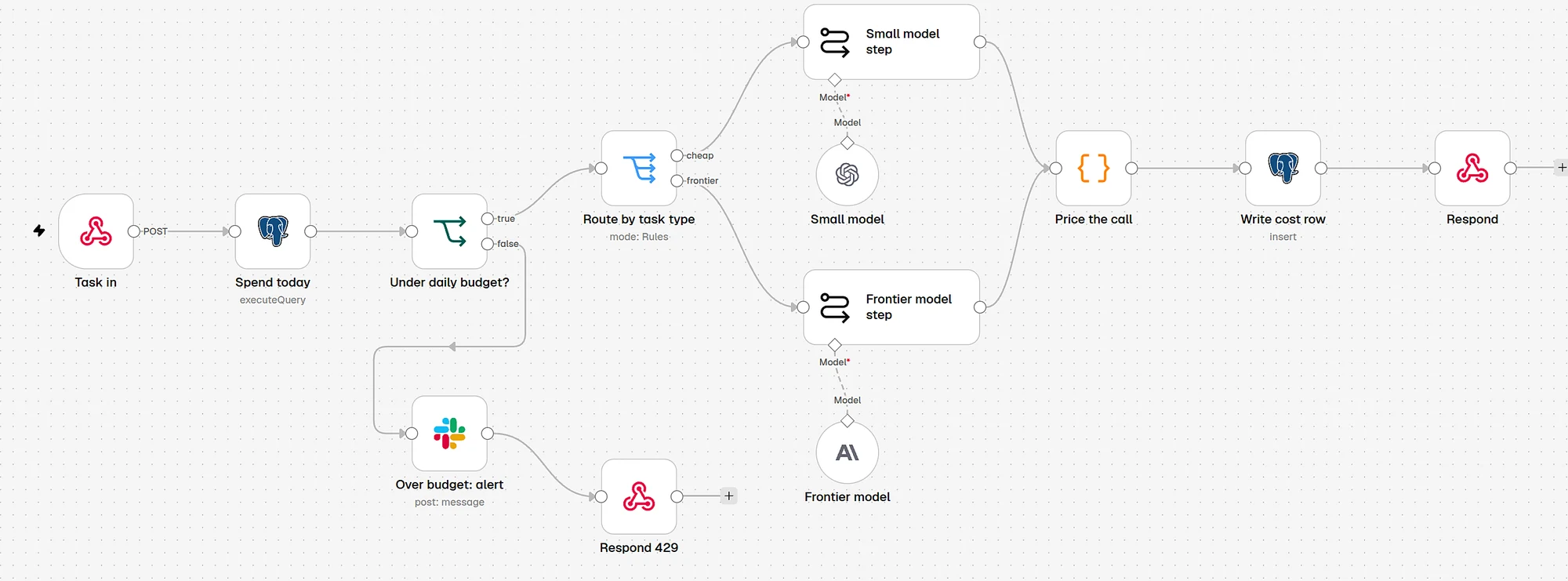
Provider spending limits protect the account. They do not protect a single task from a bug. Put your own check in front of every call: a per-run budget that stops a spiral, and a per-day budget per task that pauses new runs and pings someone.
Code
Budget guard (TypeScript)
// budget.ts: call before every model request. Works with any provider.
type Budget = { perRunUsd: number; perDayUsd: number; alertAtShare: number }

const BUDGETS: Record<string, Budget> = {
  support_reply:   { perRunUsd: 0.05, perDayUsd: 40,  alertAtShare: 0.8 },
  extract_invoice: { perRunUsd: 0.02, perDayUsd: 15,  alertAtShare: 0.8 },
  default:         { perRunUsd: 0.10, perDayUsd: 25,  alertAtShare: 0.8 },
}

export async function checkBudget(taskType: string, runSpentUsd: number) {
  const b = BUDGETS[taskType] ?? BUDGETS.default
  const daySpent = await db.sumCostToday(taskType)          // select sum(cost_usd) ... where created_at >= current_date

  if (runSpentUsd >= b.perRunUsd) {
    return { ok: false, reason: "run_budget" as const }      // stop this run, hand to a person
  }
  if (daySpent >= b.perDayUsd) {
    await alert(`${taskType}: daily LLM budget reached (${daySpent.toFixed(2)} USD). Pausing.`)
    return { ok: false, reason: "day_budget" as const }      // pause new runs of this task
  }
  if (daySpent >= b.perDayUsd * b.alertAtShare) {
    await alertOnce(`${taskType}: ${Math.round(b.alertAtShare * 100)}% of daily budget used.`)
  }
  return { ok: true as const }
}

// The numbers above are placeholders. Set yours from two weeks of llm_calls data:
// perRunUsd  = about 3x the median cost per successful run
// perDayUsd  = normal daily spend plus headroom you are willing to lose to a bug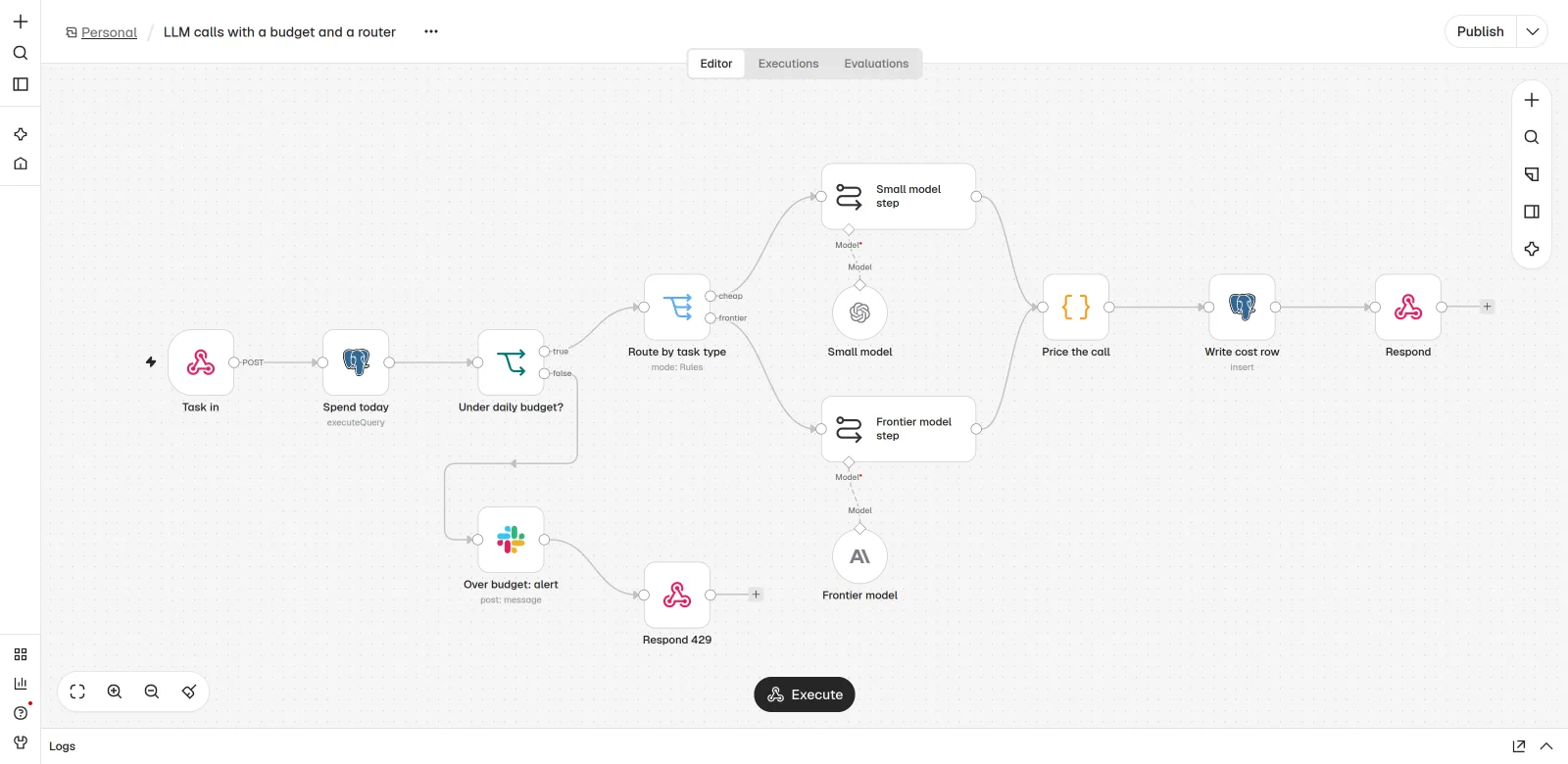
Quality
Prove quality did not drop
Every cut above can hurt quality if you do it blind. Keep a fixed set of real inputs per task, with the expected output or a grading rubric, and run it after each change. You want two numbers side by side: quality score and cost per successful task.
| Change | Quality before → after | Cost per success before → after | Keep? |
|---|---|---|---|
Step classify to small model | Your score → your score | Your number → your number | Yes if quality holds |
| Cache system prompt and tools | Should not change | Should drop | Yes |
| Top 10 passages → top 3 | Check carefully | Should drop | Only if quality holds |
| Nightly enrichment to batch | Should not change | About half on that job | Yes |
Step
classifyto small model- Quality before → after
- Your score → your score
- Cost per success before → after
- Your number → your number
- Keep?
- Yes if quality holds
Cache system prompt and tools
- Quality before → after
- Should not change
- Cost per success before → after
- Should drop
- Keep?
- Yes
Top 10 passages → top 3
- Quality before → after
- Check carefully
- Cost per success before → after
- Should drop
- Keep?
- Only if quality holds
Nightly enrichment to batch
- Quality before → after
- Should not change
- Cost per success before → after
- About half on that job
- Keep?
- Yes
For how to build that eval set, see the AI agent evals guide.
Watch out
Failure modes we see most
Cutting price, raising cost
A cheaper model fails more, retries more, and costs more per result. Fix: measure cost per successful task.
Cache that never hits
A date or user id at the top of the prompt. Fix: stable first, variable last, and watch
pct_cached.Budget only at the account level
One buggy task burns the month. Fix: per-task, per-run budgets in your own code.
Prices hardcoded in code
A price change makes your cost log wrong. Fix: one price config, read at runtime.
Optimizing a step nobody uses
Effort goes to a step that is 2% of spend. Fix: run the Pareto query first.
No fallback
The cheap model is down and the agent stops. Fix: a fallback model, then a handoff to a person.
Time and money
Time and cost
Logging and the Pareto query take a day or two. Then you need two weeks of data before the numbers mean much. Each change after that (a routed step, cache layout, a batch job, limits, budgets) is a few hours plus an eval run. How much you save depends on how your agent is built today, so we do not quote a percentage up front. The Pareto query tells you where the room is.
Timeline
First pass, in working days
Logging, day 1 to 2. Cost log table, tags on every call, price config.
Collect data, day 3 to 12. Let normal traffic run. Build the eval sets meanwhile.
Budgets and limits, day 3 to 4. Per-run and per-day budgets, loop caps. Safe to add early.
Pareto and cuts, day 13 to 15. Routing, caching and batching on the top steps, each with an eval run.
- LoggingDay 1-2
Cost log table, tags on every call, price config.
- Collect dataDay 3-12
Let normal traffic run. Build the eval sets meanwhile.
- Budgets and limitsDay 3-4
Per-run and per-day budgets, loop caps. Safe to add early.
- Pareto and cutsDay 13-15
Routing, caching and batching on the top steps, each with an eval run.
To estimate what an agent should cost before you build it, try the AI agent cost calculator. For how inference cost works at the infrastructure level, read AI inference cost optimization.
Results
How to measure it
| Metric | From | Which way you want it |
|---|---|---|
| Cost per successful task | llm_calls grouped by run_id | Down, with quality flat or up |
| Share of spend on frontier models | llm_calls by model | Down to the steps that need it |
| Cached share of input tokens | cached_tokens / input_tokens | Up |
| Runs stopped by a budget | Budget guard log | Rare; each one investigated |
| Quality score per task | Eval runs | Flat or up after every change |
Cost per successful task
- From
llm_callsgrouped byrun_id- Which way you want it
- Down, with quality flat or up
Share of spend on frontier models
- From
llm_callsby model- Which way you want it
- Down to the steps that need it
Cached share of input tokens
- From
cached_tokens / input_tokens- Which way you want it
- Up
Runs stopped by a budget
- From
- Budget guard log
- Which way you want it
- Rare; each one investigated
Quality score per task
- From
- Eval runs
- Which way you want it
- Flat or up after every change
Take the baseline from the first two weeks of logs, then re-measure two and six weeks after the first round of changes.
Questions
FAQ
How do I reduce LLM costs for AI agents?
Log every call with task and step, find the few steps that cost the most, route simple steps to cheaper models after testing them, put the stable part of the prompt first so it caches, batch work that can wait, cap agent loops, and set per-task budgets with alerts.
What is model routing?
Model routing means sending each step of a pipeline to the cheapest model that does that step well, instead of sending everything to one model. Extraction and classification usually go to small models; judgment steps go to a frontier model.
How much does prompt caching save?
It depends on how much of each prompt is a stable prefix. On Anthropic, reading a cached prefix costs a tenth of the base input price, and writing it costs 1.25 times the base price for the 5-minute cache. OpenAI caches long prompts automatically at a discount that varies by model.
What should I measure to control AI agent cost?
Cost per successful task, broken down by step and model. Add the cached share of input tokens, the share of spend on frontier models, how often budgets stop a run, and a quality score so you know cuts did not hurt results.
Do provider spending limits replace my own budgets?
No. Provider limits protect the account as a whole. Your own per-run and per-task budgets stop a single buggy task or looping agent before it eats the month.