In short
- Write a one-page spec and prove the workflow by hand before you automate it. Most demo agents fail in production because nobody defined what done means.
- Run n8n in queue mode with Postgres and Redis, or on n8n Cloud, with a pinned version. Never SQLite and "latest" in production.
- Make the agent return JSON against a schema, then validate it in a Code node. Anything outside the contract fails loudly.
- Retry external calls, send agent errors to a fallback path, and set an error workflow that alerts a channel someone reads.
- Put a person in front of irreversible actions, log every run with its execution id, and export workflows to git every night.
Who it is for: Engineers and automation leads who already have an n8n agent working on test data and need it to survive real traffic. Self-hosted or n8n Cloud.
Overview
What changes between demo and production
n8n is our main orchestration layer at AY. If a workflow connects tools, moves data or runs an agent on a trigger, it usually lives in n8n. The full backend of our customer support chatbot runs in three n8n workflows with no separate server. So we have seen most of the ways an agent that looked great in a demo breaks once real traffic arrives.
| Demo | Production | |
|---|---|---|
| Input | Clean test data | Empty fields, wrong types, other languages, duplicates |
| Output | Free text that looked right | JSON against a schema, validated |
| Failure | You see it in the editor | Alert, fallback for the user, run logged |
| Risky actions | It just does them | A person approves first |
| Load | One run at a time | Bursts; queue mode and workers |
| Changes | Edited live | Tested on dev, exported to git, then promoted |
Input
- Demo
- Clean test data
- Production
- Empty fields, wrong types, other languages, duplicates
Output
- Demo
- Free text that looked right
- Production
- JSON against a schema, validated
Failure
- Demo
- You see it in the editor
- Production
- Alert, fallback for the user, run logged
Risky actions
- Demo
- It just does them
- Production
- A person approves first
Load
- Demo
- One run at a time
- Production
- Bursts; queue mode and workers
Changes
- Demo
- Edited live
- Production
- Tested on dev, exported to git, then promoted
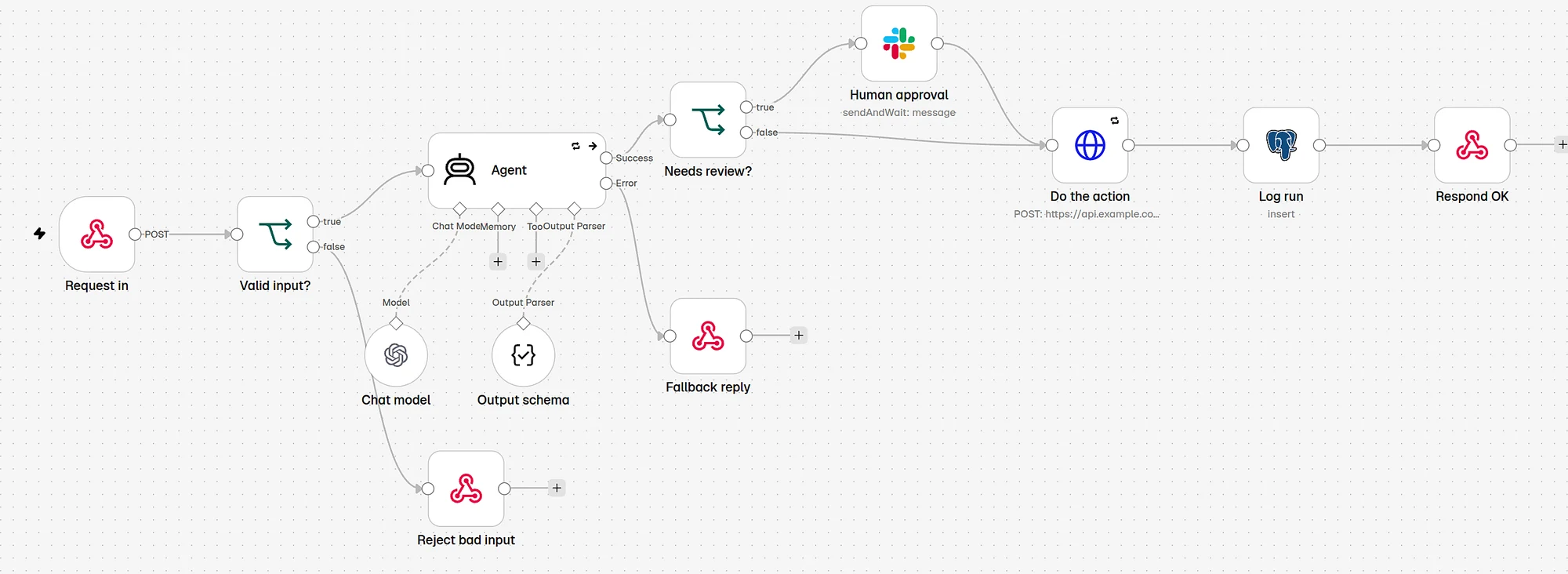
Diagram
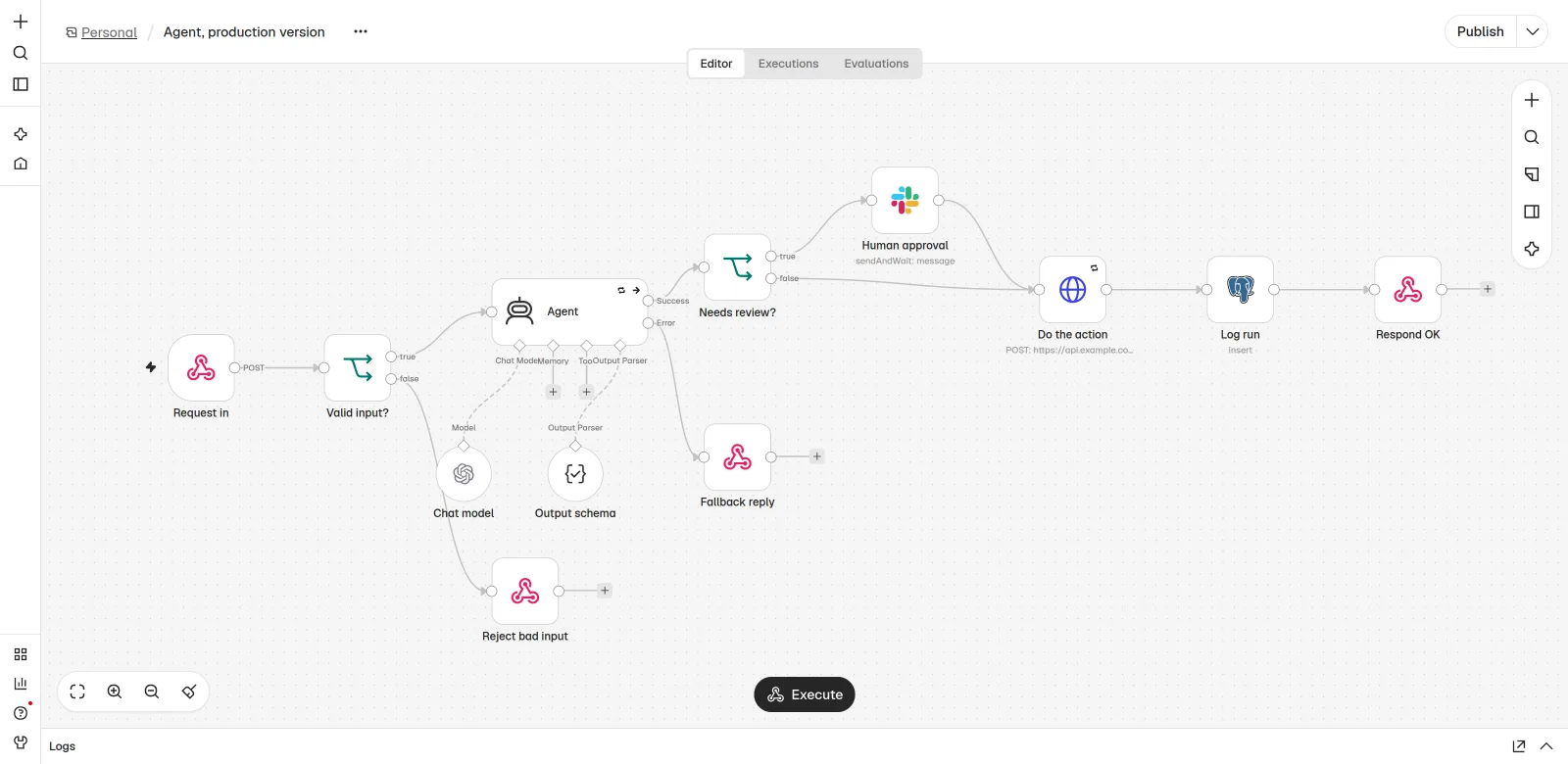
The hardened agent, end to end
Request in
webhook, schedule or app trigger
Validate input
reject bad requests with a clear error
Agent with structured output
retries on fail; errors go to their own output
Error output
Fallback reply + alert
user is told a person will follow up
Success, needs review
Human approval in Slack
approve or decline
Success, safe action
Do the action
HTTP call with retry and timeout
Log the run
execution id, action, outcome, tokens
Step 1
Write the spec and prove it by hand
Our rule on every build: map the workflow by hand, prove it, then build the n8n version. If nobody can do the job manually with the same inputs, the agent cannot either. The spec is the authority. When someone asks for a change mid-build, it goes into the spec first.
Template
One-page agent spec
AGENT SPEC  {{name}}            owner: {{person}}     version: {{v1}}

Job (one sentence): {{what it does, for whom}}
Trigger: {{webhook | schedule | app event}}      Expected volume: {{runs per day}}
Inputs: {{fields and where they come from}}
Output: {{exact JSON shape or the action taken}}
Systems it may WRITE to: {{list}}     Systems it may only READ: {{list}}
Needs a human yes when: {{conditions}}
Never does: {{hard limits}}
Done means: {{measurable result}}
On failure: {{fallback for the user}} + alert {{channel}}
Test set: {{link to 50-100 real examples with expected results}}Step 2
Set up hosting for real load
The default single-process setup is fine for building. In production, two things go wrong: one slow agent run blocks the others, and SQLite struggles with many executions. Queue mode fixes both. The main instance takes triggers and webhooks and puts executions on a Redis queue; workers pull and run them. Postgres stores workflows and execution data.
Config
Queue mode with Docker Compose
# docker-compose.yml: n8n in queue mode (main + worker + Postgres + Redis)
# Pin image versions you have tested. Never "latest" in production.
x-n8n-env: &n8n-env
  DB_TYPE: postgresdb
  DB_POSTGRESDB_HOST: postgres
  DB_POSTGRESDB_DATABASE: n8n
  DB_POSTGRESDB_USER: n8n
  DB_POSTGRESDB_PASSWORD: ${POSTGRES_PASSWORD}
  EXECUTIONS_MODE: queue
  QUEUE_BULL_REDIS_HOST: redis
  QUEUE_BULL_REDIS_PORT: 6379
  N8N_ENCRYPTION_KEY: ${N8N_ENCRYPTION_KEY}   # same value on every n8n container; back it up
  EXECUTIONS_DATA_PRUNE: "true"
  EXECUTIONS_DATA_MAX_AGE: 336                # hours (14 days)
  GENERIC_TIMEZONE: Europe/Amsterdam
  WEBHOOK_URL: https://n8n.example.com/

services:
  postgres:
    image: postgres:16
    environment:
      POSTGRES_USER: n8n
      POSTGRES_PASSWORD: ${POSTGRES_PASSWORD}
      POSTGRES_DB: n8n
    volumes: [pg_data:/var/lib/postgresql/data]
    restart: unless-stopped

  redis:
    image: redis:7
    restart: unless-stopped

  n8n-main:
    image: n8nio/n8n:{{tested_version}}
    environment: *n8n-env
    ports: ["5678:5678"]
    depends_on: [postgres, redis]
    restart: unless-stopped

  n8n-worker:
    image: n8nio/n8n:{{tested_version}}
    command: worker --concurrency=10
    environment: *n8n-env
    depends_on: [postgres, redis]
    restart: unless-stopped
    # scale with: docker compose up -d --scale n8n-worker=3

volumes:
  pg_data:
Every n8n container must share the same N8N_ENCRYPTION_KEY, or workers cannot read credentials. Lose that key and you lose every stored credential.
| n8n Cloud | Self-hosted | |
|---|---|---|
| Ops work | n8n runs it | You run updates, backups, monitoring |
| Data location and network | n8n's hosting | Your servers, your VPC |
| Scaling | By plan | Add workers |
| Best when | No one on the team wants to run servers | Data must stay in your network, or volume is high |
Ops work
- n8n Cloud
- n8n runs it
- Self-hosted
- You run updates, backups, monitoring
Data location and network
- n8n Cloud
- n8n's hosting
- Self-hosted
- Your servers, your VPC
Scaling
- n8n Cloud
- By plan
- Self-hosted
- Add workers
Best when
- n8n Cloud
- No one on the team wants to run servers
- Self-hosted
- Data must stay in your network, or volume is high
For a full cost comparison, read self-hosted n8n vs n8n Cloud. If you self-host, keep up with security releases; our notes on the n8n sandbox escape vulnerability and the n8n 3.0 upgrade guide cover the recent ones.
Step 3
Force structured output and validate it
Free text from an agent is fine for a chat reply and dangerous for anything that drives an action. Attach the Structured Output Parser sub-node to the AI Agent with a JSON schema, so the agent must return a fixed shape. Then check the business rules in a Code node right after. The parser checks the shape; your code checks that the content is allowed.
Schema
Output schema for the Structured Output Parser
{
  "type": "object",
  "properties": {
    "action":       { "type": "string", "enum": ["reply", "create_ticket", "update_record", "none"] },
    "payload":      { "type": "object" },
    "needs_review": { "type": "boolean" },
    "reason":       { "type": "string" }
  },
  "required": ["action", "needs_review", "reason"],
  "additionalProperties": false
}
Code
Validation Code node
// n8n Code node after the agent: refuse anything outside the contract.
const out = $json.output ?? {};
const allowed = ["reply", "create_ticket", "update_record", "none"];

if (!allowed.includes(out.action)) {
  throw new Error(`Agent returned unknown action: ${out.action}`);
}
if (out.action === "update_record" && !out.payload?.record_id) {
  throw new Error("update_record without record_id");
}
// Money, deletes and anything external always go to a person.
if (out.payload?.amount || out.action === "update_record") {
  out.needs_review = true;
}
return [{ json: { ...$json, output: out } }];
A thrown error here sends the run to your error handling, which is what you want: no unknown action ever reaches another system.
Step 4
Handle errors on three levels
Model APIs time out. Rate limits hit. A tool returns a 500. In production these are normal, so the workflow needs an answer for each, on three levels.
| Level | Where you set it | What it does |
|---|---|---|
| Node | Node settings: Retry On Fail, Max Tries, Wait Between Tries; timeouts in options | Absorbs short failures: timeouts, 429s, brief outages |
| Branch | Node settings: On Error → Continue (using error output) | Gives the agent an Error output, so you can send a fallback reply instead of a dead request |
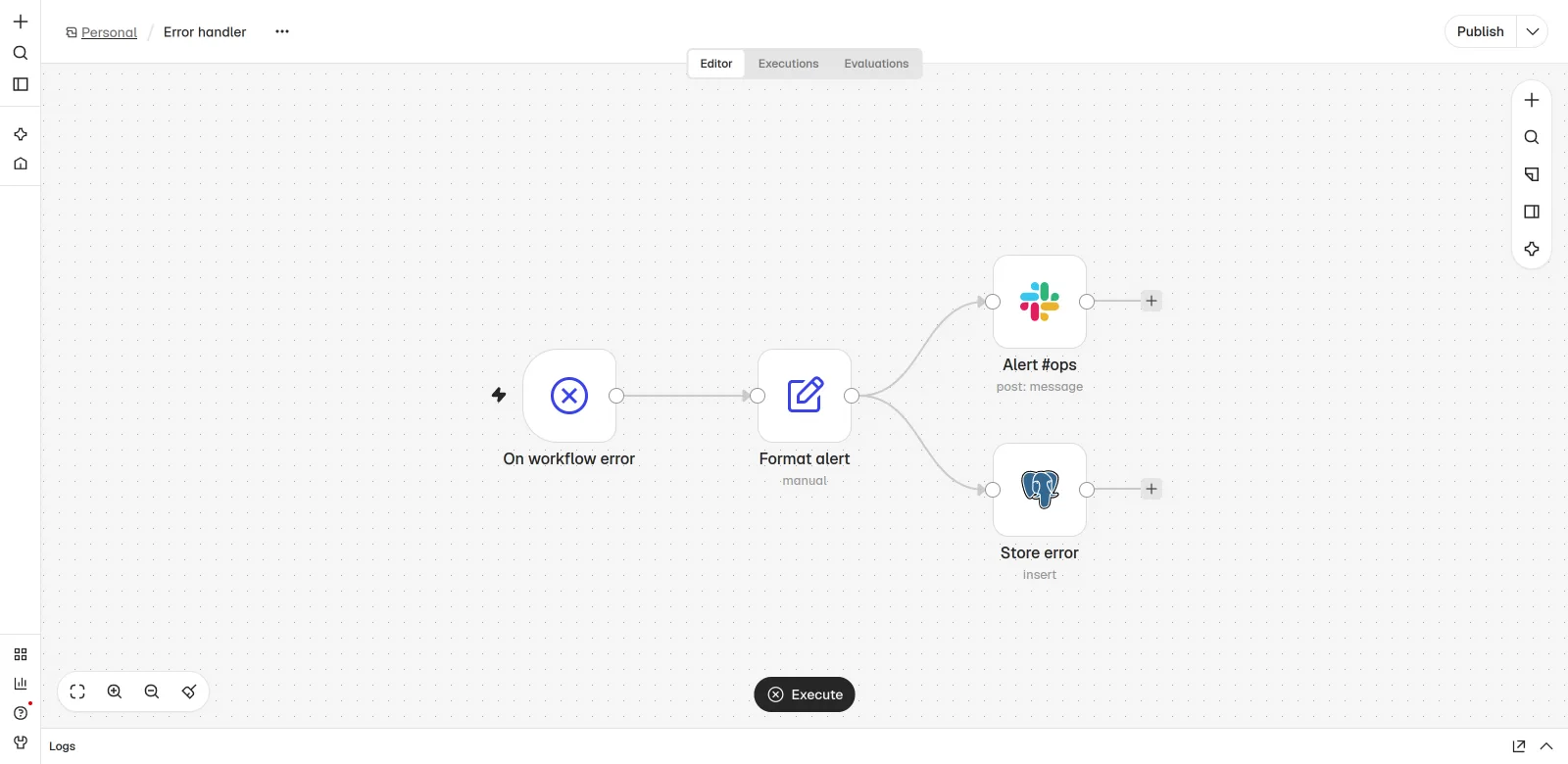
| Workflow | Workflow settings: Error workflow → a workflow that starts with Error Trigger | Catches anything that still fails: alert with a link to the execution, and a log row |
Node
- Where you set it
- Node settings: Retry On Fail, Max Tries, Wait Between Tries; timeouts in options
- What it does
- Absorbs short failures: timeouts, 429s, brief outages
Branch
- Where you set it
- Node settings: On Error → Continue (using error output)
- What it does
- Gives the agent an Error output, so you can send a fallback reply instead of a dead request
Workflow
- Where you set it
- Workflow settings: Error workflow → a workflow that starts with Error Trigger
- What it does
- Catches anything that still fails: alert with a link to the execution, and a log row
Step 5
Put a person in front of irreversible actions
When the stakes are high, the AI suggests and a person decides. In n8n the simplest way is the Slack (or Gmail, Teams) node with the send and wait for response operation: the run pauses until someone clicks approve or decline. A Wait node resumed by webhook works for custom approval screens.
| Action | Approval? | Why |
|---|---|---|
| Reply drafted from your own docs | No, after testing | Low risk, logged, reviewed weekly |
| Updating a CRM or database record | Yes at first | Hard to notice when wrong |
| Anything with money: refunds, credits, invoices | Always | Irreversible |
| Deleting or merging records | Always | Irreversible |
| Email or message to a customer or prospect | Yes until trust is built | Your name is on it |
Reply drafted from your own docs
- Approval?
- No, after testing
- Why
- Low risk, logged, reviewed weekly
Updating a CRM or database record
- Approval?
- Yes at first
- Why
- Hard to notice when wrong
Anything with money: refunds, credits, invoices
- Approval?
- Always
- Why
- Irreversible
Deleting or merging records
- Approval?
- Always
- Why
- Irreversible
Email or message to a customer or prospect
- Approval?
- Yes until trust is built
- Why
- Your name is on it
Cap throughput where people receive the output. On one build we limited an agent to 20 tasks a day so the team on the other end was not flooded. The Limit node does this in one step.
Step 6
Log every run and prune what you do not need
n8n keeps execution data, which helps you debug. As a reporting tool it is weak, and keeping every execution forever fills your database. Write your own small log row per run, linked by execution id, and let n8n prune old executions.
SQL
Run log table
create table agent_runs (
  id             bigint generated always as identity primary key,
  created_at     timestamptz not null default now(),
  workflow       text not null,
  execution_id   text not null,          -- {{ $execution.id }} links back to n8n
  input_hash     text,                   -- dedupe and replay without storing personal data
  action         text,
  needs_review   boolean,
  approved_by    text,
  outcome        text,                   -- 'done' | 'rejected' | 'failed' | 'fallback'
  model          text,
  input_tokens   int,
  output_tokens  int,
  latency_ms     int
);
Step 7
Version workflows and separate dev from prod
Editing a live agent in the production editor is how a Friday change breaks Monday. Keep a dev instance, test there, then promote. n8n's built-in source control with Git environments is available on its higher plans. On any plan, the CLI export into a git repo gives you history and a way back.
Code
Nightly export to git
# Nightly: export workflows to git (works on any plan)
docker compose exec -T n8n-main n8n export:workflow --all --separate --output=/home/node/backup/workflows/
docker compose cp n8n-main:/home/node/backup/workflows ./workflows
git add workflows && git commit -m "n8n export $(date +%F)" && git push

# Restore one workflow on another instance
n8n import:workflow --input=./workflows/<file>.json- Credentials stay out of git. Each instance has its own credentials; workflows reference them by name.
- Document each node's why in its notes field. The next person who opens the workflow will thank you.
- Pin the n8n version and upgrade on dev first. Read the release notes for breaking changes.
Step 8
Test with real data, then load test
Real data hardens prompts. Run the test set from step 1 and fix what breaks. Then simulate load: send about twice your expected peak through the webhook and watch the Redis queue, worker CPU, model rate limits and error rate. Most agents hit the model provider's rate limit before n8n struggles.
Timeline
Hardening an existing agent, in working days
Spec and test set, day 1 to 2. One-page spec, 50 to 100 real examples.
Hosting, day 2 to 3. Queue mode or Cloud, pinned version, key backed up.
Output and errors, day 3 to 6. Schema, validation, retries, error output, error workflow.
Approvals and logs, day 6 to 8. Approval steps, run log, pruning, git export.
Test and load, day 8 to 10. Real test set, 2x peak load, fixes.
- Spec and test setDay 1-2
One-page spec, 50 to 100 real examples.
- HostingDay 2-3
Queue mode or Cloud, pinned version, key backed up.
- Output and errorsDay 3-6
Schema, validation, retries, error output, error workflow.
- Approvals and logsDay 6-8
Approval steps, run log, pruning, git export.
- Test and loadDay 8-10
Real test set, 2x peak load, fixes.
For one engineer on one agent. A second agent on the same setup takes much less, because hosting, error workflow and logging are shared.
Production readiness checklist
- Spec written and signed off by the person who owns the outcome.
- Queue mode (or n8n Cloud) sized for peak volume; image version pinned.
N8N_ENCRYPTION_KEYstored in your secret manager and backed up.- Agent output parsed against a JSON schema and validated in a Code node.
- Retry on fail set on every external call; timeouts set on model and HTTP nodes.
- Agent node errors go to an error output with a user-facing fallback.
- Error workflow set in workflow settings; alerts reach a channel someone reads.
- Human approval on every irreversible action (money, deletes, external sends).
- Every run logged with execution id, action, outcome and token counts.
- Execution data pruning on; no personal data kept longer than needed.
- Workflows exported to git nightly; prod changes only after a test on dev.
- Load test at 2x expected peak; throughput capped where people receive the output.
Watch out
Failure modes we see most
Silent failures
The workflow fails, nobody knows, customers wait. Fix: error output, error workflow, alerts to an owned channel.
Free text drives actions
The agent writes "I will update the record" and something else parses it. Fix: schema plus validation.
Lost encryption key
A rebuild with a new key and every credential is unreadable. Fix: store and back up
N8N_ENCRYPTION_KEY.Database fills up
Years of execution data in Postgres. Fix: pruning on, plus your own small run log.
Hotfix in production
A quick edit breaks a node mapping. Fix: dev instance, git export, promote.
Hardcoded secrets
An API key in a Code node or an HTTP header field. Fix: always use n8n credentials.
Time and money
Time and cost
Hardening one existing agent takes about 1 to 2 weeks of one engineer's time, as in the plan above. Running costs are the n8n plan or your servers (Postgres, Redis, the main instance and workers), plus model tokens, which usually grow fastest. To keep the model side in check, use the LLM cost control playbook. To compare platform costs, try the n8n vs Zapier vs Make cost calculator.
| Cost | Scales with | Keep it down by |
|---|---|---|
| n8n Cloud plan or servers | Executions, workers | Batch small items into one execution; prune data |
| Model tokens | Runs x prompt size x loops | Route steps to small models; cap iterations |
| Your time on alerts | Error rate | Fix the top error each week |
n8n Cloud plan or servers
- Scales with
- Executions, workers
- Keep it down by
- Batch small items into one execution; prune data
Model tokens
- Scales with
- Runs x prompt size x loops
- Keep it down by
- Route steps to small models; cap iterations
Your time on alerts
- Scales with
- Error rate
- Keep it down by
- Fix the top error each week
Results
How to measure it
| Metric | From | Target direction |
|---|---|---|
Runs that ended done | agent_runs.outcome | Up |
| Runs that hit the error workflow | Error log | Down; every one has a ticket |
| Approval rate on reviewed actions | approved_by not null | Up as prompts improve |
| p95 run time | latency_ms | Stable under load |
| Tokens per run | input_tokens + output_tokens | Flat or down |
| Test set score after each change | Evaluations run | Never down |
Runs that ended
done- From
agent_runs.outcome- Target direction
- Up
Runs that hit the error workflow
- From
- Error log
- Target direction
- Down; every one has a ticket
Approval rate on reviewed actions
- From
approved_bynot null- Target direction
- Up as prompts improve
p95 run time
- From
latency_ms- Target direction
- Stable under load
Tokens per run
- From
input_tokens + output_tokens- Target direction
- Flat or down
Test set score after each change
- From
- Evaluations run
- Target direction
- Never down
Take a baseline in the first week live, then review every week with the person who owns the outcome. One fix per week, starting with the most common error, beats a big rewrite every quarter.
Questions
FAQ
Can n8n run AI agents in production?
Yes. n8n's AI Agent node, with structured output, retries, error workflows and human approval steps, runs production agents. For real load, self-host in queue mode with Postgres and Redis, or use n8n Cloud.
What is n8n queue mode?
Queue mode splits n8n into a main instance that receives triggers and webhooks and workers that run executions from a Redis queue. You set EXECUTIONS_MODE to queue, use Postgres, share one encryption key, and add workers to scale.
How do I handle errors in an n8n AI agent?
On three levels: Retry On Fail on nodes that call external services, the Continue (using error output) setting so the agent has an error branch with a fallback, and an error workflow that starts with the Error Trigger node to alert and log.
How do I add human approval to an n8n workflow?
Use the send and wait for response operation on the Slack, Gmail or Teams node, or a Wait node resumed by a webhook from your own approval screen. The run pauses until a person approves or declines.
How do I version control n8n workflows?
n8n offers Git-based source control and environments on its higher plans. On any plan, export workflows with the n8n CLI to a git repository every night, test changes on a dev instance and import them into production.