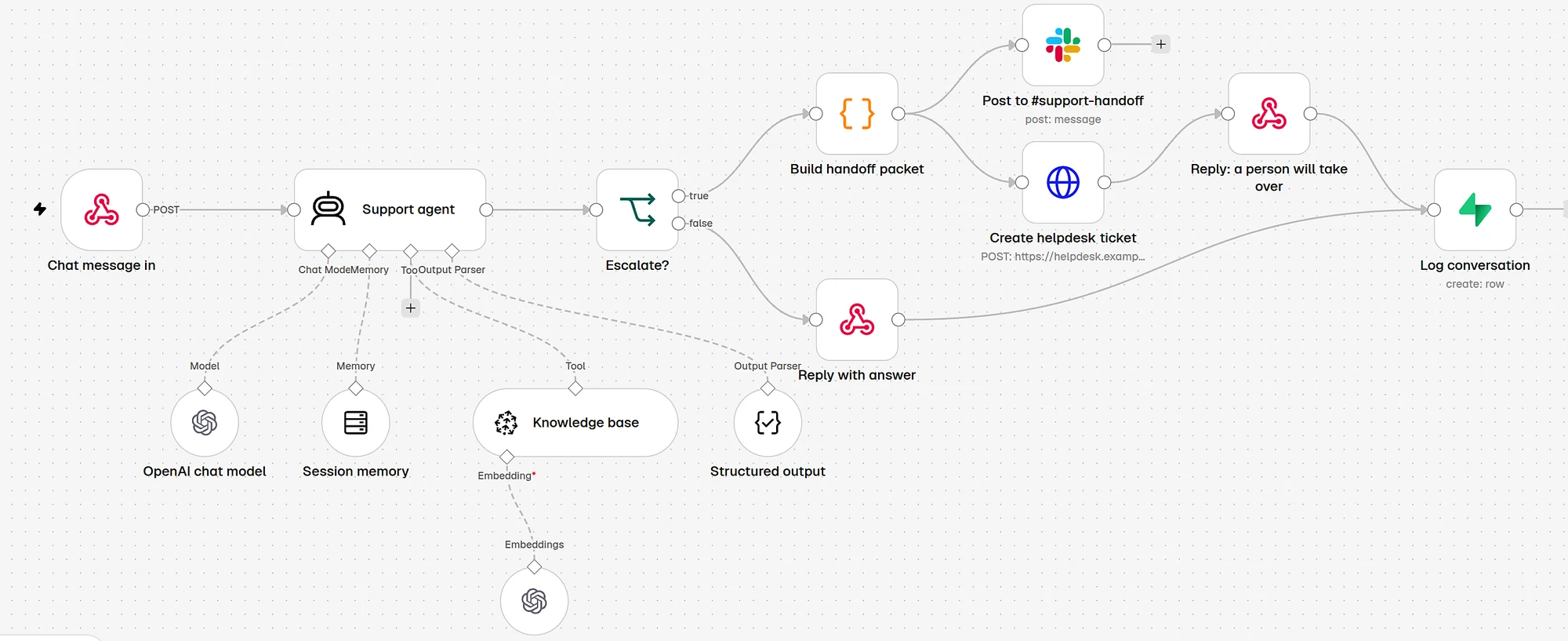
In short
- Write the handoff rules before you write the prompt. The bot is only as safe as the list of things it refuses to answer.
- Make the model return JSON: answer, confidence, escalate, reason, category and sources. That structure is what makes a clean handoff possible.
- Hand the person a packet: what was asked, what the bot said, which sources it used, and a draft next step. Skip the transcript dump.
- Test on 100 real past questions before any customer sees it, and launch on one channel with every conversation logged.
- AY shipped this pattern for a Dutch loyalty programme: answers in native Dutch from one PDF, with a confidence score and escalation flag on every reply.
Who it is for: Support leads and CTOs at companies where a large share of tickets ask the same questions, who want a bot that knows when to stop. You need someone who can work with an API and a workflow tool such as n8n.
Overview
What you will have at the end
Most support bots fail the same way. They answer everything. A customer asks about a missing refund, the bot finds a paragraph about refunds in general, and it writes a confident reply that is wrong for this customer. Now you have an angry customer and a ticket that is harder than before.
A smarter model does not fix this. A bot that knows what it may not answer does: it says so and passes the case to a person with everything that person needs. That is what this playbook builds.
Diagram
How one conversation moves through the agent
Customer message
web chat, email or WhatsApp
Retrieve from knowledge base
top passages from your own docs
Agent writes a JSON reply
answer, confidence, escalate, reason, category, sources
Escalate is false and confidence is 0.7 or higher
Send the answer
ask for thumbs up or down
Escalate is true, or confidence under 0.7
Build the handoff packet
question, bot replies, sources, draft next step
Person picks it up
helpdesk ticket plus Slack ping
Log everything
question, answer, score, flag, feedback
The 0.7 threshold is a starting point. You set the real one in step 6 from your test results.
We built this pattern for a loyalty programme provider in the Netherlands. Customers kept asking how to save points, how to redeem miles, which partners take part. The bot answers those in natural Dutch from one PDF in Google Drive. Every reply carries a confidence score, an escalation flag and a question category. When a topic is account-specific or sensitive, the bot shows the customer service contact instead of guessing. The full write-up is in the customer support case study.
| Piece | What we used | Job |
|---|---|---|
| Workflow and backend | n8n | Webhook in, retrieval, the agent call, logging. No separate backend server. |
| Model | OpenAI GPT-4.1-mini | Writes the answer and the JSON fields. |
| Embeddings | OpenAI text-embedding-3-large | Turns the knowledge base into vectors. |
| Vector store | Pinecone | Finds the passages that match the question. |
| Logs and analytics | Supabase (Postgres) | Every question, answer, score, flag and rating. |
| Knowledge source | One PDF in Google Drive | The team edits the PDF, a workflow re-indexes it. |
| Front end | Next.js chat UI | What the customer sees. |
Workflow and backend
- What we used
- n8n
- Job
- Webhook in, retrieval, the agent call, logging. No separate backend server.
Model
- What we used
- OpenAI GPT-4.1-mini
- Job
- Writes the answer and the JSON fields.
Embeddings
- What we used
- OpenAI text-embedding-3-large
- Job
- Turns the knowledge base into vectors.
Vector store
- What we used
- Pinecone
- Job
- Finds the passages that match the question.
Logs and analytics
- What we used
- Supabase (Postgres)
- Job
- Every question, answer, score, flag and rating.
Knowledge source
- What we used
- One PDF in Google Drive
- Job
- The team edits the PDF, a workflow re-indexes it.
Front end
- What we used
- Next.js chat UI
- Job
- What the customer sees.
Before you start
Who this is for, and what you need first
This works when a big share of your tickets ask questions where the answer is the same for every customer. Programme rules, opening hours, how a feature works, shipping times, where to find an invoice. If most of your tickets need someone to look at an account, a bot will mostly hand off, and you should start with a triage agent instead.
Have these before day 1
- 3 months of real tickets exported from your helpdesk, with the customer message and the final agent reply.
- One owner for the knowledge base. A person, by name, who keeps the source document correct.
- A helpdesk or inbox with an API (Zendesk, Freshdesk, Intercom, HubSpot, Gmail) so the bot can open tickets.
- A handoff owner. Who picks up escalations, in which hours, and how fast.
- Model and vector store accounts with billing set, and a Postgres database for logs.
- Someone who can build in n8n or code. The workflow is not hard, but it needs a builder.
One rule from how we deliver: map the workflow by hand before you automate it. If your team cannot say today when a ticket goes to a senior agent, the bot cannot say it either. Write it down first.
Step 1
Sort three months of tickets into intents
You need to know what customers actually ask before you decide what the bot answers. Export the tickets, strip personal data, and let a model do the first grouping. Then a person who knows support corrects it. This takes half a day and saves you from building for the wrong questions.
Prompt
Group tickets into intents
Below are {{n}} real support tickets, one per line, with the ticket id first.

Group them into intents: the job the customer is trying to get done, not the topic.
Rules:
- 8 to 20 intents. Merge anything under 1% of tickets into "other".
- For each intent return: name (verb first, e.g. "redeem points"), share of tickets in %, 3 example ticket ids, and whether the answer is the same for every customer (yes/no).
- Mark an intent "needs account" if a correct answer needs data about this one customer.
- Do not invent tickets. Use only the ids below.

Return a markdown table sorted by share, then a list of tickets you could not place.

Tickets:
{{paste_tickets}}
Run it in batches of a few hundred tickets if your export is large, then merge the tables by hand.
Now turn the table into a routing decision. For each intent, answer three questions: is the answer the same for everyone, is it in a document you control, and what happens if the bot gets it wrong.
| Intent | Same answer for all? | In the docs? | Cost of a wrong answer | Route |
|---|---|---|---|---|
| Redeem points | Yes | Yes | Low | Bot answers |
| Which partners take part | Yes | Yes | Low | Bot answers |
| Points missing from a purchase | No, needs account | Partly | Medium | Hand off with a form |
| Refund request | No | Policy only | High | Hand off, always |
| Complaint about staff | No | No | High | Hand off, priority |
Redeem points
- Same answer for all?
- Yes
- In the docs?
- Yes
- Cost of a wrong answer
- Low
- Route
- Bot answers
Which partners take part
- Same answer for all?
- Yes
- In the docs?
- Yes
- Cost of a wrong answer
- Low
- Route
- Bot answers
Points missing from a purchase
- Same answer for all?
- No, needs account
- In the docs?
- Partly
- Cost of a wrong answer
- Medium
- Route
- Hand off with a form
Refund request
- Same answer for all?
- No
- In the docs?
- Policy only
- Cost of a wrong answer
- High
- Route
- Hand off, always
Complaint about staff
- Same answer for all?
- No
- In the docs?
- No
- Cost of a wrong answer
- High
- Route
- Hand off, priority
Step 2
Write the handoff rules before the prompt
This is the step teams skip, and it is the one that decides whether the bot is safe. A handoff rule has three parts: the trigger, where the case goes, and what the customer sees while they wait.
| Trigger | How the bot detects it | Where it goes | What the customer sees |
|---|---|---|---|
| Needs account data | Intent marked needs account in step 1 | Helpdesk queue | A colleague with access will reply |
| Money, refunds, cancellations | Category plus keywords | Helpdesk, high priority | Same, with the expected reply time |
| Upset customer | The model flags upset; repeated caps or swearing | Senior agent | A short apology and a handover |
| Legal, safety, privacy | Category list | Named owner | Handover, no answer attempted |
| Not in the docs | No passage above the relevance cut, or not_covered | Helpdesk queue | Honest: I do not have this, passing it on |
| Asked for a human | Any request for a person | Helpdesk queue | Immediate handover, no pushback |
| Same question twice | Category repeats in the session | Helpdesk queue | Handover |
| Low confidence | Confidence under your threshold | Helpdesk queue | Handover |
Needs account data
- How the bot detects it
- Intent marked
needs accountin step 1 - Where it goes
- Helpdesk queue
- What the customer sees
- A colleague with access will reply
Money, refunds, cancellations
- How the bot detects it
- Category plus keywords
- Where it goes
- Helpdesk, high priority
- What the customer sees
- Same, with the expected reply time
Upset customer
- How the bot detects it
- The model flags
upset; repeated caps or swearing - Where it goes
- Senior agent
- What the customer sees
- A short apology and a handover
Legal, safety, privacy
- How the bot detects it
- Category list
- Where it goes
- Named owner
- What the customer sees
- Handover, no answer attempted
Not in the docs
- How the bot detects it
- No passage above the relevance cut, or
not_covered - Where it goes
- Helpdesk queue
- What the customer sees
- Honest: I do not have this, passing it on
Asked for a human
- How the bot detects it
- Any request for a person
- Where it goes
- Helpdesk queue
- What the customer sees
- Immediate handover, no pushback
Same question twice
- How the bot detects it
- Category repeats in the session
- Where it goes
- Helpdesk queue
- What the customer sees
- Handover
Low confidence
- How the bot detects it
- Confidence under your threshold
- Where it goes
- Helpdesk queue
- What the customer sees
- Handover
Diagram
The order the checks run in
Did the customer ask for a person?
yes: hand off now
Is the intent on the never-answer list?
money, legal, account, complaints
Did retrieval find a strong passage?
no: hand off as not covered
Model answers and scores itself
JSON with confidence and escalate
Confidence above threshold and escalate false?
yes: send; no: hand off
Did the customer ask for a person?
yes: hand off now
Is the intent on the never-answer list?
money, legal, account, complaints
Did retrieval find a strong passage?
no: hand off as not covered
Model answers and scores itself
JSON with confidence and escalate
Confidence above threshold and escalate false?
yes: send; no: hand off
Cheap, certain checks run first. The model only sees what is left.
Notice that the first two checks do not need the model at all. A keyword list and the intent label catch the riskiest cases before any text is generated. That makes the bot safer and cheaper.
Step 3
Build one knowledge source the team owns
On the loyalty programme build, the whole knowledge base is one PDF in Google Drive. When rules change, the client edits the PDF. An n8n workflow watches the file, re-chunks it, creates new embeddings and re-indexes Pinecone. No CMS, no developer in the loop. That is the main reason the bot stays correct after launch.
Diagram
Knowledge base refresh
Support owner edits the document
Google Drive, Notion or your help center
Change detected
file watcher or a nightly schedule
Split into passages
by heading; keep each passage on one topic
Embed and upsert
replace old passages for that document
Vector store ready
next question uses the new text
Support owner edits the document
Google Drive, Notion or your help center
Change detected
file watcher or a nightly schedule
Split into passages
by heading; keep each passage on one topic
Embed and upsert
replace old passages for that document
Vector store ready
next question uses the new text
- Write answers, not marketing. Each section should answer one question in the words customers use. Copy the phrasing from real tickets.
- Split by heading, not by fixed character count, so a passage never mixes two topics.
- Keep an id and a title on every passage. The bot returns these as
sources, and the person who gets a handoff can check them. - Delete before you insert when a document changes, so old rules do not linger next to new ones.
Step 4
Write the agent prompt with structured output
The prompt does three jobs: limit the bot to your sources, list the handoff rules again in plain words, and force a fixed output shape. Use your platform's structured output feature (the Structured Output Parser node in n8n, JSON schema mode in the model APIs) so a malformed reply fails loudly instead of reaching a customer.
Prompt
Support agent system prompt
You are the support assistant for {{company}}. You answer questions about {{scope}}.

Rules
1. Answer only from the knowledge base results you are given. If the answer is not there, do not guess.
2. Never act on an account, never promise a refund, never quote a balance. You cannot see accounts.
3. Write in {{language}}, in the tone of the examples below. Short sentences. No filler.
4. If the customer asks for a person, hand off. Do not argue.

Hand off (set "escalate": true) when any of these is true:
- the question needs account data, a payment, a refund or a change to an order
- the customer is upset, threatens to cancel, or mentions a complaint, a lawyer or the press
- the topic is legal, medical, safety or privacy
- the knowledge base does not cover it, or two sources disagree
- this is the second time the customer asks the same thing in this conversation

Output
Return only JSON that matches this schema:
{
  "answer": string,            // what the customer sees; if escalating, a one-line handover message
  "confidence": number,        // 0 to 1, how sure you are the answer is fully supported by the sources
  "escalate": boolean,
  "escalation_reason": string, // one of: account, upset, sensitive, not_covered, conflict, repeat, asked_for_human, none
  "category": string,          // the intent label from the list below
  "sources": string[]          // the ids of the knowledge base chunks you used
}

Intent labels: {{intent_list}}

Tone examples
{{three_real_replies_from_your_best_agent}}
Replace every {{...}}. The three tone examples matter more than any adjective you could write about tone.
Why ask the model for its own confidence? On its own it is not a perfect probability. Combined with the retrieval score and the hard rules from step 2, it is a useful extra signal, and it gives you one number per reply that you can tune against real results in step 6.
- answer
What the customer reads
When escalating, this becomes a one-line handover message, never an attempt at the answer.
- confidence
0 to 1, self-reported
Combined with the retrieval score. You set the cut from test data, not by feel.
- escalate + reason
Why it handed off
A fixed list of reasons lets you count them and fix the top one each week.
- sources
Which passages it used
Shown to the person on handoff, and used in review to catch made-up answers.
Step 5
Build the handoff itself
The person picking up a handoff should never have to start over. Send them a packet: the customer's own words, what the bot already said, which sources it used, and a draft next step they can accept or change. The customer should never repeat themselves.
Template
Handoff packet for the helpdesk ticket
HANDOFF  {{ticket_id}}   priority: {{low|normal|high}}
Customer: {{name}} · {{email}} · channel: {{web chat|email|whatsapp}}
Intent: {{category}}          Reason: {{escalation_reason}}
Bot confidence: {{confidence}}

What they asked (their words):
"{{last_customer_message}}"

What the bot already told them:
{{bot_answers_in_this_conversation}}

Sources the bot used:
{{source_titles_with_links}}

Suggested next step (draft, check before sending):
{{one_line_suggestion}}

Full transcript: {{link}}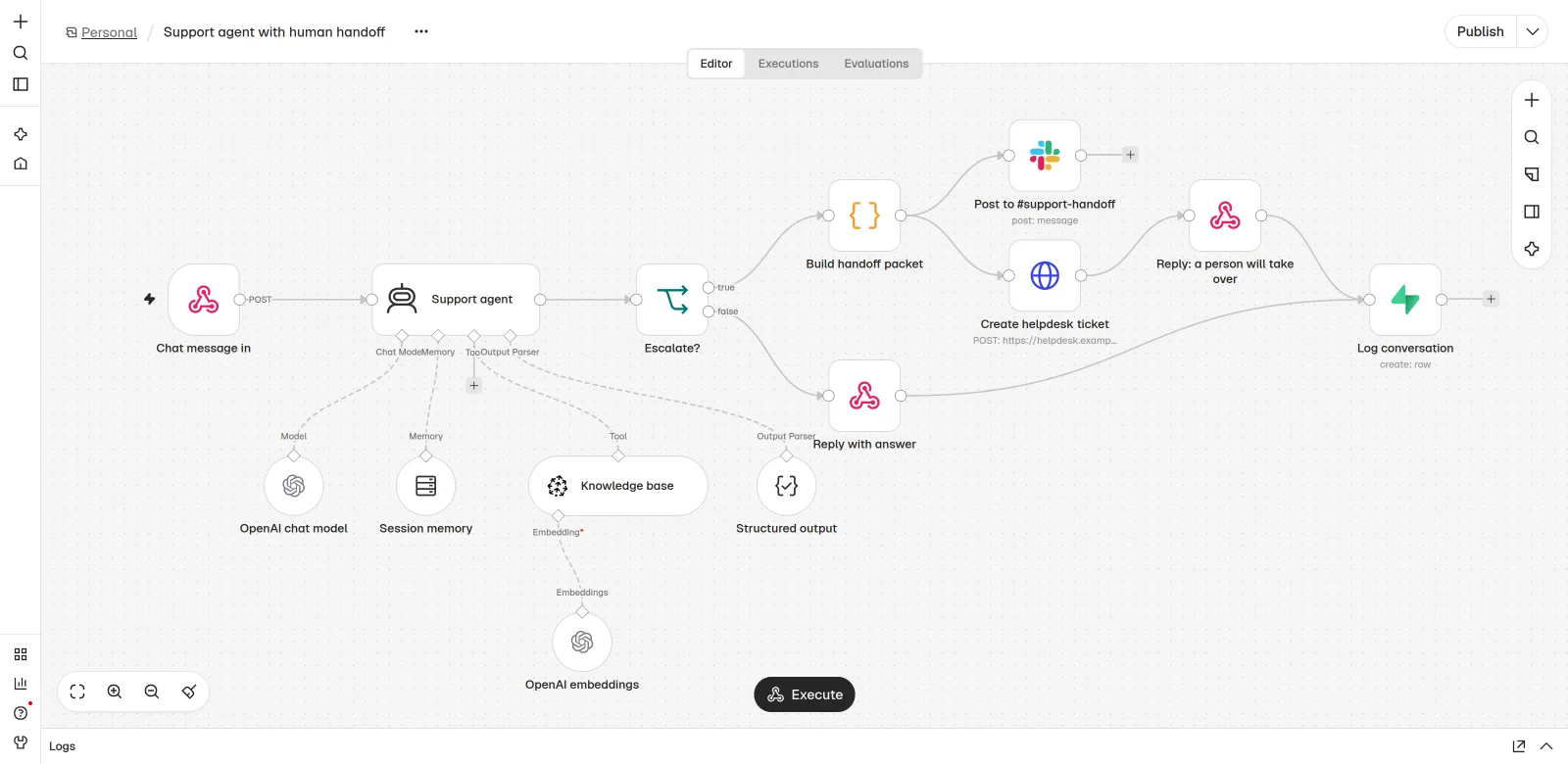
| Case | Message (adapt to your voice) |
|---|---|
| Office hours | I'm passing this to a colleague who can see your account. They'll reply here, usually within {{time}}. |
| Out of hours | A colleague will pick this up when we open at {{time}}. You don't need to send it again. |
| Upset customer | Sorry this has been a hassle. I'm handing this to a person on our team now. |
| Not covered | I don't have a reliable answer for this one. I've passed your question to the team. |
Office hours
- Message (adapt to your voice)
- I'm passing this to a colleague who can see your account. They'll reply here, usually within {{time}}.
Out of hours
- Message (adapt to your voice)
- A colleague will pick this up when we open at {{time}}. You don't need to send it again.
Upset customer
- Message (adapt to your voice)
- Sorry this has been a hassle. I'm handing this to a person on our team now.
Not covered
- Message (adapt to your voice)
- I don't have a reliable answer for this one. I've passed your question to the team.
Step 6
Test on 100 real questions before launch
Lab prompts break on real input. Pull about 100 questions from the export in step 1: mostly the top intents, plus every kind of handoff case, plus a handful of tricky ones (two questions in one message, slang, a different language). Write the reference answer for each, or mark it should hand off.
| Group | Share of the set | What you check |
|---|---|---|
| Top intents, clear questions | About half | Correct and grounded |
| Top intents, messy wording | About a fifth | Still correct; no made-up details |
| Must hand off (money, account, legal, upset) | About a fifth | Escalates every time |
| Not in the docs | A few | Says so and hands off |
| Asks for a person | A few | Hands off with no pushback |
Top intents, clear questions
- Share of the set
- About half
- What you check
- Correct and grounded
Top intents, messy wording
- Share of the set
- About a fifth
- What you check
- Still correct; no made-up details
Must hand off (money, account, legal, upset)
- Share of the set
- About a fifth
- What you check
- Escalates every time
Not in the docs
- Share of the set
- A few
- What you check
- Says so and hands off
Asks for a person
- Share of the set
- A few
- What you check
- Hands off with no pushback
Prompt
Grader prompt for each test question
You grade a support bot. You get the customer question, the bot's JSON output and the reference answer written by our team.

Score each item:
- correct: does the answer match the reference on every fact? (yes / partly / no)
- grounded: is every claim supported by the cited sources? (yes / no)
- handoff_right: should this have been escalated, and did the bot do the right thing? (right / missed_handoff / needless_handoff)
- tone: short, polite, in {{language}}? (ok / fix)

Return JSON: {"id": "...", "correct": "...", "grounded": "...", "handoff_right": "...", "tone": "...", "note": "one line"}

Be strict. "partly" counts as wrong for anything about money, dates or eligibility.
Your launch bar should be stricter on missed handoffs than on anything else. A needless handoff costs a few minutes of an agent's time. A missed one puts a wrong answer about money in front of a customer. Set the confidence threshold at the point where missed handoffs in the test set reach zero, then look at how many questions the bot still answers.
Launch gate
- No missed handoffs on the money, account, legal and upset cases.
- No answer with a claim that is not in the cited sources.
- Tone checked by the support lead on 20 random replies.
- A person has read every reply in the test run at least once.
Step 7
Launch narrow and log everything
Start on one channel, in office hours, so handoffs get picked up fast while you learn. Log every conversation from the first one. On the loyalty programme build, every question, answer, confidence score, escalation flag, session id and thumbs rating goes into Supabase. That log is what makes the bot better each week.
Timeline
A 10-working-day plan
Tickets and intents, day 1 to 2. Export, group, and decide routes (steps 1 and 2).
Knowledge source, day 2 to 4. Clean the document, set up the refresh workflow.
Agent and handoff, day 4 to 7. Prompt, schema, packet, helpdesk and Slack wiring.
Test set and grading, day 7 to 9. 100 questions, two grading rounds, threshold set.
Narrow launch, day 10. One channel, office hours, logs on.
- Tickets and intentsDay 1-2
Export, group, and decide routes (steps 1 and 2).
- Knowledge sourceDay 2-4
Clean the document, set up the refresh workflow.
- Agent and handoffDay 4-7
Prompt, schema, packet, helpdesk and Slack wiring.
- Test set and gradingDay 7-9
100 questions, two grading rounds, threshold set.
- Narrow launchDay 10
One channel, office hours, logs on.
A plan for one builder who works with your support lead. A messy knowledge base is what usually stretches it.
SQL
Log table (Postgres or Supabase)
create table support_logs (
  id               bigint generated always as identity primary key,
  created_at       timestamptz not null default now(),
  session_id       text not null,
  channel          text,
  question         text not null,
  answer           text,
  category         text,
  confidence       numeric(3,2),
  escalated        boolean not null default false,
  escalation_reason text,
  sources          text[],
  feedback         smallint,          -- 1 thumbs up, -1 thumbs down, null none
  reviewed_label   text               -- filled by your weekly review: correct / wrong / missed_handoff
);

create index on support_logs (created_at);
create index on support_logs (category, escalated);- Week 1: a person reads every handed-off conversation and a sample of answered ones, and fills
reviewed_label. - Each week after: fix the top reason for handoffs. Usually it is a missing passage in the document, not the prompt.
- Widen scope with data. Add an intent to the bot's list only when its test questions pass the launch gate.
Watch out
Failure modes we see most
Confident answer, wrong customer
General policy applied to an account-specific case. Fix: the
needs accountintents hand off before the model writes anything.Stale knowledge
Rules changed, the index did not. Fix: re-index on change, delete old passages first, and name an owner.
Handoff into a void
The bot hands off at 23:00 and nobody sees it until Monday. Fix: tell the customer the real reply time and route out-of-hours cases to a queue someone checks.
The customer repeats themselves
The person gets a ticket with no context. Fix: the handoff packet from step 5, with the transcript link.
Threshold set by feel
0.8 sounds safe, so it ships. Fix: set it from the test set so missed handoffs are zero.
Nobody reads the logs
The bot drifts and no one notices. Fix: a fixed weekly 30-minute review with the SQL in the next section.
Time and money
Time and cost
The build is about 10 working days for one builder working with your support lead, as in the plan above. The running cost has four parts. None of them is large for a support bot that answers short questions, but you should know which one grows with volume.
| Cost | What it scales with | How to keep it down |
|---|---|---|
| Model tokens | Conversations x (prompt + retrieved passages + reply) | A small model for answers; cap passages at the top few; cache the fixed system prompt |
| Embeddings | Size of the knowledge base x how often it changes | Re-embed only the changed document |
| Vector store | Number of passages, queries | Postgres with pgvector if you already run Postgres |
| Workflow hosting | Executions | Self-hosted n8n, or the n8n Cloud plan that fits your volume |
| People | Handoff volume | Fix the top handoff reason every week |
Model tokens
- What it scales with
- Conversations x (prompt + retrieved passages + reply)
- How to keep it down
- A small model for answers; cap passages at the top few; cache the fixed system prompt
Embeddings
- What it scales with
- Size of the knowledge base x how often it changes
- How to keep it down
- Re-embed only the changed document
Vector store
- What it scales with
- Number of passages, queries
- How to keep it down
- Postgres with pgvector if you already run Postgres
Workflow hosting
- What it scales with
- Executions
- How to keep it down
- Self-hosted n8n, or the n8n Cloud plan that fits your volume
People
- What it scales with
- Handoff volume
- How to keep it down
- Fix the top handoff reason every week
To put a number on your case, use the support cost per ticket calculator for the people side and the AI chatbot cost calculator for the model side. For build versus buy (a custom agent versus a helpdesk vendor's bot), read AI customer support agent development.
Results
How to measure it
Closed conversations is the wrong headline number. A bot that answers everything closes a lot and causes damage. Count how many it answers correctly, and how many risky cases it kept that it should have passed on.
| Metric | Where it comes from | Which way you want it |
|---|---|---|
| Share answered by the bot | escalated = false | Up, slowly, as you add intents |
| Missed handoffs | Weekly review label | Zero. This is the safety number |
| Wrong answers | Weekly review label | Down |
| Thumbs down | Customer feedback | Down |
| Time to first answer | Log timestamps | Seconds for the bot, your SLA for people |
| Top handoff reason | escalation_reason | Changes each week as you fix the last one |
Share answered by the bot
- Where it comes from
escalated = false- Which way you want it
- Up, slowly, as you add intents
Missed handoffs
- Where it comes from
- Weekly review label
- Which way you want it
- Zero. This is the safety number
Wrong answers
- Where it comes from
- Weekly review label
- Which way you want it
- Down
Thumbs down
- Where it comes from
- Customer feedback
- Which way you want it
- Down
Time to first answer
- Where it comes from
- Log timestamps
- Which way you want it
- Seconds for the bot, your SLA for people
Top handoff reason
- Where it comes from
escalation_reason- Which way you want it
- Changes each week as you fix the last one
SQL
Weekly numbers query
-- Weekly numbers for the support agent
select
  date_trunc('week', created_at)                               as week,
  count(*)                                                     as conversations,
  round(100.0 * avg((not escalated)::int), 1)                  as pct_answered_by_bot,
  round(100.0 * avg(escalated::int), 1)                        as pct_handed_off,
  round(100.0 * avg((feedback = -1)::int)
        filter (where feedback is not null), 1)                as pct_thumbs_down,
  round(100.0 * avg((reviewed_label = 'wrong')::int)
        filter (where reviewed_label is not null), 1)          as pct_wrong_in_review,
  round(100.0 * avg((reviewed_label = 'missed_handoff')::int)
        filter (where reviewed_label is not null), 1)          as pct_missed_handoff
from support_logs
group by 1
order by 1 desc;
Questions
FAQ
What is human handoff in an AI support agent?
Human handoff is the moment the AI stops answering and passes the conversation to a person, together with the question, what the bot already said, the sources it used and a suggested next step. A good handoff means the customer never repeats themselves.
When should an AI support agent hand off to a human?
When the answer needs account data, money is involved, the customer is upset or asks for a person, the topic is legal or sensitive, the knowledge base does not cover it, or the bot's confidence is under the threshold you set from testing.
Do I need a vector database to build a support agent?
You need some way to find the right passage in your docs. A vector store such as Pinecone works, and so does Postgres with pgvector if you already run Postgres. For a very small knowledge base, you can put the whole document in the prompt and cache it.
How do I stop the bot from making things up?
Limit it to retrieved passages, make it cite the passages it used, hand off when nothing relevant is found, and grade it on real past questions before launch. Then review a sample of live replies every week.
Can I build this inside Zendesk, Intercom or HubSpot instead?
Yes. Most helpdesks now sell an AI agent with handoff built in. A custom build makes sense when you need your own rules, another language done properly, your own data sources, or full control of logs. The handoff rules and the test set in this playbook apply either way.
How long does it take to build?
About 10 working days for one builder working with your support lead, if the knowledge base is in reasonable shape. Cleaning up a messy or conflicting knowledge base is what usually takes longer.