In short
- Send cold email from a subdomain such as
outreach.yourdomain.comwith its own SPF, DKIM and DMARC records. Never from your main domain. - Warm every mailbox before the first campaign (it starts at 10 a day and adds 1 a day), and keep warmup running after you launch.
- Verify the list before import. AY Inbox refuses to launch a list of 50 or more deliverable leads above a 4% projected bounce rate.
- Write a campaign brain for each offer, then let Claude Code build the campaign over MCP. Run preflight and plan, and start it yourself.
- Run auto-reply in Supervised mode first. Switch to Automatic only after you have a month of drafts you approved without edits.
Who it is for: Founders and sales leads who run outbound themselves or with one or two SDRs, and RevOps people who own email infrastructure. You need access to your DNS, a mailbox provider (Google, Microsoft or any IMAP/SMTP), and a terminal with Claude Code.
Overview
What you will have at the end
Cold email breaks in the plumbing long before it breaks in the copy. A domain without authentication lands in spam. A mailbox that never warmed up gets throttled in week one. A list full of dead addresses pushes your bounce rate past the point where providers stop trusting you. Then the replies arrive in five different inboxes and nobody answers fast.
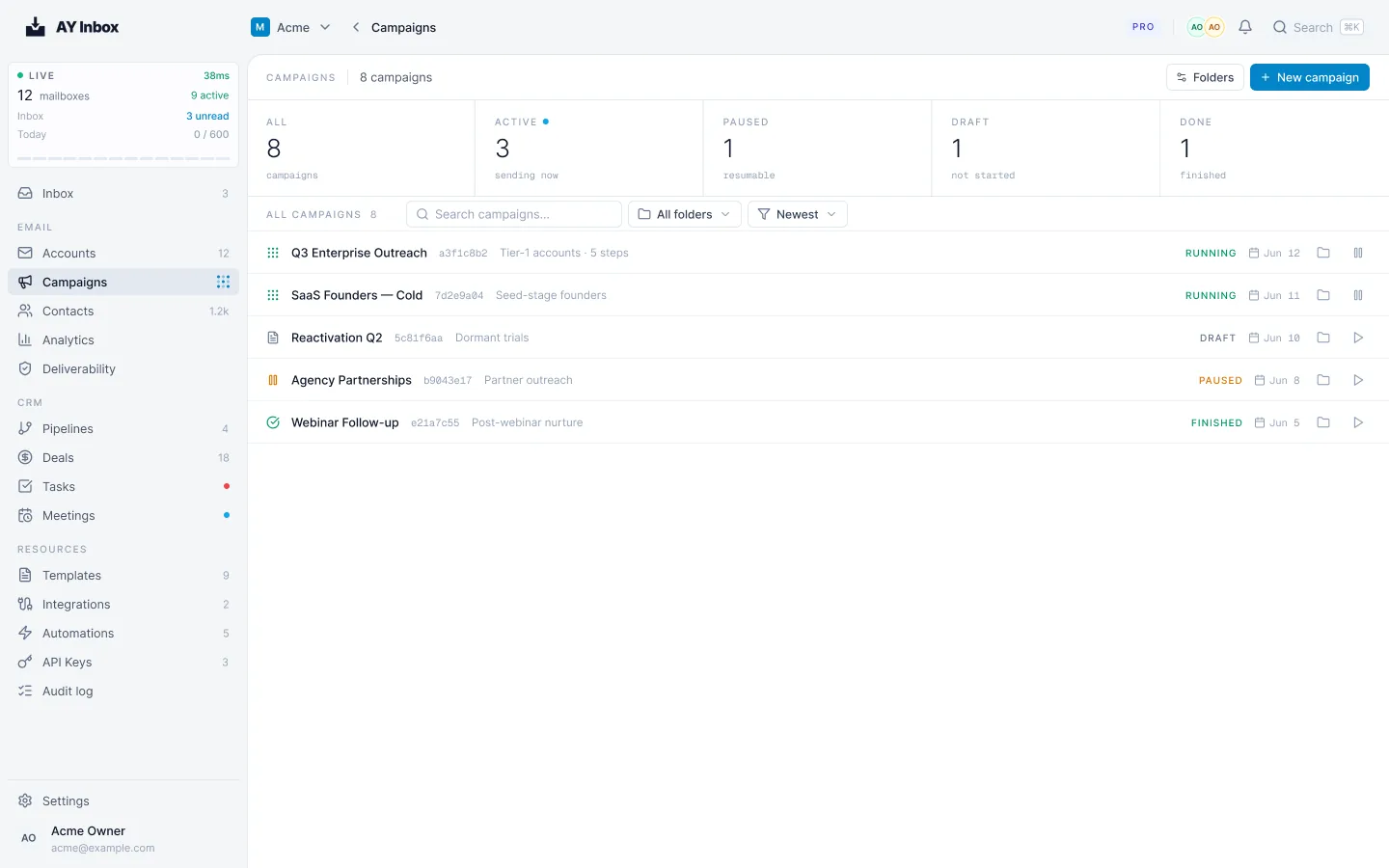
AY Inbox is our own answer to that. It is an open-source, agentic cold email and warmup platform. It runs campaigns from mailboxes you already own and warms them. Opens, clicks and replies land in one shared dashboard live. One workspace takes the place of five tools: warmup, a sequencer, a shared inbox, a scheduler and a CRM. This playbook shows the whole build, in the order you do it.
In that post Walid wrote that "reducing the volume doesn't mean reducing the reply rate", and described outreach as running ads: you set a budget, launch your campaigns and reach the people you actually want to reach, at what he calls 20x lower cost. That 20x figure is his claim from running the system internally. The rest of this guide is the setup that makes low volume work: clean infrastructure, a verified list, and a brain per campaign.
Diagram
The whole system, from DNS to a deal in the CRM
Domain and subdomain
SPF, DKIM, DMARC on the subdomain
Connect mailboxes
Google, Microsoft or any IMAP/SMTP
Warmup ramp
10 a day, +1 a day, ceiling 40
Import verified leads
verified with looot, checked again at launch
Write the campaign brain
facts, links, pricing, do-not-say
Claude Code builds the steps
over MCP, as a draft
Preflight and plan
list check and today's real limits
A person starts the campaign
the agent cannot
Replies arrive and get tagged
one inbox for every mailbox
Inbox agent drafts, or Supervised auto-reply
a person approves, edits or discards
Booking offers 3 open times
through Cal.com or Calendly
Deal in the CRM
contacts, pipeline, tasks, meetings
A note on automation, because it shapes every design choice below. In September Walid wrote that he does not want to fully automate outreach: sales still needs a human, and even if AI can handle the research, qualification, context, follow-ups and preparation, he does not want an AI running every conversation. The build follows that. Claude Code prepares and reads. A person presses start. A person approves the first replies.
Background
Who this is for and what you need
This guide fits a founder or a small sales team that sends to a defined list of accounts and wants to keep control of the infrastructure. It also fits an agency or RevOps lead who has been stitching together a warmup tool, a sequencer, a shared inbox and a calendar link. If you want to send tens of thousands of emails a day from one mailbox, this is not the guide, and the sending limits in step 2 explain why.
Before you start
- A domain you control, with access to its DNS. You will add records to a subdomain, not the main domain.
- Mailboxes you own at Google, Microsoft or any IMAP/SMTP provider. Mailbox and domain costs come from your provider, so check their current pricing.
- An AY Inbox workspace. There is a free trial with no card. Plans are per workspace with no seats: Solo $20, Launch $149, Scale $499, Max $1,499 a month, 20% less billed yearly, and Enterprise on request. Sign up at app.ayinbox.com.
- Claude Code installed in a terminal, to build campaigns over MCP.
- A way to verify emails. We use looot, covered in the find and verify B2B emails playbook.
- A Cal.com or Calendly account if you want booking from replies. Calendly needs a paid plan with the Scheduling API.
- One offer and one audience. A campaign brain is written per offer, so decide the offer first.
AY Inbox is self-hostable with Docker Compose if you want it on your own infrastructure. The docs live at docs.ayinbox.com. If you would rather have a pilot set up with you, the team answers at team@ayinbox.com.
Step 1
Set up your sending domain and authentication
Cold email carries risk, and you want that risk off your main domain. Send from a subdomain such as outreach.yourdomain.com, with its own records. If a campaign goes badly, the damage stays on the subdomain and your invoices and customer email keep landing.
AY Inbox sends through your own mailbox provider, so SPF needs only that provider's include. Keep the record short. SPF has a limit of 10 DNS lookups, and a record that includes five services will fail without any visible error.
Config
SPF record for a Google Workspace subdomain
# DNS TXT record on outreach.yourdomain.com (Google Workspace mailboxes)
v=spf1 include:_spf.google.com ~all

# Rules we follow
# 1. One SPF record per (sub)domain. Never two.
# 2. Include only your mailbox provider. AY Inbox sends through that provider, so nothing else is needed.
# 3. SPF allows 10 DNS lookups in total. Every include counts, and so do the includes inside them.
# 4. DKIM: turn it on in your mailbox provider and publish the key it gives you.
# 5. DMARC: start at p=none, move up the table below.
Using Microsoft or another provider? Use that provider's published include instead of the Google one.
Authentication checklist for the subdomain
- Subdomain chosen and its own DNS records created.
- SPF published with only your mailbox provider's include, under 10 lookups.
- DKIM enabled at your mailbox provider and its key published.
- DMARC published at p=none to start collecting reports.
- A test email from each mailbox checked for pass on SPF, DKIM and DMARC before you connect it.
| Stage | Policy | What it does | Move on when |
|---|---|---|---|
| 1 | p=none | Reports only. Nothing is blocked. | Reports show your own mail passing |
| 2 | p=quarantine | Failing mail goes to spam | No legitimate source is failing |
| 3 | p=reject | Failing mail is refused | This is where you stay |
1
- Policy
p=none- What it does
- Reports only. Nothing is blocked.
- Move on when
- Reports show your own mail passing
2
- Policy
p=quarantine- What it does
- Failing mail goes to spam
- Move on when
- No legitimate source is failing
3
- Policy
p=reject- What it does
- Failing mail is refused
- Move on when
- This is where you stay
Step 2
Connect mailboxes and run the warmup
Connect each mailbox you plan to send from, then turn on warmup. Warmup and cold sending run as separate budgets, so one does not eat the other. The dashboard shows each mailbox with its health, warmup state and which campaigns it is assigned to.
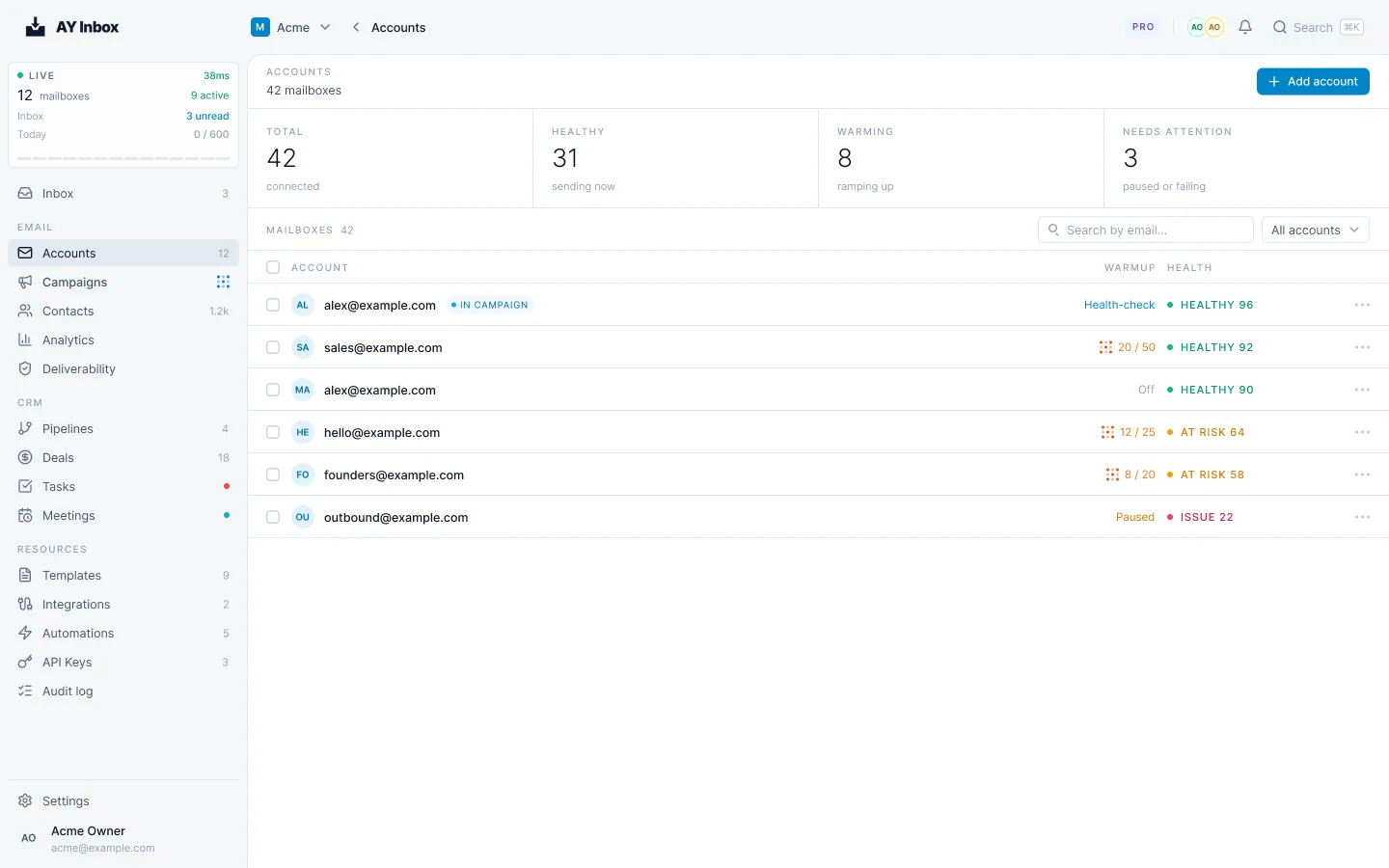
Warmup starts at 10 a day, adds 1 a day and tops out at 40 a day (25 for a free Gmail or Outlook.com mailbox). It does that through a pool of vetted, monitored mailboxes. Free and premium pools stay apart. Your mailbox pairs with partners outside your workspace first. A mailbox never starts two warmup threads with the same partner on one day, and every warmup message carries a single-use token.
Timeline
Warmup ramp for one mailbox
Days 1 to 10, day 1 to 10. Warmup climbs from 10 to about 19 a day. No cold email yet.
Days 11 to 20, day 11 to 20. Warmup climbs to about 29 a day. Import and verify your list.
Days 21 to 30, day 21 to 30. Warmup climbs to about 39 a day, reaching the 40 ceiling just after. Write the brain, build the campaign as a draft.
- Days 1 to 10Day 1-10
Warmup climbs from 10 to about 19 a day. No cold email yet.
- Days 11 to 20Day 11-20
Warmup climbs to about 29 a day. Import and verify your list.
- Days 21 to 30Day 21-30
Warmup climbs to about 39 a day, reaching the 40 ceiling just after. Write the brain, build the campaign as a draft.
A planning estimate from the documented ramp: start at 10 a day, add 1 a day, ceiling 40. Free Gmail and Outlook.com mailboxes stop at 25.
| Setting | Default or limit |
|---|---|
| Cold emails per mailbox per day | 50 |
| Minimum gap between two sends from one mailbox | 600 seconds (10 minutes) |
| New free Gmail or Outlook.com mailbox | 20 a day, 900 seconds apart |
| Sending plan for a new mailbox | 28 to 32 a day |
| Where to start a fresh mailbox | 10 to 20 cold emails a day |
| Normal band for a warmed mailbox | 30 to 50 a day |
| Highest cap you can set | 5,000 a day (the dashboard warns above 100) |
| Campaign budgets reset | Midnight UTC |
Cold emails per mailbox per day
- Default or limit
- 50
Minimum gap between two sends from one mailbox
- Default or limit
- 600 seconds (10 minutes)
New free Gmail or Outlook.com mailbox
- Default or limit
- 20 a day, 900 seconds apart
Sending plan for a new mailbox
- Default or limit
- 28 to 32 a day
Where to start a fresh mailbox
- Default or limit
- 10 to 20 cold emails a day
Normal band for a warmed mailbox
- Default or limit
- 30 to 50 a day
Highest cap you can set
- Default or limit
- 5,000 a day (the dashboard warns above 100)
Campaign budgets reset
- Default or limit
- Midnight UTC
Chart
Cold emails one mailbox can send in a day
- Free Gmail or Outlook.com default20
900 seconds apart
- Default cap per mailbox50
where most teams should stay at most
- Spacing ceiling at 600 secondsabout 144
never a target
A cap is a ceiling, not a target. At 600 seconds between sends, a mailbox can send at most about 144 emails in 24 hours.
The way to send more is more mailboxes, not a higher cap. Ten warmed mailboxes at the default cap give you up to 500 a day, and each one keeps a clean reputation of its own. If one mailbox gets into trouble, the others keep sending.
A mailbox that warmed with AY Inbox eases into cold sending. It starts at 5 a day. Each contact who sent a human reply in the last 7 days adds 1, and each clean day can add up to 5 more. A spam placement, bounce or complaint pauses the clean-day count for 72 hours. Keep warmup running after the campaign starts. Stopping it is one of the failure modes we see most.
Step 3
Verify the list before you import it
A bad list does more damage than bad copy. Bounces count against the mailbox that sent them, and a handful of dead addresses on a small list can move your bounce rate a long way. Verify before import. We walk through the process in the find and verify B2B emails playbook. In the run we document there, a deep verify costs $0.004 and checks start from $0.00025 each.
Lead sourcing inside AY Inbox is optional. A looot lead job can add leads for you, or you can bring your own file. Imports take CSV, TSV or XLSX up to 50 MB and 50,000 rows. AY Inbox keeps the verification verdicts you bring with the file. A campaign never sends to an address marked invalid, and sends to risky only if you allow it.
| Projected bounce rate | What AY Inbox does | What you do |
|---|---|---|
| Under 2% | No warning | Go on to preflight |
| 2% to 4% | Warns | Re-verify the risky rows, drop what you can |
| Above 4% | Refuses to launch | Clean the list, then try again |
Under 2%
- What AY Inbox does
- No warning
- What you do
- Go on to preflight
2% to 4%
- What AY Inbox does
- Warns
- What you do
- Re-verify the risky rows, drop what you can
Above 4%
- What AY Inbox does
- Refuses to launch
- What you do
- Clean the list, then try again
Step 4
Write the campaign brain
A campaign brain is a named set of facts for one offer. Every draft that the inbox agent or the auto-reply writes for that campaign has to stay inside it. Drafts are flagged when they contain a link, a price or a phrase the brain does not give. A brain never sends anything. It only limits what gets written.
| Field | Limit | What goes in it |
|---|---|---|
| What you sell | 1,500 characters | The offer, plainly |
| Who it is for | 600 characters | Titles, company size, the trigger |
| How to sound | 400 characters | Tone rules |
| Pricing | 800 characters | The numbers you will quote |
| Booking link | One | Your Cal.com or Calendly link |
| Links | Up to 8 | Case studies, docs, pricing page |
| Internal rules | 800 characters | Never quoted to the prospect |
| Do-not-say list | Up to 15 phrases | Words and claims you never use |
| Material | Up to 30 sources | Documents the brain reads |
What you sell
- Limit
- 1,500 characters
- What goes in it
- The offer, plainly
Who it is for
- Limit
- 600 characters
- What goes in it
- Titles, company size, the trigger
How to sound
- Limit
- 400 characters
- What goes in it
- Tone rules
Pricing
- Limit
- 800 characters
- What goes in it
- The numbers you will quote
Booking link
- Limit
- One
- What goes in it
- Your Cal.com or Calendly link
Links
- Limit
- Up to 8
- What goes in it
- Case studies, docs, pricing page
Internal rules
- Limit
- 800 characters
- What goes in it
- Never quoted to the prospect
Do-not-say list
- Limit
- Up to 15 phrases
- What goes in it
- Words and claims you never use
Material
- Limit
- Up to 30 sources
- What goes in it
- Documents the brain reads
Template
Campaign brain, ready to fill in
CAMPAIGN BRAIN: [one offer, one name, e.g. "Q4 outbound: finance teams"]

What we sell (max 1,500 characters)
[What the product or service does, for whom, and the result it produces. Plain facts only. No adjectives you cannot back up.]

Who it is for (max 600 characters)
[Job titles, company size, industry, the situation that makes them need it now.]

How to sound (max 400 characters)
[Short sentences. Plain words. First name basis. No exclamation marks. Write like one person to another.]

Pricing (max 800 characters)
[The real numbers you will quote. If a prospect asks and this is empty, the reply says "I will check". Put the price here.]

Booking link
[Your Cal.com or Calendly link]

Links the reply may use (up to 8)
1. [case study URL]
2. [docs or pricing page URL]

Internal rules (max 800 characters, never quoted to the prospect)
[e.g. "Never offer a discount. If they ask for a security review, hand to a person. Do not name other customers."]

Do not say (up to 15 phrases)
[phrase 1]
[phrase 2]
[phrase 3]

Material (up to 30 sources)
[Case studies, one pager, FAQ, pricing page. The brain reads these when it drafts.]
A workspace holds up to 50 brains. Make one per offer so a reply about one product never borrows facts from another.
Step 5
Build the campaign from Claude Code
Connect Claude Code to AY Inbox with one command, then run /mcp inside Claude Code and choose Authenticate. You sign in over OAuth in the browser.
Code
Connect Claude Code
claude mcp add --transport http ayinbox https://api.ayinbox.com/v1/mcp

# Then, inside Claude Code:
/mcp
# choose ayinbox, then Authenticate

# Optional: load only the tools you need
https://api.ayinbox.com/v1/mcp?toolsets=inbox,campaigns,contacts
Save the skill from ayinbox.com/skill.md as ~/.claude/skills/ayinbox/SKILL.md so Claude knows the workflow.
The tools Claude uses for the build are create_campaign_draft, add_campaign_step, set_campaign_senders, add_contact, set_campaign_segments and get_campaign. A separate tool, generate_reply_draft, writes a reply draft and, like the others, never sends. Give Claude the brain text and a precise brief. The prompt below does that.
Prompt
Build the campaign draft
You are building a cold email campaign in AY Inbox over MCP. You build and read. A person starts the sending.

Offer and audience:
[paste the "What we sell" and "Who it is for" text from the campaign brain]

Do this in order:
1. Call the tool that lists my mailboxes. Show me each mailbox with its health and warmup state. Stop if fewer than [N] are healthy.
2. Create a campaign draft named "[campaign name]". Do not start it.
3. Add 3 steps:
   - Step 1: a first email, under 90 words, one idea, one question at the end. Include a subject line.
   - Step 2: a follow-up that waits 3 days. No subject, so it sends as a reply in the same thread. Add one new fact, not a reminder.
   - Step 3: a last short follow-up that waits 4 days. Also no subject. Give a clear way to say no.
4. Set the senders: only the mailboxes I name below, equal weight.
5. Add the contacts from the file I give you. Skip any row whose verification verdict is "invalid".
6. Read the campaign back and list every link, price or claim in the copy. Flag any that is not in the campaign brain.

Rules:
- Never write a price, a figure or a link that is not in the brain.
- No fake urgency, no fake familiarity, no "I hope this finds you well".
- Do not send, start or schedule anything. Tell me when the draft is ready for preflight.
Step 6 of the prompt matters most. It makes Claude list every link, price and claim in the copy, so you can compare them with the brain before preflight.
Campaigns are multi-step sequences. A follow-up waits wait_after days after the step before it, and the default is 3. A follow-up with no subject is sent as a reply in the same thread, which is what you want for steps 2 and 3. Here is the shape of a three-step campaign as a file.
Schema
campaign.json with 3 steps
{
  "name": "Q4 outbound: finance teams",
  "steps": [
    {
      "name": "Intro",
      "subject": "Question about [their process]",
      "body_plain": "Short first email. One idea. One question at the end.",
      "wait_after": 0
    },
    {
      "name": "Bump",
      "body_plain": "Follow-up with one new fact. No subject, so it sends as a reply in the same thread.",
      "wait_after": 3
    },
    {
      "name": "Last",
      "body_plain": "Last note. Easy way to say no.",
      "wait_after": 4
    }
  ]
}
Field names follow the AY Inbox campaigns API reference. Each step waits its own wait_after days after the previous one (the first defaults to 0, follow-ups to 3). A step with no subject is sent as a reply in the same thread.
You can also run the same build from the ayinbox CLI, which uses the REST API with an API key. Every CLI command that sends asks for confirmation first, and refuses to run without a terminal unless you pass --yes. Use idempotency keys on create and import calls, so a retry cannot create a second campaign or a second copy of the list.
Code
A first session with the CLI
# 1. Check the connection and your mailboxes
ayinbox status --json
ayinbox mailbox list --json

# 2. Create the campaign from a file (the key makes a retry safe)
ayinbox campaign create --input @campaign.json --idempotency-key q4-outbound-1

# 3. Choose which mailboxes send, and how much weight each gets
ayinbox campaign set-senders CAMPAIGN_ID --input '{"senders":[{"email_account_id":"...","weight":1}]}'

# 4. Add the verified contacts
ayinbox contact create --input @contacts.json --idempotency-key leads-q4-1

# 5. Check the list and see today's real numbers
ayinbox campaign preflight CAMPAIGN_ID --json
ayinbox campaign plan CAMPAIGN_ID --json

# 6. You start it, in your terminal. It asks first.
ayinbox campaign start CAMPAIGN_ID

# After launch: replies and drafts
ayinbox inbox list --unseen --json
ayinbox inbox agent-drafts --json
ayinbox inbox approve-draft DRAFT_ID
ayinbox events tail --json --intent EMAIL --count 20
Step 6
Preflight, read the plan, then start it yourself
Run ayinbox campaign preflight CAMPAIGN_ID --json first. It runs the list check from step 3 and the other launch checks. Then run ayinbox campaign plan CAMPAIGN_ID --json. The plan tells you how many emails go out today and lists every limit that lowered that number: caps, spacing, warmup state, health. Read it. If the number is lower than you expected, one of those limits is the reason, and fixing the cause is better than fighting the number.
Then you run ayinbox campaign start CAMPAIGN_ID in your terminal, and it asks first. That is the one step the agent cannot do for you.
| Setting | Value |
|---|---|
| Days | Monday to Friday |
| Workday start | Between 09:03 and 09:27 |
| Workday finish | Between 17:18 and 17:56 |
| Lunch break | Starts between 12:00 and 13:30, lasts 30 to 60 minutes |
| Rate | 5 to 9 cold emails an hour |
| Gap between emails | 90 to 420 seconds |
| Missed steps | Never sent late at night |
Days
- Value
- Monday to Friday
Workday start
- Value
- Between 09:03 and 09:27
Workday finish
- Value
- Between 17:18 and 17:56
Lunch break
- Value
- Starts between 12:00 and 13:30, lasts 30 to 60 minutes
Rate
- Value
- 5 to 9 cold emails an hour
Gap between emails
- Value
- 90 to 420 seconds
Missed steps
- Value
- Never sent late at night
The times vary on purpose. A mailbox that sends at exactly 09:00 and exactly every five minutes looks like a machine. This plan looks like a person with a morning, a lunch and an afternoon.
| Signal | Watch | Quarantine | Blocked |
|---|---|---|---|
| Complaint rate | 0.03% or more | 0.10% or more | 0.30% or more |
| Bounce rate | Not set | 5% or more | 10% or more |
| Spam placement | 10% or more | Not set | At 20%, the mailbox is throttled and cold volume is halved |
Complaint rate
- Watch
- 0.03% or more
- Quarantine
- 0.10% or more
- Blocked
- 0.30% or more
Bounce rate
- Watch
- Not set
- Quarantine
- 5% or more
- Blocked
- 10% or more
Spam placement
- Watch
- 10% or more
- Quarantine
- Not set
- Blocked
- At 20%, the mailbox is throttled and cold volume is halved
Check these bands in the first week, daily. A mailbox that reaches quarantine is a sign to stop and look. Do not respond by adding volume to the other mailboxes. Find out which list or which step caused the signal. Watch the live events with ayinbox events tail --json --intent EMAIL --count 20 to see opens, clicks, replies and bounces as they arrive.
Step 7
Handle replies: tags, drafts, auto-reply and booking
Replies from every mailbox land in one inbox and get tagged as they arrive, with filters for interested, pricing and follow-up. You read the thread on the right and answer from the same place.
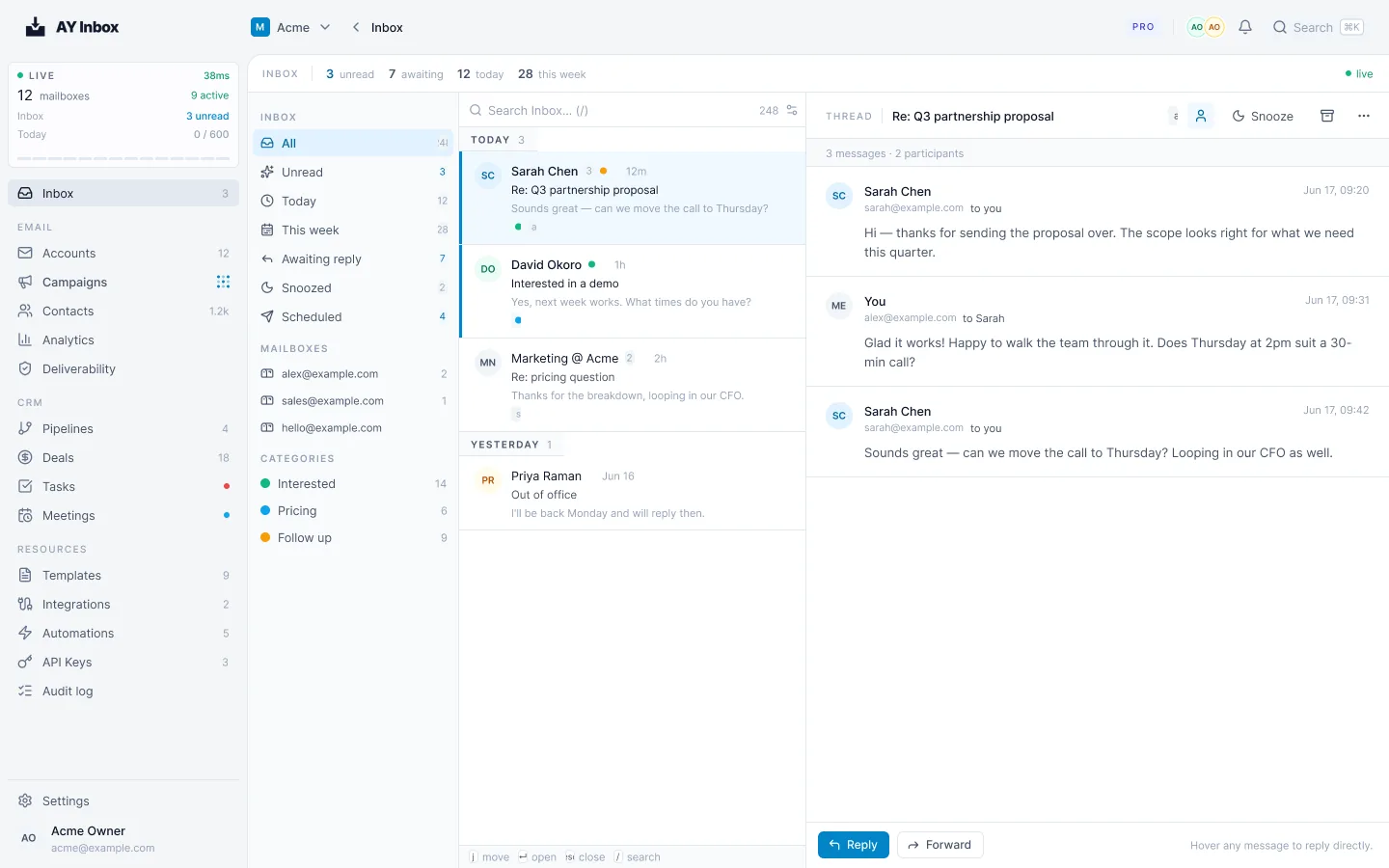
The inbox agent drafts a reply to each human reply to a campaign. A person approves, edits or discards the draft. It never sends. It skips throwaway lines like "thanks", and each handled reply costs 5 AI credits. From the CLI, ayinbox inbox agent-drafts --json lists the drafts, and ayinbox inbox approve-draft DRAFT_ID approves one after asking. A draft flagged because it contains a link, price or phrase outside the brain needs --acknowledge-flags.
Auto-reply is opt-in per campaign and off by default. It has three modes.
| Mode | What happens | Use it |
|---|---|---|
| Off | No automatic answers. The inbox agent drafts, you decide. | The default |
| Supervised | Every check runs and nothing sends. The answer arrives as a draft marked "would have sent automatically". | First, for a month or more |
| Automatic | The answer sends on its own, inside the limits below. | Only after Supervised data you trust |
Off
- What happens
- No automatic answers. The inbox agent drafts, you decide.
- Use it
- The default
Supervised
- What happens
- Every check runs and nothing sends. The answer arrives as a draft marked "would have sent automatically".
- Use it
- First, for a month or more
Automatic
- What happens
- The answer sends on its own, inside the limits below.
- Use it
- Only after Supervised data you trust
Supervised mode is the reason this is safe to try. It shows you what Automatic would do, without sending. The panel summarizes the result in a line such as "Last 30 days: 18 would have sent, 15 sent as written, 2 edited, 1 discarded". That line is the docs' example of the format, not our result. Your own share of "sent as written" is the number that tells you whether to move on.
| Limit | Value |
|---|---|
| Automatic answers per thread | 2 by default, up to 5 |
| Automatic answers per contact | At most 2 in 24 hours |
| Gap between two answers in a thread | At least 10 minutes |
| Automatic answers per mailbox | 20 in 24 hours |
| Delay after the reply arrives | 60 to 150 seconds |
| Cost | 5 AI credits per answered reply |
| Content | Only links and figures a member approved, checked by a second model call against the campaign facts |
Automatic answers per thread
- Value
- 2 by default, up to 5
Automatic answers per contact
- Value
- At most 2 in 24 hours
Gap between two answers in a thread
- Value
- At least 10 minutes
Automatic answers per mailbox
- Value
- 20 in 24 hours
Delay after the reply arrives
- Value
- 60 to 150 seconds
Cost
- Value
- 5 AI credits per answered reply
Content
- Value
- Only links and figures a member approved, checked by a second model call against the campaign facts
Some replies never get an automatic answer: out-of-office, bounces, opt-outs, legal or complaint language, "not interested" and "wrong person". Those go to a person, or to nobody.
Booking from replies is also off by default. When on, AY Inbox offers 3 open times (you can set 1 to 5) in the prospect's timezone, taken from your Cal.com or Calendly. It requires at least 4 hours of notice, looks up to 10 days ahead, and keeps to prospect hours of 9:00 to 18:00. It reads the pick, such as "option 2", in English, French, German and Spanish, and books through your provider, which sends the invite. The meeting then lands in the CRM next to the contact, with the deal, tasks and pipeline.
Watch out
Failure modes we see most
Raising caps instead of adding mailboxes
A mailbox pushed past its comfort band collects spam placements and throttling. Fix: keep each mailbox in the 30 to 50 band, treat a cap as a ceiling, and add warmed mailboxes for more volume.
Sending from the main domain
One bad campaign hurts the mail your customers and invoices depend on. Fix: send from a subdomain like
outreach.yourdomain.comwith its own SPF, DKIM and DMARC.Stopping warmup once live
The mailbox loses the activity that built its reputation, and cold-only traffic stands out. Fix: warmup and cold are separate budgets, so keep warmup running after the campaign starts.
Importing an unverified list
Bounces count against the mailbox that sent them. Fix: verify first, import the verdicts with the file, and treat a launch refusal above 4% as a stop sign.
Automatic before Supervised data
A reply that quotes a wrong price goes out under your name. Fix: run Supervised first, read the "sent as written" share, and add pricing to the brain before you switch.
Giving an agent permission to send
A bug or a bad prompt can start a campaign nobody reviewed. Fix: stay on OAuth MCP where SEND_CAMPAIGNS is never granted, and keep CLI confirmations on.
Time and money
Time and cost
Plan for about a month, and most of it is the warmup ramp. The hands-on work is a few sessions: DNS and mailboxes on day one, list verification and the brain while warmup runs, and the Claude Code build and preflight at the end. You can do the list, brain and campaign work in parallel with the warmup, as the timeline in step 2 shows.
| Cost | What sets it | Keep it down by |
|---|---|---|
| AY Inbox plan | Per workspace, no seats: Solo $20, Launch $149, Scale $499, Max $1,499 a month. 20% less billed yearly. Free trial with no card. | Start on the smallest plan that fits your mailboxes |
| AI credits | 5 per drafted reply and 5 per auto-answered reply | Skip throwaway replies (the agent already does) and review drafts in batches |
| Mailboxes and domains | Your provider's pricing. Check it on their site. | Fewer, healthier mailboxes beat many unmonitored ones |
| Email verification | A deep verify cost $0.004 in the looot example. Checks start from $0.00025. | Verify once, import the verdicts, do not re-verify unchanged rows |
| Your time | Reading drafts and approving replies | A good brain cuts edits |
AY Inbox plan
- What sets it
- Per workspace, no seats: Solo $20, Launch $149, Scale $499, Max $1,499 a month. 20% less billed yearly. Free trial with no card.
- Keep it down by
- Start on the smallest plan that fits your mailboxes
AI credits
- What sets it
- 5 per drafted reply and 5 per auto-answered reply
- Keep it down by
- Skip throwaway replies (the agent already does) and review drafts in batches
Mailboxes and domains
- What sets it
- Your provider's pricing. Check it on their site.
- Keep it down by
- Fewer, healthier mailboxes beat many unmonitored ones
Email verification
- What sets it
- A deep verify cost $0.004 in the looot example. Checks start from $0.00025.
- Keep it down by
- Verify once, import the verdicts, do not re-verify unchanged rows
Your time
- What sets it
- Reading drafts and approving replies
- Keep it down by
- A good brain cuts edits
Capacity is simple arithmetic. Mailboxes times the daily cap gives the ceiling: 10 warmed mailboxes at the default cap of 50 allow up to 500 emails a day. That is a ceiling, not a target. Most teams do better sending less, to a cleaner list, with a better brain. For the other side of the comparison, the AI SDR vs human SDR cost calculator puts a number on what a person costs for the same work.
Results
How to measure it
| Metric | Where it comes from | Which way you want it |
|---|---|---|
| Inbox placement | Placement tests in the deliverability view | Up, with spam placement under 10% |
| Bounce rate | Deliverability view, per mailbox | Under 2% |
| Complaint rate | Deliverability view, per mailbox | Under 0.10% |
| Reply rate | Campaign stats | Up |
| Positive reply rate | Inbox tags such as interested and pricing | Up |
| Meetings booked | Booking from replies and the CRM | Up |
| Time to first answer | Reply arrival vs. first answer sent | Down, to minutes |
| Supervised "sent as written" share | Auto-reply panel | Up, before you switch to Automatic |
Inbox placement
- Where it comes from
- Placement tests in the deliverability view
- Which way you want it
- Up, with spam placement under 10%
Bounce rate
- Where it comes from
- Deliverability view, per mailbox
- Which way you want it
- Under 2%
Complaint rate
- Where it comes from
- Deliverability view, per mailbox
- Which way you want it
- Under 0.10%
Reply rate
- Where it comes from
- Campaign stats
- Which way you want it
- Up
Positive reply rate
- Where it comes from
- Inbox tags such as interested and pricing
- Which way you want it
- Up
Meetings booked
- Where it comes from
- Booking from replies and the CRM
- Which way you want it
- Up
Time to first answer
- Where it comes from
- Reply arrival vs. first answer sent
- Which way you want it
- Down, to minutes
Supervised "sent as written" share
- Where it comes from
- Auto-reply panel
- Which way you want it
- Up, before you switch to Automatic
Take a baseline before the first send: run a placement test on each mailbox and record the projected bounce rate from preflight. Re-measure two and six weeks after the campaign starts. Judge the reply rate against the volume you sent, not against a headline benchmark. Walid's point stands: lower volume does not have to mean a lower reply rate, and the scorecard is how you check that on your own list.
Questions
FAQ
How many cold emails can I send per day per mailbox?
The AY Inbox default is 50 cold emails per mailbox per day, with at least 600 seconds between two sends. A new free Gmail or Outlook.com mailbox starts at 20 a day and 900 seconds. Start a fresh mailbox at 10 to 20 a day and keep a warmed one in the 30 to 50 band.
How do I set up cold email infrastructure?
Send from a subdomain such as outreach.yourdomain.com with its own SPF, DKIM and DMARC records, connect warmed mailboxes from your own provider, and verify your list before import. Roll DMARC out from p=none to p=reject. AY Inbox then runs the campaigns, the warmup and the shared inbox from one workspace.
How do I improve cold email deliverability?
Authenticate the sending subdomain, warm each mailbox starting at 10 a day, keep warmup running, and verify your list so the bounce rate stays low. AY Inbox watches complaint, bounce and spam placement bands and throttles a mailbox at 20% spam placement, and Google's guidelines ask for a spam rate below 0.10%.
Can I automate cold email replies?
Yes, in steps. The inbox agent drafts a reply to each human reply for a person to approve. Auto-reply is off by default, and Supervised mode shows what Automatic would send without sending it. Automatic only carries links and figures a member approved, and never answers opt-outs, out-of-office or complaints.
Can I run cold email campaigns from Claude Code?
Yes. Connect with claude mcp add --transport http ayinbox https://api.ayinbox.com/v1/mcp and authenticate through /mcp. Claude can build a campaign draft and read results, but over OAuth MCP no tool sends mail, so a person starts the campaign.