Book a Free Strategy Call
Skip the read: talk to Walid in 30 min.
Free strategy call. We map your AI engineering team, you keep the notes.
Grok Bot is xAI's always-on AI agent product, launched in beta on August 11, 2026. Each Bot is a named agent with its own cloud computer that signs into your apps, finishes multi-step jobs and keeps working after you close the app. It comes with Cursor and SuperGrok plans.
xAI shipped Grok Bot on August 11, 2026: a beta product that gives you a roster of AI agents, called Bots, that work on a persistent cloud computer with a browser, file system and terminal. It is not a chat window. It is a set of coworkers you assign work to, and the work keeps running after you close your laptop.
Checked September 26, 2026 against xAI's own pages (the August 11 launch post and the August 26 plans update) and Cursor's Grok Bot docs and pricing page. Pricing and plan details below come only from those pages.
For anyone building or buying AI agents right now, Grok Bot is worth a close look, not because the idea is new (OpenClaw and Hermes have both tried variations of "an agent with its own computer"), but because of what shipped alongside it: a messenger-style interface regular people can actually operate on day one, a real mobile app, and a distribution deal through Cursor that puts it in front of a developer audience that already pays for AI tooling.
This breakdown is based on xAI's own launch material and hands-on walkthroughs recorded by independent creators the same week, with the actual product screens pulled directly from that footage.
What Is Grok Bot?
Grok Bot is xAI's always-on AI agent product, built on top of Grok and distributed jointly with Cursor. You sign in with a Cursor account, and Cursor's docs say the computers Bots work on run in Cursor's cloud. Each Bot you create gets:
- A named role you assign it (email, LinkedIn outreach, research, scheduling)
- Its own screen on a persistent cloud computer with a real browser, file system and terminal
- Access to the logins you connect once, which your Bots reuse
- Its own conversations and learned memory, kept separate from your other Bots
- The ability to keep working after you close the app, because the work runs on a persistent cloud computer (optional local command execution on desktop)
One detail differs from most launch-week coverage. Per Cursor's Grok Bot docs, all of your Bots share one cloud computer per account, including its files, browser sessions and app logins. Each Bot gets its own screen on that computer, and one Bot runs one computer-use task on its screen at a time. Treat anything you put on that computer as visible to every Bot you run.
The cloud part is the actual product decision worth noticing. Most AI agent tools today, including well-known coding and research agents, run inside a chat window on your device. Grok Bot runs jobs in the cloud, then reports back. You can close your laptop mid-task and the Bot keeps going.
Availability (checked September 26, 2026): Grok Bot is still labeled beta. Cursor's docs list the desktop app for macOS, Windows and Linux, and the mobile app for iPhone (iOS 18 or later, per the get started guide). Cursor's mobile help page says the mobile app is also on Android through Google Play. On August 26, 2026, xAI expanded access: Grok Bot is now included with SuperGrok, SuperGrok Plus, SuperGrok Heavy, Cursor Pro, Cursor Pro+, Cursor Ultra, and Cursor Teams Standard and Premium. See the pricing section below for what each plan costs and what is still unconfirmed.
Related Reads
Is Grok Bot the Same as @grok on X?
No. Searches for "grok bot" and "grok bots" often mean the @grok account on X, where you tag Grok in a reply. Grok Bot is a separate xAI product with its own apps, cloud computer and usage pool. This post covers Grok Bot only. xAI's Grok Bot pages do not document @grok, so we make no claims about how that account works or who can use it.
Free weekly brief
Steal our production automations
The exact n8n flows, Claude Code setups, and prompts we ship for clients, broken down step by step. No spam, unsubscribe anytime.
How Do You Set Up Grok Bot?
xAI's docs describe three steps. Create a Bot, describe its job in a message, then grant access to the tools it needs. There is no workflow builder to configure. Desktop apps exist for macOS, Windows and Linux, and mobile apps for iPhone, iPad and Android (docs.x.ai/grok-bot/overview, checked September 26, 2026). The docs also warn that some websites block automation or need a human to step in.
How Much Does Grok Bot Cost and Which Plans Include It?
Grok Bot has no separate subscription. You get it through a Cursor plan or by linking an individual SuperGrok or X Premium+ account. Grok Bot usage is its own pool, separate from your normal Grok and Cursor usage, and it resets weekly. Cursor's help page also describes a free trial given as a usage credit, not a free tier.
| Route | Monthly price | Grok Bot usage | Source |
|---|---|---|---|
| Cursor Pro | $20 | Weekly usage, below Pro+ | cursor.com/pricing, cursor.com/help/grok-bot/plans |
| Cursor Pro+ | $60 | Generous weekly usage, below Ultra | same |
| Cursor Ultra | $200 | Highest weekly usage | same |
| Cursor Teams (self-serve) | $40 per user | Follows the Teams seat allowance, every member has access | same |
| SuperGrok, SuperGrok Plus, SuperGrok Heavy (linked) | Not confirmed, see note | Linked usage, Heavy highest | x.ai/news/grok-bot-more-plans, cursor.com/help/grok-bot/plans |
| X Premium+ (linked) | Not confirmed | Linked usage, below SuperGrok Plus | cursor.com/help/grok-bot/plans |
| Cursor Hobby (free) | $0 | Grok Bot access not listed | cursor.com/pricing |
| SuperGrok Lite | Not confirmed | Not included | cursor.com/help/grok-bot/plans |
What is confirmed on those pages:
- Free trial. Cursor's help page says the Grok Bot free trial is a usage credit, measured by agent steps and tokens, with a 7-day window. A single long job can use most or all of it, and used credit is not restored.
- Extra usage. When weekly usage runs out, work can continue as on-demand usage billed through Cursor, if on-demand is enabled. You set a monthly limit for it in the Cursor dashboard. The same page notes the limit is not a hard stop mid-run. A Bot already working can finish past it.
- Plans do not stack. Linking SuperGrok on top of a Cursor plan that already includes Grok Bot does not add usage. Upgrading within Cursor (for example Pro+ to Ultra) does.
- Team plans. On self-serve Cursor Teams, Cursor's help page says every member gets access with no Premium seat required. Enterprise access goes through your account executive.
What we could not confirm: SuperGrok, SuperGrok Plus, SuperGrok Heavy and X Premium+ prices (xAI's pricing page did not load when we checked), the Cursor Teams Premium seat price, and the exact size of each weekly allowance, which none of these pages state as a number.
How Do You Use Grok Bot?
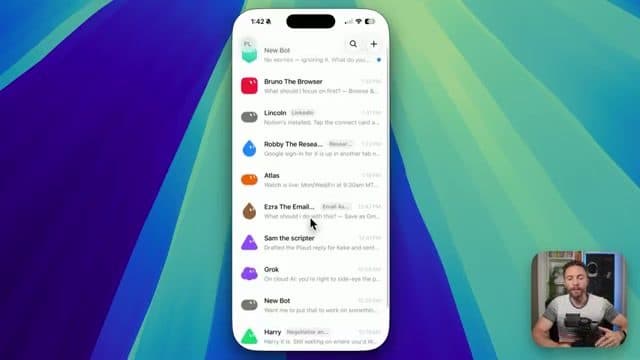
Opening the desktop app looks closer to iMessage than to a typical AI chat product. Every conversation centers on Bots, not tasks. A walkthrough recorded the week of launch shows a sidebar of named Bots, each with a distinct role: one for email, one for LinkedIn research, one for negotiating deals, one for general use.
You are not limited to one Bot per conversation either. You can put several Bots in a group chat, and xAI's launch post says they can message each other, pass work and assign ownership on their own. The product is explicitly asking you to think in terms of roles, not tasks: instead of "summarize this document," you are building a team member who handles a category of work indefinitely.
Setting up a new Bot does not involve a settings panel. You describe what you want in plain language ("I need help planning a vacation and finding the best flight deal"), and the Bot asks clarifying questions, drafts a plan, and starts working. It will even name and describe itself if you ask it to.
One detail matters more than it looks: Grok Bot does not let you pick which underlying model runs a given task. Cursor's settings docs say it directly: "Cursor manages model selection, so there's no model picker." For most users that is a convenience. For technical teams evaluating this for real workflows, the lack of a model-selection or advanced mode is a real limitation worth flagging before you commit a team to it.
Handing Over Control for Logins
Because Bots work on a cloud computer, some tasks require you to log in on their behalf, once, so they can keep working without you pasting credentials into chat.
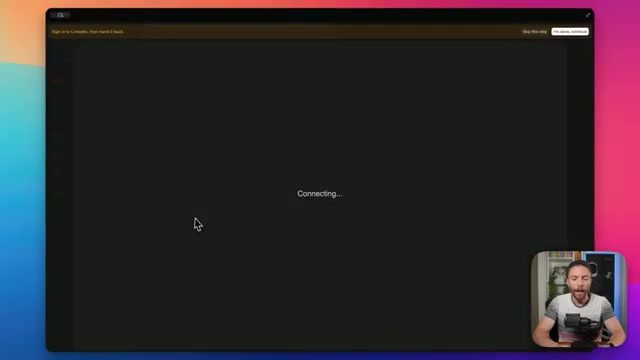
When a Bot needs LinkedIn access to research companies, it navigates to the login screen itself and hands control back to you with a "sign in, then hand it back" prompt. You authenticate, click done, and the Bot resumes from where you left it. This pattern, watch the Bot get most of the way there and step in only for the sensitive part, is the same trust model used for connecting Notion, Gmail, and Google Drive. Cursor's docs add that for supported connections a masked secret field keeps the value out of the transcript and away from the model, and that you should never paste passwords or one-time codes into ordinary chat.
Beyond manual handoff, Grok Bot ships with a plugin library for the integrations it expects teams to use most:
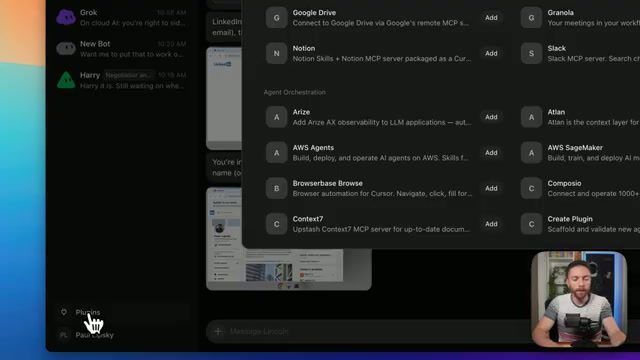
Notion, Slack, Google Drive, AWS Agents, AWS SageMaker, Browserbase, Composio, and Context7 all showed up as one-click connections in the launch-week footage, alongside an option to build a custom plugin. Bots use plugins where available (faster, more reliable) and computer use for everything else (more flexible, works with sites that have no API). You are not expected to configure this yourself; it surfaces the connection prompt only when a task actually needs it.
Teaching a Bot a New Workflow by Recording It
The feature most relevant to actual businesses evaluating AI agent development is the "teach a task" mode.
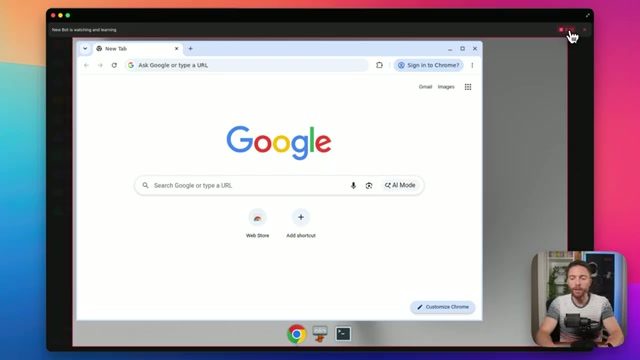
Clicking teach a task puts the Bot into a recording state on its own screen. You walk through a workflow step by step, open this site, click here, fill this field, and the Bot turns the demonstration into a draft skill it can repeat. Combined with routines (recurring, scheduled runs of a task a Bot already knows how to do), this is the closest thing in Grok Bot to a no-code automation builder: instead of describing a workflow in words, you perform it once and the Bot generalizes from the demonstration.
Two current details from Cursor's docs: teach a task is rolling out gradually, so the button may not show up for you yet (you can ask the Bot to build a skill from written instructions instead), and a single Bot can own up to 50 routines.
This matters for the same reason robotic process automation mattered a decade ago: the bottleneck for automating a workflow is rarely the technology, it is the time it takes someone to specify the workflow precisely enough for software to execute it reliably. A screen recording removes most of that specification cost.
Desktop and Mobile Are the Same Product
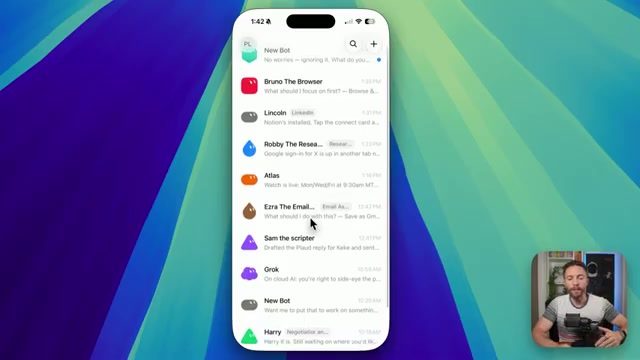
The mobile app is not a stripped-down companion. Cursor's docs say the iPhone app connects to the same Bots, conversations, routines, and cloud computer as desktop, and the launch-week footage shows the live view of a Bot's screen on the phone, including the ability to take over a Bot's session. In the same walkthrough, the reviewer's actual Bot roster illustrates the role-based pattern well: a browser agent, a LinkedIn outreach agent, a research agent, an email assistant, a scripting agent, and a general-purpose Grok chat, all addressable from a single phone screen.
That parity is a distribution decision as much as an engineering one. A tool you can only fully use at a desk gets checked once a day. A tool with full parity on the device already in your pocket gets checked, and used to assign new work, throughout the day.
Real Use Cases People Are Already Running
A second hands-on breakdown, recorded the same week as launch, walks through four Bots the reviewer actually put to work rather than just demoed. The pattern across all four is the same: describe the outcome once, let the Bot figure out the mechanism.
- Recurring reporting from a demonstration, not an integration. One Bot was taught to pull newsletter post statistics from Beehiiv purely by watching a single screen recording of the reviewer doing it manually. No API, no plugin for that specific report. The Bot turned the recording into a repeatable skill and now runs the same statistics pull on request.
- Social monitoring on a schedule. A second Bot was told, in one sentence, to watch a specific X account and message the reviewer whenever a new post appeared. It built its own 30-minute checking routine using the browser, with no manual scheduling step required.
- Inbox triage through a plugin instead of a screen. A third Bot connected to Gmail through an MCP plugin (an OAuth-style connection, not a screen recording) and started pulling and summarizing emails immediately, since that specific task already had a reliable integration available.
- Account research using full computer access, not just a browser tab. In the same walkthrough, a Bot was pointed at a Salesforce account and left to log in and navigate the CRM itself, the way a person would, rather than calling a Salesforce API. The reviewer's own framing is worth repeating directly: an estimated 80 percent of the internet has no API or MCP a Bot could call instead, which is exactly the gap full computer access is built to cover.
None of these four are exotic. That is the point. Reporting, monitoring, inbox triage, and CRM research are the same tasks most operations teams already run manually, and each one picked a different mechanism, screen recording, scheduled browser routine, plugin, or full computer control, based on what the specific tool actually supported. xAI's own examples point the same way: its August 26 post lists Bots working as a sales prospector, website builder, inbox manager, customer support agent and meeting stand-in.
Grok Bot vs a Typical AI Chat Agent
| Typical chat-based AI agent | Grok Bot | |
|---|---|---|
| Where it runs | Your device, inside the chat window | A persistent cloud computer (optional local command execution on desktop), shared by your Bots, one screen per Bot |
| Works when your device is off | No | Yes |
| Output location | Inside the chat | The actual tool (inbox, CRM, doc, slide deck) |
| Learns a new workflow | Prompted each time | Can be taught once by demonstration (rolling out gradually) |
| Model selection | Often user-selectable | Managed by Cursor, no model picker |
| Mobile | Varies | iPhone and Android apps on the same account and cloud computer |
| Entry price (checked Sep 26, 2026) | Varies, often a free tier | Included with Cursor Pro at $20 a month or a linked SuperGrok plan, plus a usage-credit free trial |
What Are Grok Bot's Limits?
Three limitations stand out:
- No model control. There is no way to choose or constrain which model handles a task, which matters for teams with compliance, cost, or reliability requirements around specific model behavior.
- No live voice mode. In the launch-week walkthroughs, the only voice input was dictation into a text field. A live, conversational mode, where you talk through several tasks and have them assigned to different Bots in real time, was not available.
- Usage, not price, is now the gate. Since August 26 the entry point dropped to plans as cheap as Cursor Pro at $20 a month, but each plan comes with a weekly allowance that none of the official pages size in numbers. Heavy agent jobs burn through it and then move to on-demand billing. Set the monthly on-demand limit before you hand a Bot anything long.
What This Means If You're Evaluating AI Agents for Your Business
The specific product matters less than the pattern it validates: agents that own a persistent environment (their own computer, their own logins, their own memory of what they have already done) are outperforming agents that only exist inside a chat turn. That is the same architectural direction we build toward with clients through custom AI agent development: role-scoped agents with their own credentials and their own state, coordinated rather than crammed into a single do-everything assistant.
If your team is evaluating whether an off-the-shelf tool like Grok Bot fits, or whether the workflow is specific enough to warrant a custom build, the deciding factor is usually the same one that shows up in Grok Bot's own gaps: does the task need a specific model, a specific compliance boundary, or integration with an internal tool that has no public plugin? Off-the-shelf agent products are built for breadth. Custom agent builds exist for the workflows breadth does not reach.
If you are weighing agents for your team, start with our guide to AI agents for business, and read how to sandbox AI agents safely before you give any Bot your logins. For another agent-with-a-computer product, compare Cursor vs Claude Code. For more on how these architectures compare in practice, see our breakdown of open-source AI agent frameworks and what a real AI-native development team stack looks like once agents are doing production work, not demos.
FAQ
What is Grok Bot?
Grok Bot is xAI's always-on AI agent product, launched in beta on August 11, 2026. You create named Bots, give each a role, and they work on a persistent cloud computer with a browser, file system and terminal, so work continues after you close your device. It is distributed jointly with Cursor and uses your Cursor account.
Is Grok Bot free?
Not as an ongoing plan. Cursor's help page describes a free trial given as a usage credit, measured by agent steps and tokens, with a 7-day window. After that you need a paid Cursor plan (Pro, Pro+, Ultra or Teams) or a linked SuperGrok or X Premium+ account. Cursor's free Hobby plan does not list Grok Bot access.
Which plans include Grok Bot?
Since August 26, 2026, xAI says Grok Bot is included with SuperGrok, SuperGrok Plus, SuperGrok Heavy, Cursor Pro, Cursor Pro+, Cursor Ultra, and Cursor Teams Standard and Premium. Cursor's help page adds X Premium+ as a linkable account. SuperGrok Lite, SuperGrok Team and SuperGrok Enterprise cannot link. Cursor Enterprise access goes through your account executive.
How much does Grok Bot cost?
Grok Bot has no separate subscription. On Cursor's pricing page, Pro is $20 a month, Pro+ $60, Ultra $200 and Teams $40 per user, and each includes weekly Grok Bot usage. SuperGrok prices were not confirmed from xAI's pricing page on September 26, 2026. Extra usage past the weekly allowance is billed on demand through Cursor.
Is Grok Bot the same as @grok on X?
No. Grok Bot is xAI's agent product with its own apps and cloud computer. The @grok account on X is a different way to reach Grok. xAI's Grok Bot pages do not cover @grok, so check X's own help pages for how it works.
How do I set up Grok Bot?
Per xAI's docs, create a Bot, describe its job in a message, then grant it access to the tools it needs. Install the desktop app or the mobile app and sign in with your Cursor account. Some websites block automation or ask you to step in.
What devices does Grok Bot run on?
xAI's docs list desktop apps for macOS, Windows and Linux, and mobile apps for iPhone, iPad and Android. Everything runs on a cloud computer, so work continues when your device is off. Docs checked September 26, 2026 at docs.x.ai/grok-bot/overview.
How is Grok Bot different from Grok chat?
Grok chat answers you inside a conversation. Grok Bot runs agents on a cloud computer that sign into your apps, do multi-step work in the real tools, and keep going when you close the app. Grok Bot usage is also separate from your Grok and Cursor usage, so work you hand to a Bot does not count against your chat limits.
Is Grok Bot available on Android?
Yes. As of September 26, 2026, Cursor's Grok Bot mobile help page says the app is available on iOS and Android, installed from the App Store or Google Play. You sign in with the same Cursor account and get the same cloud computer as on desktop. The desktop app runs on macOS, Windows and Linux.
How is Grok Bot different from a regular AI chatbot?
A regular AI chatbot produces its output inside the chat window and stops working when you close it. Grok Bot's agents run on a cloud computer, keep working when your device is off, and produce output directly inside the tool being used (an inbox, a CRM, a document) rather than in the chat.
Can I choose which AI model Grok Bot uses for a task?
No. Cursor's Grok Bot settings docs say Cursor manages model selection and there is no model picker. This is a limitation for technical teams with specific model requirements.
What is the "teach a task" feature in Grok Bot?
Teach a task puts a Bot into a recording mode where you demonstrate a browser workflow step by step. The Bot turns the recording into a draft skill it can repeat, including on a schedule through routines. Cursor's docs say the feature is rolling out gradually, so it may not appear on every account yet.
Should a business build a custom AI agent instead of using Grok Bot?
It depends on the workflow. Off-the-shelf tools like Grok Bot are built for breadth across common tasks. A workflow with specific compliance, model, or internal-tool requirements that Grok Bot cannot meet is a better fit for custom AI agent development.
Screenshots and use-case details in this article are drawn from xAI's official Grok Bot launch video and two hands-on walkthroughs published the same week by independent AI creators Paul J Lipsky and Brendan Jowett. Plan, pricing and platform details were checked on September 26, 2026 against x.ai/news/introducing-grok-bot, x.ai/news/grok-bot-more-plans, cursor.com/pricing, cursor.com/docs/grok-bot and cursor.com/help/grok-bot/plans.
Continue Reading
AI automation agencies that ship to production: 9 compared (2026)
About 88% of enterprise AI proofs of concept never reach production, according to IDC research cited by bex.co. We graded 9 small and mid-size AI automation agencies, AY Automate included, on whether their own sites show shipped production work and maintenance after launch.
AI agent production-readiness audit: the checklist before you give it real permissions
A framework for checking permission scope, kill switches, and monitoring before an AI agent gets write access to real systems, built around the September 2026 OpenAI-Hugging Face incident and UN safeguards report.
GPT-6 Astra API Update: Async Tool Calling and Mid-Turn Steering
What the September 2026 GPT-6 Astra API update changed for agent builders: async tools, mid-turn steering, mid-conversation effort changes, verified pricing and a migration checklist.
Book a Free Strategy Call
Building this in production?
Walid runs a 30-min call to map your AI engineering team. Free, no slides.
Free weekly brief
Steal our production automations
The exact n8n flows, Claude Code setups, and prompts we ship for clients, broken down step by step. No spam, unsubscribe anytime.

Ex-IBM AI engineer and enterprise architect. Adel owns the technical architecture behind every automation and AI agent system AY Automate ships.


