The most useful examples of AI for sales automation share one trait: they remove a defined manual handoff without asking AI to control the whole sales process. You can copy that approach by choosing one repeatable task, setting clear rules and keeping a person responsible for exceptions.
AI sales automation means using AI within a workflow to interpret information, prepare an action or route work between sales systems. The five examples below cover lead qualification, account research, follow-up preparation, CRM administration and ecommerce support. They are workflow patterns rather than ranked products, so you can adapt them to your current tools instead of replacing your sales stack.
| Example | What it does | Who it suits |
|---|---|---|
| Lead intake and routing | Reads enquiries, applies qualification rules and assigns the next action | B2B teams with leads from several channels |
| Account research brief | Collects approved account data and prepares a structured brief | SaaS teams doing account research |
| Follow-up draft workflow | Turns call notes into a draft follow-up for review | Sales teams with frequent calls |
| CRM update assistant | Converts approved notes into structured CRM fields | Teams losing time to CRM administration |
| Ecommerce support triage | Classifies incoming questions and routes sales opportunities | Ecommerce teams handling support around the clock |
1. A lead intake workflow that routes the next action
This pattern receives a form submission, email or other inbound enquiry and converts it into a consistent lead record. An AI step can classify the request, extract relevant details and prepare a routing recommendation. Fixed business rules should then decide whether the record goes to sales, support or another queue.
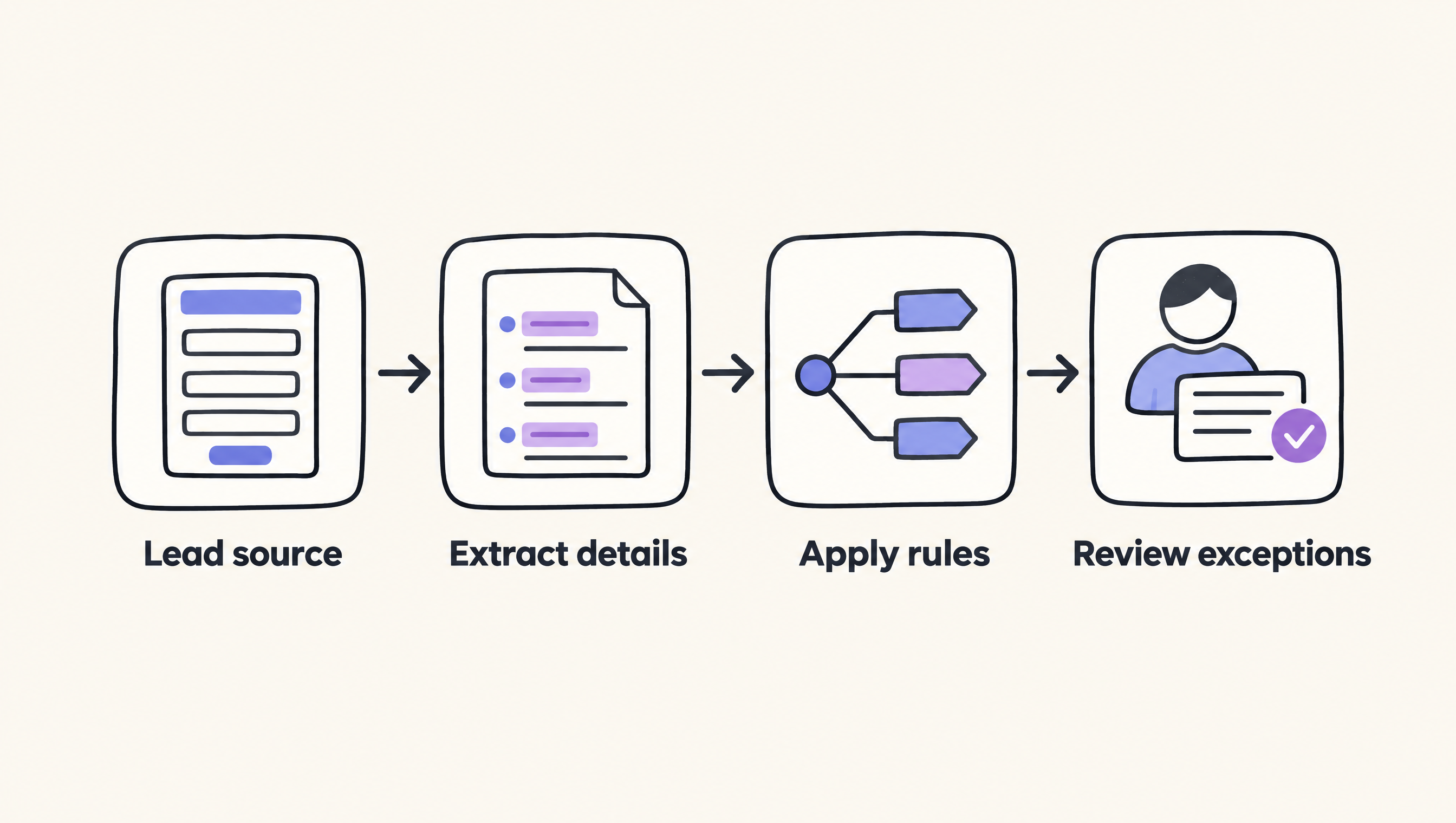
It works because AI handles interpretation while ordinary workflow logic controls the action. That division matters. Free text varies, but ownership rules, required fields and escalation paths should remain explicit. The workflow should stop and request review when information is missing or the classification is uncertain.
How to do the same:
- Choose one lead source and define the fields sales needs before accepting a record.
- Ask the AI step to return a fixed structure, such as request type, company details and stated need.
- Apply ordinary routing rules after the AI output, then send unclear records to a review queue.
- Record the original message alongside the extracted data so a salesperson can check the context.
Why it works
- It gives every inbound lead the same minimum data structure.
- It separates interpretation from routing authority.
- It creates a clear place for exceptions.
Limits
- It cannot confirm whether a prospect is genuinely ready to buy from a short message.
- Poorly defined routing rules still produce poor assignments.
- Sensitive or high-value enquiries may need review before any automated response.
Skip this example if your lead volume is low enough that manual triage is faster, or if ownership rules change from case to case.
2. An account research brief prepared before outreach
An account research workflow gathers information from sources your team has approved and arranges it into a standard sales brief. The brief might contain company context, relevant events, open questions and the source behind each point. It should prepare research, not invent a reason to contact the account.
Did This AI Tool Just Change Sales Forever? (Clay AI Review)Watch "Did This AI Tool Just Change Sales Forever? (Clay AI Review)" on YouTube
This pattern works when every brief follows the same template and retains links to the underlying material. Salespeople can then check the evidence before using it. The workflow is especially useful when research is repetitive but judgment about positioning still belongs to the account owner.
How to do the same:
- Define the exact questions a salesperson answers before contacting an account.
- Limit the workflow to approved data sources and preserve the source link for each factual point.
- Ask the AI step to mark missing information rather than complete gaps with assumptions.
- Require the account owner to approve the brief and choose the outreach angle.
Why it works
- A fixed template makes research easier to review.
- Source links let the salesperson check claims before outreach.
- Missing information remains visible.
Limits
- The brief may be outdated if its underlying data changes.
- AI cannot decide whether a business event creates genuine buying intent.
- Data access and permitted use must be settled before automation starts.
Skip this workflow if your sales motion depends mainly on long-standing personal knowledge rather than repeatable account research.
The video below shows a Clay AI review from Sales Feed and can help you see how one sales research tool is presented in practice. It was published on November 25, 2025, according to the YouTube video page.
3. A follow-up workflow that drafts the next email
This example takes approved call notes or a transcript and prepares a follow-up draft. It can identify agreed actions, unanswered questions and dates mentioned during the conversation. A salesperson reviews the draft, corrects the details and decides whether to send it.
The workflow works because it starts from a specific conversation rather than a generic prompt. A structured draft also makes omissions easier to spot. Keep sending separate from drafting until the process has clear approval rules and the team understands common failure cases.
How to do the same:
- Set a standard note format with decisions, actions, owners and open questions.
- Ask the AI step to draft only from those notes and to mark unclear details.
- Place the draft in the salesperson's normal review queue.
- Save the approved version and any corrections so you can inspect recurring errors.
Why it works
- It converts existing call information into a reviewable draft.
- It keeps the salesperson responsible for promises and tone.
- It exposes missing owners or dates before the message leaves.
Limits
- Bad notes lead to an incomplete or inaccurate draft.
- The workflow should not invent commitments, pricing or product capabilities.
- Automatic sending can create avoidable customer risk.
Skip this example if conversations rarely produce repeatable actions, or if your team cannot review drafts before sending them.
4. A CRM assistant that structures approved notes
A CRM update assistant turns approved sales notes into fields such as contact details, opportunity stage suggestions, next actions and internal summaries. It can prepare changes for confirmation or write only to fields that carry low operational risk. Stage changes and forecasts should remain governed by your sales rules.
This pattern works when the CRM has a clear data model. The assistant needs to know which fields are required, which values are allowed and what evidence supports each update. Duplicate checks and audit records also matter because a clean-looking update can still be attached to the wrong account.
How to do the same:
- Select a small group of fields with clear definitions and allowed values.
- Map each field to evidence in the approved note or source record.
- Add duplicate checks and require review for stage, ownership or forecast changes.
- Keep a record of the proposed value, approved value and original note.
Why it works
- Structured outputs fit defined CRM fields.
- Evidence mapping makes proposed updates easier to check.
- Approval rules can vary by field risk.
Limits
- It cannot repair an unclear CRM process by itself.
- Duplicate records and inconsistent field definitions can send data to the wrong place.
- Forecast and stage decisions still require accountable sales judgment.
Skip this workflow if the team has not agreed on field definitions or does not use the CRM as its working record. Start with process design before adding sales automation AI.
5. Ecommerce support triage that identifies sales opportunities
This workflow classifies ecommerce questions, retrieves approved information and routes each request to the right destination. It may identify questions about products, orders, returns or larger purchase needs. Around-the-clock intake is possible when a custom workflow stays connected to the business tools, but escalation and human coverage still need clear rules. AY Automate builds n8n workflows and autonomous agents connected to existing tools for business logic around the clock, according to its AI automation agency service page.
This example works when support and sales categories are explicit. The system can prepare an answer grounded in approved information or route the case, but it should not create product facts, policies or stock claims. A private retrieval pipeline can ground answers in a company's own information, which is one service AY Automate describes on the same service page.
How to do the same:
- Separate support categories from sales signals and define the owner of each queue.
- Connect only approved product, policy and order information.
- Set escalation rules for uncertain answers, complaints and sensitive cases.
- Review classifications and approved responses before expanding coverage.
Why it works
- One intake process can sort different kinds of customer questions.
- Approved information limits what the answer can draw from.
- Sales opportunities can enter a defined queue instead of remaining in support.
Limits
- It cannot safely answer from missing or outdated product information.
- Around-the-clock intake does not mean every case can be resolved without a person.
- Bulk product data mapping is a separate data workflow and needs field validation, exception handling and source control.
Skip this example if product information is spread across conflicting systems or your escalation queue has no clear owner.
How to pick the right one to start with
Start with the smallest workflow that has a clear input, a clear owner and an output someone can verify. The right first choice is usually a repeated handoff with documented rules, not the most ambitious AI feature. Compare wider platform choices in our guides to AI workflow automation platforms and workflow automation platforms.
Choose lead routing when response ownership is unclear
Use the lead intake pattern if enquiries already arrive but spend too long waiting for the right owner. Document required fields and routing rules first. If sales and support disagree about ownership, settle that before building the workflow.
Choose research briefs when preparation is repetitive
Use the account research pattern if salespeople answer the same research questions for every account. Keep source links and require review. If you need named product options rather than patterns, see our comparison of AI sales automation tools.
Choose follow-up or CRM support when administration is the bottleneck
Drafting and data entry are good candidates when the source information already exists and a person can verify the result. Start with drafts or proposed updates. Do not begin with automatic external messages or unrestricted CRM changes.
Choose ecommerce triage when categories and escalation paths are stable
Use support triage when your product information is controlled and each request type has an owner. Treat bulk product data mapping as its own workflow. Validate identifiers, required fields and exceptions before allowing updates to a catalogue or sales system.
AY Automate audits workflows, builds automations with n8n, Claude Code and a client's existing stack, tests them on real data and maintains them after launch, according to its AI automation agency page. If you need help choosing a safe first workflow, ask us to review the handoffs in your current process.
FAQ
What is AI for sales automation?
AI for sales automation is the use of AI inside a defined sales workflow to interpret information, prepare work or route tasks. Useful examples include classifying enquiries, structuring research, drafting follow-ups and preparing CRM updates. Business rules and human review should control actions that affect customers, ownership or forecasts.
Which AI for sales automation workflow should I start with?
Start with a frequent task that has a clear input, documented rules and an output a person can check. Lead routing is suitable when ownership is the problem. Draft follow-ups or proposed CRM updates are better when sales administration consumes attention.
Can AI sales automation send follow-ups automatically?
It can be designed to send messages, but drafting with human approval is the safer starting point. A reviewer should confirm names, commitments, dates, pricing and product claims. Automatic sending should only follow clear approval and exception rules.
What AI ecommerce automation tools are available for 24/7 support and productivity?
Custom workflows and agents can connect support intake, approved knowledge and business systems to handle business logic around the clock. AY Automate describes building n8n workflows and autonomous agents connected to tools a business already uses on its service page. Around-the-clock intake still needs human escalation for uncertain or sensitive cases.
Is AI ecommerce automation best for bulk product data mapping?
AI can help interpret inconsistent product descriptions, but it should not control bulk product updates without validation. Use fixed field mappings for known structures, retain source records and route uncertain matches for review. Product identifiers, required fields and allowed values need deterministic checks.
Can AI sales automation replace salespeople?
AI sales automation cannot replace the accountable judgment needed for discovery, negotiation, relationship management and commitments. It is better used for defined preparation, classification and administration tasks. A salesperson should remain responsible for customer-facing decisions and exceptions.
Does AI sales automation require replacing the CRM?
No, a workflow can connect to existing business tools when those tools provide suitable integration access. AY Automate states that it builds automations around a client's existing stack and provides API integration for manual handoffs on its service page. The practical fit still depends on the systems and permissions involved.
If you want a workflow built around your existing sales process, contact AY Automate to discuss an audit and a production-tested implementation.
Sources
- AY Automate homepage
- AY Automate AI automation agency
- Sales Feed, "Did This AI Tool Just Change Sales Forever? (Clay AI Review)"
Last checked: November 25, 2026
Book a Free Strategy Call
Building this in production?
Walid runs a 30-min call to map your AI engineering team. Free, no slides.
Continue Reading
n8n vs Gumloop for AI Workflow Automation
Compare n8n vs Gumloop for AI workflow automation using practical criteria for ownership, testing, maintenance and production readiness.
AI sales automation: Build a working workflow
Use this AI sales automation guide to map, build, test and monitor a sales workflow without handing every decision to artificial intelligence.
How to Qualify Sales Leads With AI Automation
How to qualify sales leads with AI in 2026: BANT and MEDDIC updated for agent-assisted pipelines, with scoring models and automated trigger actions.

Taha builds and ships custom AI agents and workflow automations for AY Automate clients across SaaS, finance, and professional services.